What are you trying to achieve?
Hi,
I’m trying to understand how to use the information given in the Brevo API Guide in a Make automation.
For example, I would like to connect a contact to a company.
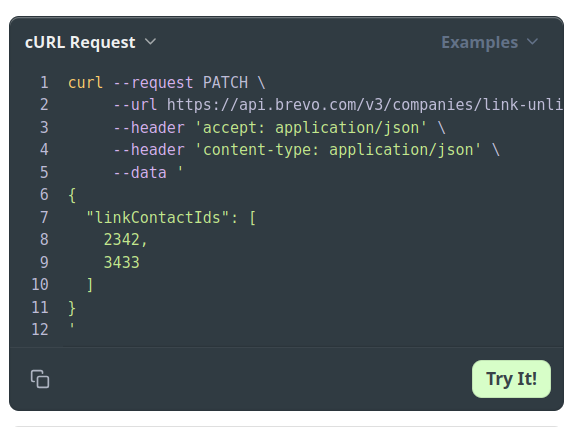
The guide seems explicit, and gives the code : Link and Unlink company with contact and deal
Steps taken so far
I plug in my values, and get this code to use :
curl --request PATCH
–url https://api.brevo.com/v3/companies/link-unlink/67c0aacbefabafdfb3f6ab47
–header ‘accept: application/json’
–header ‘content-type: application/json’
–data ’
{
“linkContactIds”: [
2342
]
}
’
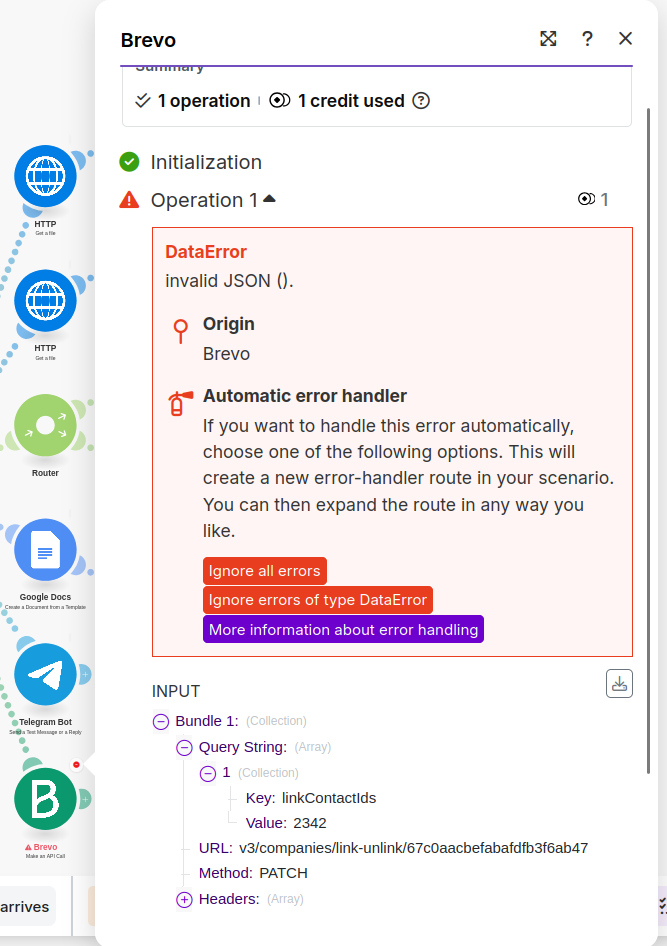
But I don’t understand how to use it in the “Make an API Call” Brevo module, because the parameter (the list of ids to connect) that it plug in the “Quert String” get me an error “invalid JSON ().”
What did I not get?
I’m sure it’s a simple problem, but I’m stuck.
Could you help me?
Thank you !!