# Extract Ranges and add to new sheet
**URL:** https://community.make.com/t/extract-ranges-and-add-to-new-sheet/30418
**Category:** Questions
**Tags:** arrays, google-sheets
**Created:** [March 13, 2024, 3:08pm UTC](https://community.make.com/t/extract-ranges-and-add-to-new-sheet/30418 "2024-03-13T15:08:40Z")
**Posts on this page:** 4
**Page:** 1
### Author:  [@SerenityAdmin](https://community.make.com/u/SerenityAdmin)
#### Post date: [March 13, 2024, 3:08pm UTC](https://community.make.com/t/extract-ranges-and-add-to-new-sheet/30418/1 "2024-03-13T15:08:40Z")
I would like to extract 3 columns from an google sheet and add them into a new sheet in a new workbook.
The two issues I’m having are:
1. The ranges successfully extract each cell on the third column but not on the other two, it only takes the first column and iterates through that
2. The iteration keeps going even after the total number of bundles. it for some reason duplicates the extraction of the third column (I also cant seem to limit it with a filter)
Ive tries, creating JSON, Parsing Json, iterating and aggregating.
I’ve also tried using one aggregator but it wont allow me to select multiple modules as inputs. and when I chain them together it cost me 20,000 operations…
Not sure which method is the best but none seem to work. The current methods I’ve tried requite 2-4 modules to iterate the same amount of times which seems quite costly for such a simple automation.
The extraction from the sheet seems to be good, even the iteration of the numbers(except for the issue of duplicate execution), but it wont do it for the name or amount column.
[blueprint (3).json](https://community.make.com/uploads/short-url/g4xMh1hxbPXH1V5G9nQiVC9JZr1.json) (64.1 KB)
Column 1:

Column 2:

Column 3:

The over execution issue:

First oppression is correct, but second doesn’t properly iterate. Only the Number (Numero) column iterates thought the array not the Name(Destinaire) and Amount (Montant):

The first iterator after the “create JSON”

The Parse JSON into “ROW”:

The last aggregator on the “ROW”:

Sheet output:

Ideally id like
NUMBER ID | NAME | AMOUNT|
Ive been stuck on this for a while, thank you.
---
### Author:  [@IOA\_Brett](https://community.make.com/u/IOA_Brett)
#### Post date: [March 13, 2024, 5:38pm UTC](https://community.make.com/t/extract-ranges-and-add-to-new-sheet/30418/2 "2024-03-13T17:38:15Z")
Hello,
I would highly recommend using the Google Sheets “Get Range Values” and “Make an API Call” Modules for this process.
Step 1: Get the data from your source sheet using the “get Range Values” module. This will return n bundles for each record returned.

Step 2: use a “text aggregator” to parse each bundle into your desired data. This will use 1 operation. Separate by a comma, and format the data in a array of strings. E.g [“data1”,“data2”,“data3”]

Step 3: Use the “Make an API Call” Module to append data from step 2 in one operation.


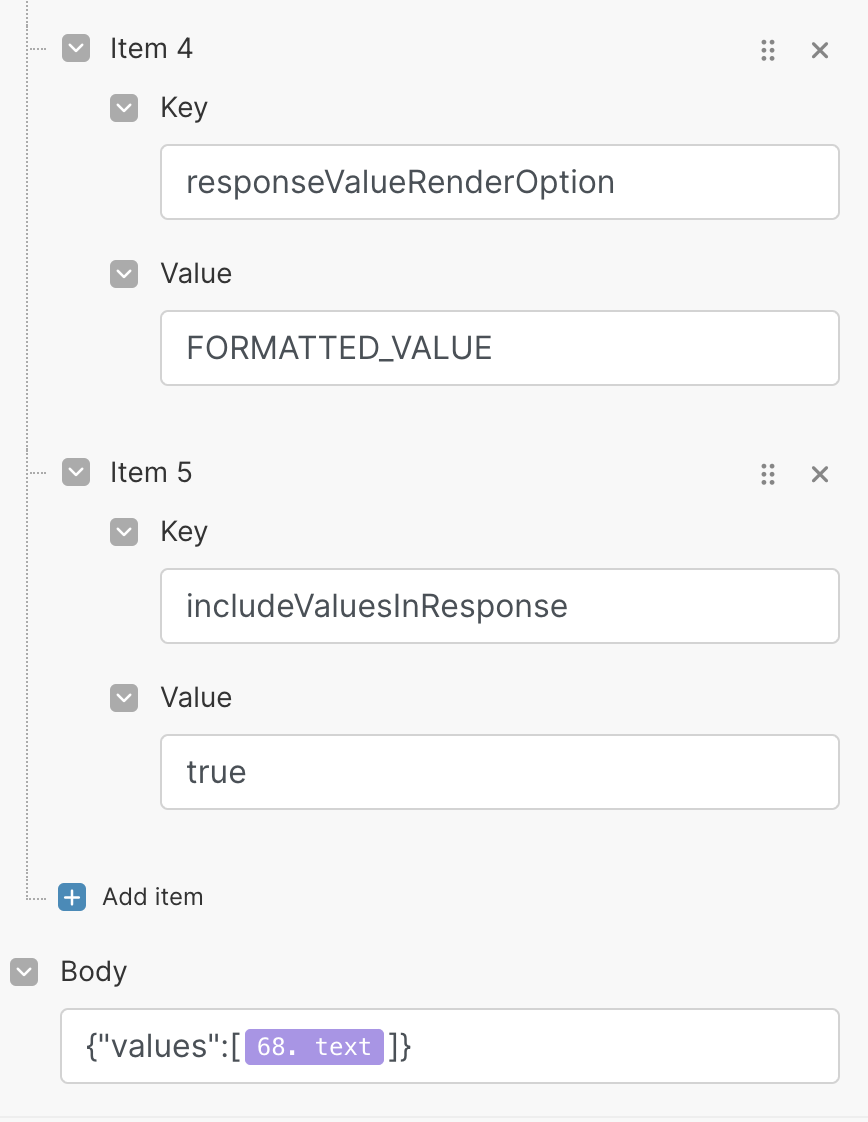
Here are the results using a test sheet I put together:
Source Sheet:

Result Sheet:

Using this method I can extract thousands of records from the target sheet, and append them to the result sheet in 3 operations.

This link will send you to the Google Sheets documentation for more details:
> **[Google Sheets API Overview | Google for Developers](https://developers.google.com/sheets/api/guides/concepts)**
Hope that helps!
---
### Author:  [@SerenityAdmin](https://community.make.com/u/SerenityAdmin)
#### Post date: [March 14, 2024, 11:37am UTC](https://community.make.com/t/extract-ranges-and-add-to-new-sheet/30418/3 "2024-03-14T11:37:33Z")
Worked beautifully thank you, Honestly would’ve taken me a while to get there on my own. Very much appreciated for the quick and clear help.
---
### Author:  [@Make\_Bot](https://community.make.com/u/Make_Bot)
#### Post date: [March 28, 2024, 11:48am UTC](https://community.make.com/t/extract-ranges-and-add-to-new-sheet/30418/4 "2024-03-28T11:48:13Z")