# How to setup clients google account without having to reauthorize weekly
**URL:** https://community.make.com/t/how-to-setup-clients-google-account-without-having-to-reauthorize-weekly/87280
**Category:** Questions
**Tags:** gmail, google-calendar, oauth
**Created:** [July 15, 2025, 5:18pm UTC](https://community.make.com/t/how-to-setup-clients-google-account-without-having-to-reauthorize-weekly/87280 "2025-07-15T17:18:43Z")
**Posts on this page:** 5
**Page:** 1
### Author:  [@Blair\_Shaw](https://community.make.com/u/Blair_Shaw)
#### Post date: [July 15, 2025, 5:18pm UTC](https://community.make.com/t/how-to-setup-clients-google-account-without-having-to-reauthorize-weekly/87280/1 "2025-07-15T17:18:43Z")
Currently I am having trouble figuring out how I can onboard a client into [make.com](http://make.com) without having to reauthorize the Google Test App in Google Console. If I am just creating an automation for someone’s website and emails, why or how would I be able to get verified from google. Yes I do understand the reason why I need to reauthorize, I just don’t understand how I can meet the requirements for having to have a Privacy Policy for an internal system and web app being built for a client.
Do I need to include a privacy policy for a website that only the person behind the website is involved in? How can I do this for an internal system that is built strictly for a clients credentials?
Someone please help ☹
---
### Author:  [@samliew](https://community.make.com/u/samliew)
#### Post date: [July 16, 2025, 4:27am UTC](https://community.make.com/t/how-to-setup-clients-google-account-without-having-to-reauthorize-weekly/87280/2 "2025-07-16T04:27:04Z")
Welcome to the Make community!
Your client needs to be using Google Workspace Email and not Gmail, OR, use a custom GCP app and publish it to production, and create a new connection using it.
# How to Connect and Use Google APIs in Make!
# 0. Prerequisites
-
## 0.1. You need to have a Google account
Make sure you can sign in to [Google Cloud Console](https://accounts.google.com/v3/signin/identifier?continue=https%3A%2F%2Fconsole.cloud.google.com&flowName=GlifWebSignIn) with this.
-
## 0.2. Create a Google Cloud Platform (GCP) project
Follow this main help centre guide on [How to set up a custom OAuth 2.0 custom app in Make](https://www.make.com/en/help/apps/it-and-development/g-suite-admin#connecting-to-google-services-using-oauth2).
# 1. Enable Google APIs
-
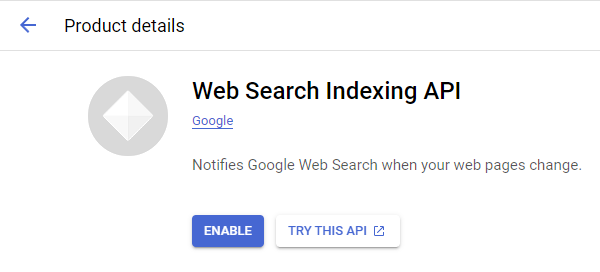
## 1.1. Enable the relevant APIs that you want to use
**Search for the relevant Google API here:** [https://console.cloud.google.com/apis/library](https://console.cloud.google.com/apis/library)
- Go to each API page that you want to use, end click “Enable”
- Usually you’ll want to enable at least [Drive](https://console.cloud.google.com/apis/api/drive.googleapis.com) (includes Docs/Sheets) and [Gmail](https://console.cloud.google.com/apis/api/gmail.googleapis.com).
* * *
# 2. OAuth Client
**Direct Link:** [https://console.cloud.google.com/apis/credentials](https://console.cloud.google.com/apis/credentials)
-
## 2a. Create “OAuth client ID” Credentials

-
## 2b. Insert all the Google Redirect URIs for your app

### Insert All Google Redirect URIs
Here are some commonly-needed redirect URIs you need for your [Google Cloud Console](https://console.cloud.google.com/) OAuth app. If you set these up, you can reuse the same GCP app for other Google apps and modules on Make.
```plaintext
https://www.make.com/oauth/cb/oauth2
https://www.make.com/oauth/cb/google
https://www.make.com/oauth/cb/google/
https://www.make.com/oauth/cb/google-custom
https://www.make.com/oauth/cb/google-restricted
https://www.make.com/oauth/cb/google-cloud-speech
https://www.make.com/oauth/cb/google-search-console
https://www.make.com/oauth/cb/google-analytics-4
https://www.make.com/oauth/cb/google-ads2
https://www.make.com/oauth/cb/google-ads2/
https://www.make.com/oauth/cb/youtube
https://www.make.com/oauth/cb/chrome
```
#### Including These Google Redirect URIs
You are also **required** to insert the legacy URLs below from the old Integromat system that not been migrated to Make yet (same as the above list, but replace “make” with “integromat”):
```plaintext
https://www.integromat.com/oauth/cb/oauth2
https://www.integromat.com/oauth/cb/google
https://www.integromat.com/oauth/cb/google/
https://www.integromat.com/oauth/cb/google-custom
https://www.integromat.com/oauth/cb/google-restricted
https://www.integromat.com/oauth/cb/google-cloud-speech
https://www.integromat.com/oauth/cb/google-search-console
https://www.integromat.com/oauth/cb/google-analytics-4
https://www.integromat.com/oauth/cb/google-ads2
https://www.integromat.com/oauth/cb/google-ads2/
https://www.integromat.com/oauth/cb/youtube
https://www.integromat.com/oauth/cb/chrome
```
> **Note 1:** Due to inconsistencies in Make’s implementation of the connections, there are two separate entries where has one is `google` and another ending in a forward slash `google/` - you might need one or the other, so we have to use both!
> **Note 2:** Once you’ve set these up, you can use/reuse the same Google OAuth App ID + Secret for all the supported Google connections and modules on Make - you’ll just have to enable the relevant [Google APIs](https://console.cloud.google.com/apis/library)!
* * *
# 3. OAuth consent screen
**Direct Link:** [https://console.cloud.google.com/apis/credentials/consent/edit](https://console.cloud.google.com/apis/credentials/consent/edit)
-
## 3a. Insert Two Authorised Domains
- Insert `make.com` and `integromat.com`
- Fill in other required fields
- Click “Save and Continue”.
-
## 3b. Add All Scopes
- Click “Add or Remove Scopes”
- Select 100 “Rows per page”, for each page, check all the rows, OR
- Manually type in the scopes you need
- Click “Update” at the bottom

-
## 3c. Step through and go to dashboard
At the last step/page, click “ **BACK TO DASHBOARD** ” instead of “Prepare for Verification”

-
## 3d. Publish your GCP OAuth2 app
You will need to set your OAuth application to “Production”, otherwise the credentials expire very frequently.
- To do this, go back to “[OAuth consent screen](https://console.cloud.google.com/apis/credentials/consent)”
- Then click the “ **PUBLISH APP** ” button
- Then click the “ **CONFIRM** ” button

* * *
# 4. Create New Connection (HTTP, or respective Google module)
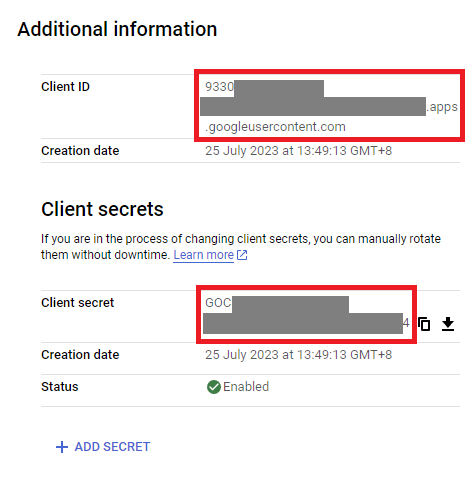
You can find the Client ID and Client Secret in the OAuth2 app you created in GCP, on the right-hand side of where you inserted the callback URLs in step 2:
-
## 4a. Specific Google module (Sheets, Docs, Drive, Gmail, etc.)
Insert the GCP app client ID and secret here **BEFORE** clicking “Sign in”
_(Gmail example)_

**OR,**
-
## 4b. HTTP OAuth 2.0 Request module

You need a “Authorize Parameters” key of `redirect_uri` with the above Make OAuth2 callback URL.

* * *
**Related Topics:**
- [Gmail/Google Drive verification issues (error 400): how to solve](https://community.make.com/t/gmail-google-drive-verification-issues-error-400-how-to-solve/27432)
Hope this helps! Let me know if there are any further questions or issues.
— @samliew
P.S.: investing some effort into the tutorials in the [Make Academy](https://academy.make.com) will save you lots of time and frustration using Make!
---
### Author:  [@Blair\_Shaw](https://community.make.com/u/Blair_Shaw)
#### Post date: [July 16, 2025, 6:02pm UTC](https://community.make.com/t/how-to-setup-clients-google-account-without-having-to-reauthorize-weekly/87280/3 "2025-07-16T18:02:06Z")
Thanks for the reply. So the main questions for me since I know how to get it setup and working.
I can Publish the App on google cloud and not have to go through verification and that will stop from me having to reauthorize weekly?
Thanks for responding!
---
### Author:  [@samliew](https://community.make.com/u/samliew)
#### Post date: [July 18, 2025, 12:58pm UTC](https://community.make.com/t/how-to-setup-clients-google-account-without-having-to-reauthorize-weekly/87280/4 "2025-07-18T12:58:05Z")
Yes, it only needs to be published. Verification can be ignored if you’re the only user, or only have a handful of clients.
Hope this helps! Let me know if there are any further questions or issues.
— @samliew
---
### Author:  [@Make\_Bot](https://community.make.com/u/Make_Bot)
#### Post date: [October 16, 2025, 1:12pm UTC](https://community.make.com/t/how-to-setup-clients-google-account-without-having-to-reauthorize-weekly/87280/5 "2025-10-16T13:12:04Z")