[Airtable → Make] How to send one email per supplier when an order has multiple generic products?

Goal
From Airtable, when a Purchase Request (table Orders) is set to send, I need to send one single email per supplier. Each order contains multiple Generic Products (table Generics), and each generic can be linked to one or more Suppliers (table Suppliers).

Airtable schema

  • Orders

    • Order Number (text)

    • Requested Generics (link to Generics, multiple)

    • Order Details (long text, line breaks)

    • Send supplier emails (single select: “send”)

    • Email sent (Make) (date/time; Make writes now after successful sending)

  • Generics

    • Name

    • Linked Suppliers (link to Suppliers, multiple)

  • Suppliers

    • Supplier Name

    • Email

Make scenario (current)

  1. Airtable – Watch Records (Orders)
    Filter formula (only picks candidates):

    AND(
      {Send supplier emails} = 'send',
      {Email sent (Make)} = BLANK()
    )
    
    
  2. Airtable – Get a Record [Order]

  3. Flow Control – Iterator (list: Order.Requested Generics[])

  4. Airtable – Get a Record [Generic]

  5. Flow Control – Iterator (list: Generic.Linked Suppliers[])

  6. Airtable – Get a Record [Supplier] → here I get Supplier.Email (this yields 1 bundle per generic–supplier pair; e.g., 5 bundles if 3+2)

  7. Flow Control – Array aggregator (A1)

    • Source module: Get a Record [Supplier]

    • Group by: trim(lower(73."Email")) (73 = the Supplier Get module)

    • Stop processing after an empty aggregation: Yes
      (Goal: collapse 5 bundles down to 2 unique suppliers.)

  8. Flow Control – Iterator (I1)

    • Array: A1 → Array[] (or Groups[], depending on UI)
      (Goal: re-iterate over unique suppliers only.)
  9. Email – Send an Email

    • To: I1.Key (this is the grouped supplier email)

    • Subject: “Quotation Request {{Order.Order Number}}”

    • Content Type: HTML

    • Body: my template; I insert {{Order.Order Details}} (long text; CSS white-space: pre-line)

  10. Airtable – Update a Record (Orders)

    • Set {Email sent (Make)} = now (via date/time function picker), so the Watch filter will never match this record again.

What I expect
If an order involves 3 generics for Supplier A and 2 generics for Supplier B, I expect 2 emails total: one to A, one to B.

What actually happens
Emails are sent per generic (e.g., 5 emails), even though I configured an Array aggregator. In Run history I still see 5 bundles reaching the Email module.

Likely cause
The Email module is still attached to the pre-aggregation path (the first iterator’s cycle), or it’s reading an email value from the earlier Supplier module instead of using the aggregated Key from A1. I also hit “Invalid email address in parameter to” when the To field accidentally concatenated the supplier email with the order number (e.g., someone@mail.comPC-...), which breaks the address.

Exact mappings I’m using

  • Array aggregator (A1) → Group by:

    trim(lower(73."Email"))
    
    
  • Iterator (I1) → Array:

    A1.Array[]   (or A1.Groups[])
    
    
  • Email → To:

    I1.Key    // only this chip; no concatenation with other chips or text


What I already tried

  • Group by with and without lower() / trim().

  • With and without an extra Text aggregator.

  • Placing the Email immediately after A1 (and after I1).

  • Verified I1.Key is just the email (no appended order number).

  • Still, Email shows 5 operations in the run (one per generic).

Questions

  1. What’s the correct pattern to break out of the first iterator’s cycle and ensure the Email runs per unique supplier only? Is the sequence A1 → I1 → Email the right approach, or do I need a different structure (e.g., Router, distinct aggregator)?

  2. Is there a recommended way to guarantee To = unique supplier email that cannot inherit the pre-aggregated bundles?

  3. Any best practices to avoid the “Invalid email address in to” when grouping and mapping (e.g., always use I1.Key, or group by Supplier Record ID and then pick the first email in the group)?

Debug artifacts I can share

  • A1 (Array aggregator) config + output (should show #ops = #unique suppliers).

  • I1 (Iterator on A1) output showing Key.

  • Email Input → To (to confirm it’s I1.Key only).

  • Module operation counters (I’m seeing 5 on Email when it should be 2).

Bonus constraints

  • I want to keep the email body simple: the order-level Order Details is the same for all suppliers of that order, so I can insert it directly in the HTML (I do not need to build a per-supplier list unless necessary).

  • After successful send(s), I must set {Email sent (Make)} = now to block any future re-sends for that order.

Thanks! Any guidance on a definitive “one email per supplier per order” pattern would be hugely appreciated.

Hey there,

can you show some screenshots of the scenario to better show what is going on?

Best guess → your aggregator source module is wrong, or your email module is in the wrong place.

Hi @j.m_Tirab

What you have in your hands is a scenario that usually generates confusion with Make. There are a lot of questions related to this topic.

You see, modules that return rows (eg any “Search Rows”) will yield multiple bundles. From that point on, each bundle in the result will trigger a run of all the subsequent modules of the scenario. Those runs are operations.

You can use aggregators over bundles, but once the operations start to kick in, you can’t aggregate them, unless you set the module that produces the different bundles as the source module for the aggregation.

Think of an operation as a full scenario execution. The only way to stop an execution and wait for the next one, to aggregate results from both, is to return the excution back to the origin of the different bundles. Make visually shows this, highlighting the source module for the aggregator in gray.

Besides that, you may need to group by a field in a different module than the source one, as in your case.

For example, in your scenario, you get all the generics from an order with “Send” status. That triggers N subsequent operations, where N is the number of generics returned. So, you must aggregate the results of the “Get Generics” step, but you still don’t have the supplier email to group by. Later, when you get the supplier, you can use it to group the results.

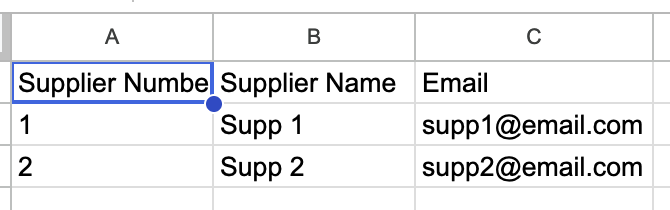
I reconstructed your scenario with Google Sheets as a database, using 4 tabs: Orders, Generics, Supplier and Generics-Supplier (NxN relationship).

Orders

Supplier

Generics

Generics-Supplier

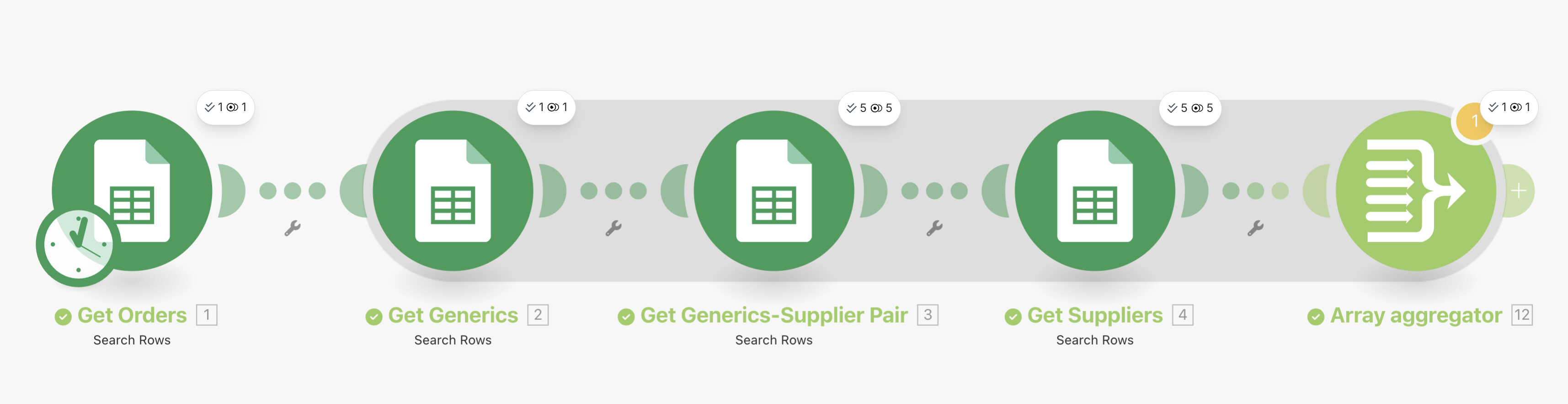
This is the scenario for this structure, up to the aggregator:

Get Generics returns 5 bundles:

Then, the scenario runs an operation for each bundle, querying the relation and the supplier on each operation. Then, the array aggregator combines all bundles again.

Disadvantages of this scenario:

  • It’s not credit-savvy. You’ll query the same supplier again and again for each Generics found. Let’s say you have an order with 20 generics from the same supplier. That would produce 1 operations querying the exact same supplier (as you will see below).
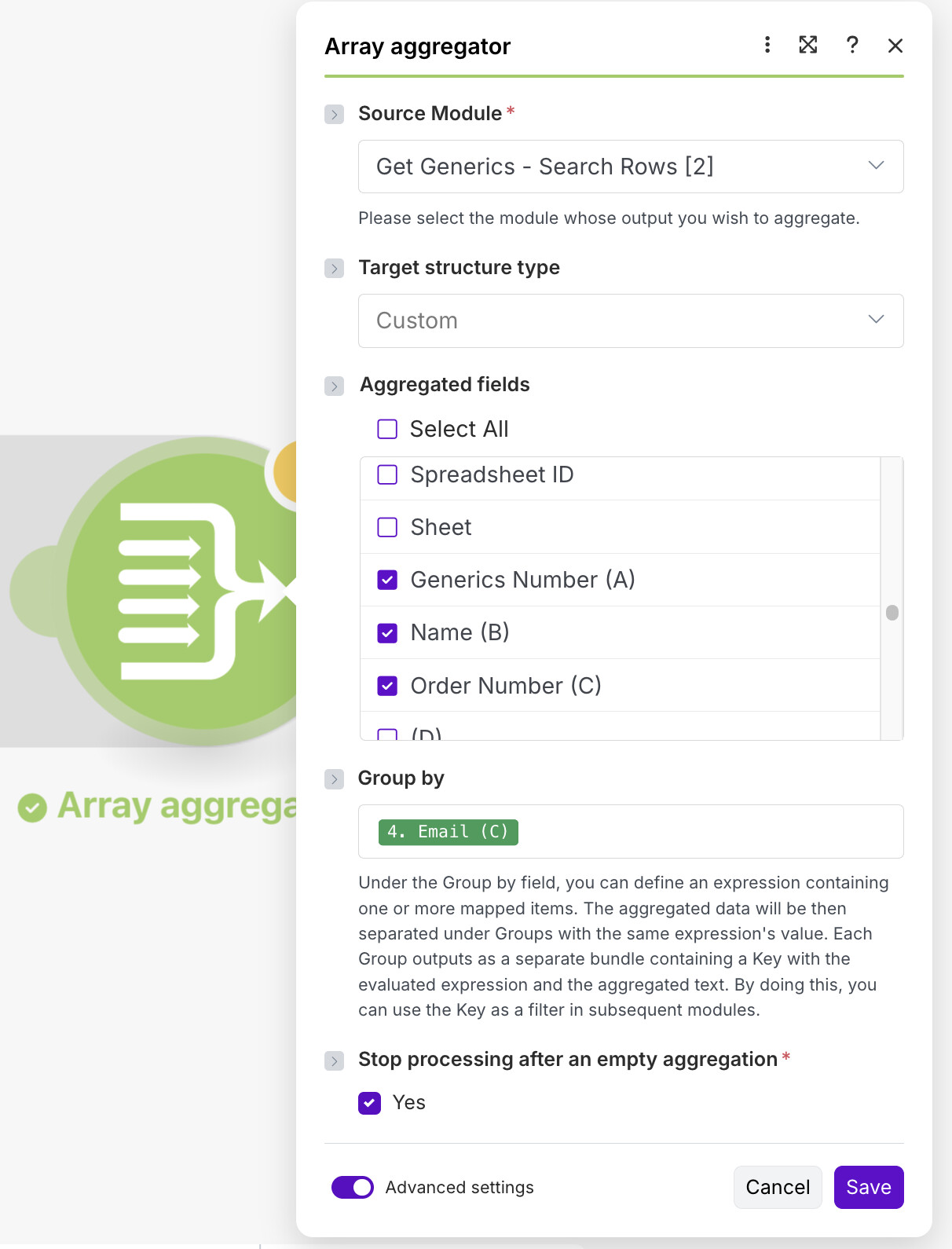
  • Since you want the data from Generics, you don’t have access to any supplier data other than the email, which is used as the key. The 3 columns you see checked above are from the “Get Generics” module. It only makes sense (pun intended) to reference one set of results.
  • As the results are aggregated, the only output from the “gray area” are the results of the aggregator, meaning the 3 columns I just mentioned. You don’t have access to anything else in other modules.

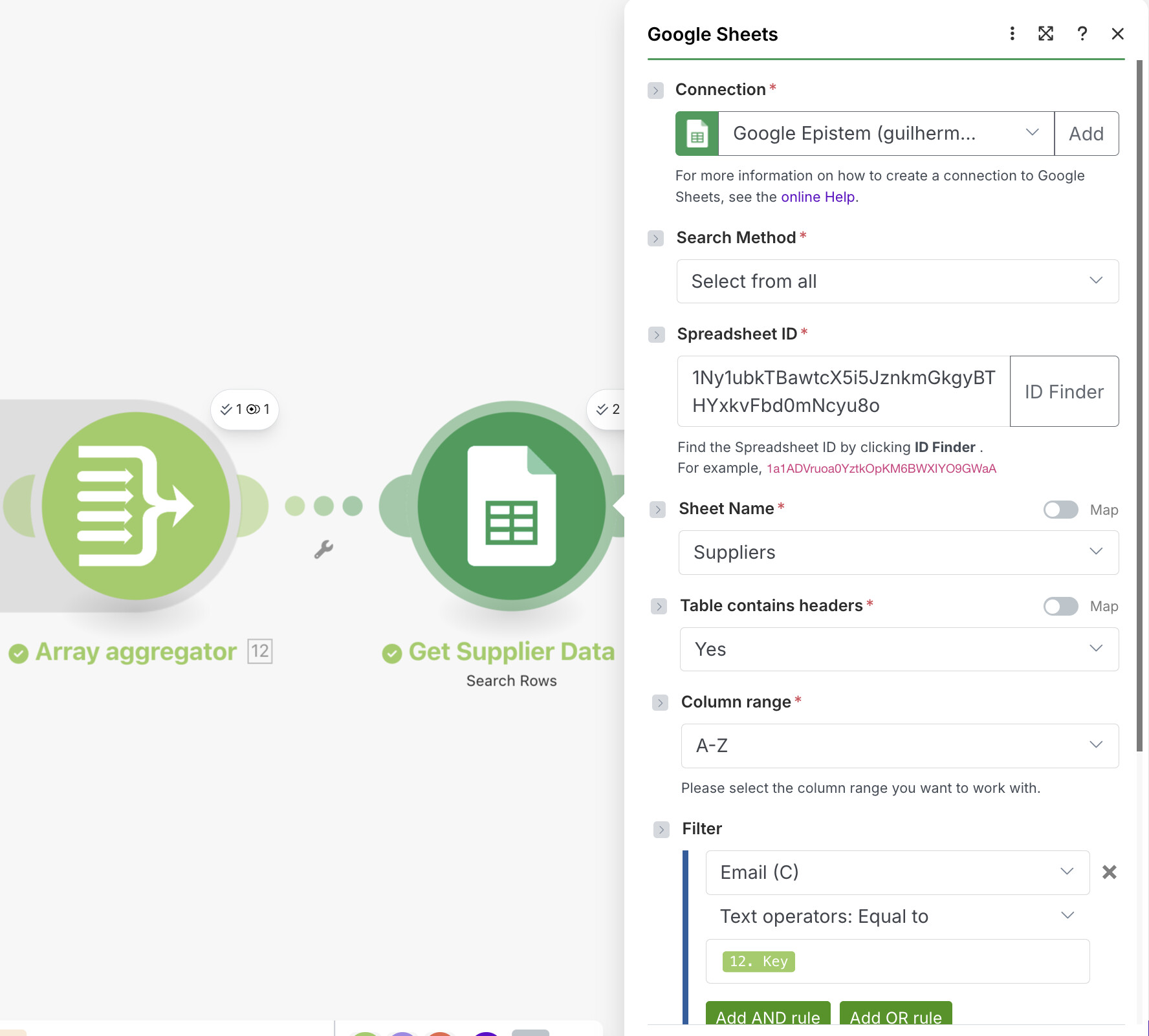
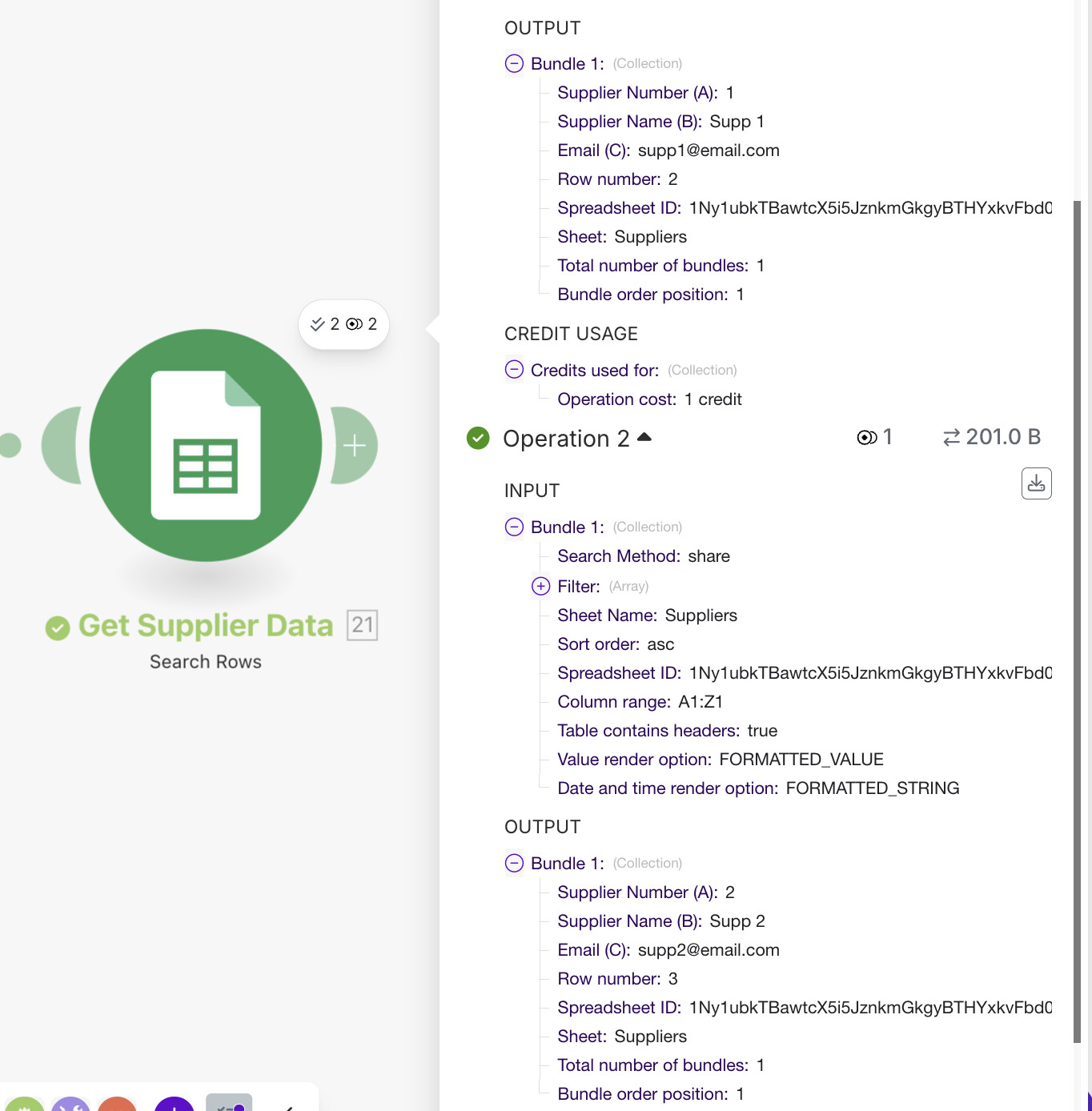
If you also need other Supplier data (e.g. name), you would have to query the supplier data again, using the email as the filter, since it is a unique key. (Thus, 20 + 1 queries, in the example above)

This would trigger as many subsequent operations as suppliers involved. In this case, 2.

Getting the list of Generics per Supplier with a Text Aggregator, in case you ever need to use something other than Order Details in the email body:

On the Send Email module, you would have access to the suppliers and orders data, as well as the resulting text.

This way you will have one email per supplier, as requested.

Afterwards, you can update the order(s) sent with now as you requested, simply by referencing the very first module, where you got the order(s) from.

Here’s the whole picture:

And here’s the blueprint for this scenario:

supplier aggregation.blueprint.json (89.6 KB)

If you need a solution to optimize the scenario and potentialy reduce the comsumption of thousands of operations, just DM me and we can get to an arrangement.

I hope that helps you understand the issue and make progress in you journey with Make!

Hint: Make is mainly a visual tool. Whenever you ask for help, try posting the screenshots (or even the blueprint) of the scenario to allow for a better understanding of the issue.

@damato

1 Like

Thanks for the recommendation Damato!! I didn’t copy the scenario exactly as it was, but I applied your approach to group at the branching source and avoid redundant calls.

I iterate providers from the webhook, group them by provider ID, and send one email per provider.

The scenario flow is: webhooks → iterator → array → get → send email → update
Result: fewer credits used and no duplicates. Thanks for the clarity and focus on efficiency!