Hi all,
I’m new to Make and automations — this is my first-ever build, and I have zero technical background. I used ChatGPT to guide me and failed many times before finally getting this working.
 What I’m Doing
I’m scraping websites and sending the cleaned content to GPT to classify the companies. I want to minimize token usage and avoid junk input.
Current flow:
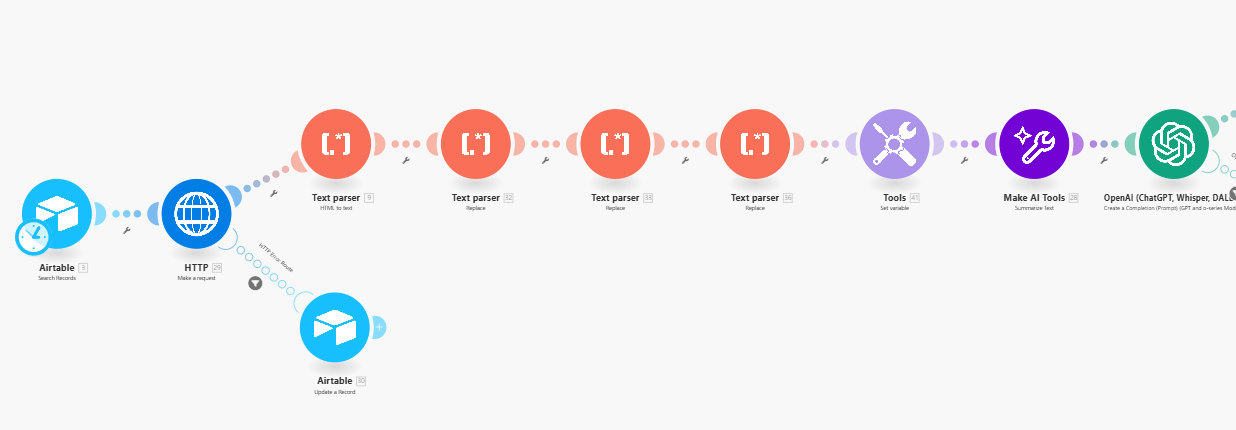
- HTTP – Grab website
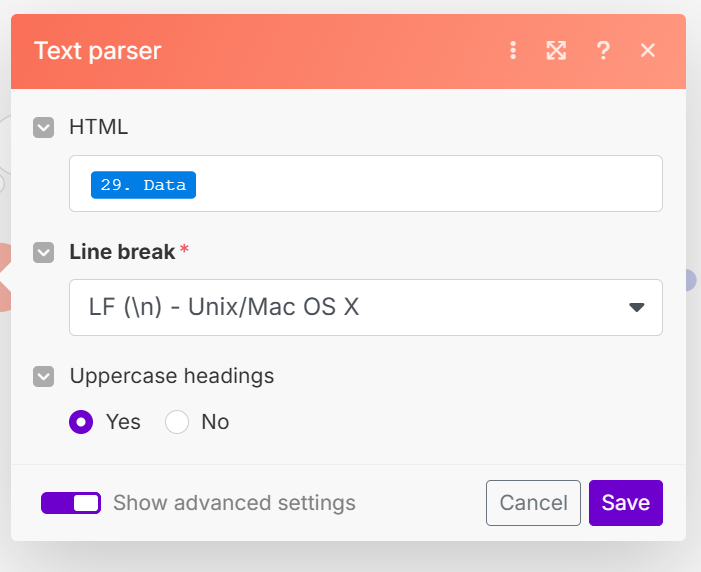
- HTML to Text
- Text Parser → Replace 1 – Remove full
http lines:
.*https?:\/\/\S+.*
- Text Parser → Replace 2 – Remove brackets and content inside:
\[[^\[\]]*?\]
- Text Parser → Replace 3 – Remove lines with only short words:
^[ \t]*(\S{1,10})?[ \t]*\r?\n
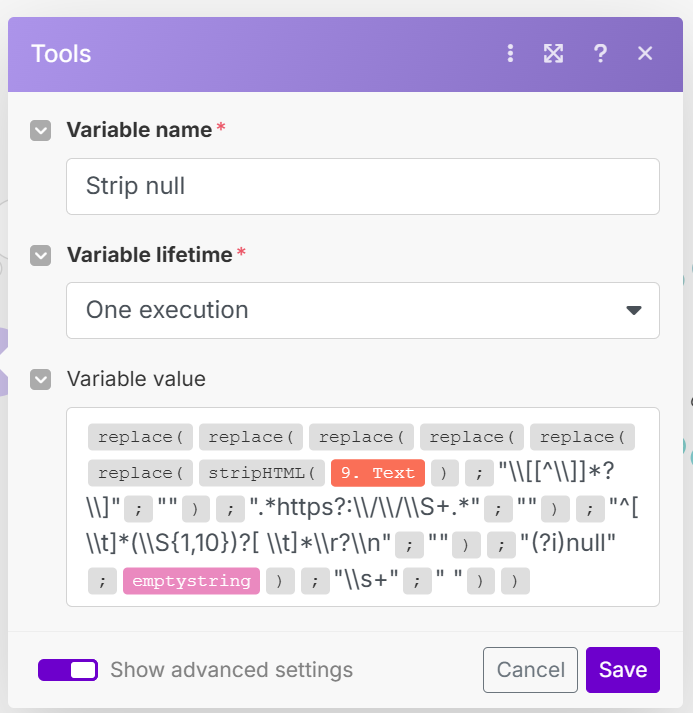
- Set variable – Strip
"null" using:
replace(stripHTML(36.Text); "null"; emptystring)
- Make AI Tools → Summarise Text – To avoid sending large blocks to GPT
 My Concerns
- This flow has 11 modules, and I plan to run it on ~1000 websites (I’m on the Core plan)
- I couldn’t combine all cleanup into a single Set variable — regex escaping and formatting kept breaking things
- I’m not sure if using the “Summarise Text” module makes sense — I added it to avoid long GPT inputs, but it might be burning through AI tokens quickly
- I’ve tried multiple times to consolidate all the cleaning steps into a single nested
Set variable, using chained replace() and trim() functions, but I kept running into issues — especially with regex escaping, line breaks, and Make’s syntax. No matter how I structured it, something would break or not clean as expected. That’s why I ended up using separate Text parser → Replace modules instead, even though I know it’s less efficient.
 What I Need Help With
- Can this be done with fewer modules (e.g., better regex chaining or a smarter Set variable)?
- Should I remove the “Summarise Text” and just truncate or clean the text before GPT?
- Do my current regex patterns look good, or could they be optimized further?
 I’ve attached screenshots of my scenario and formula setup.
Thanks so much — I’d really appreciate tips or optimizations from anyone who’s built similar automations.
Hi Carlos,
I get your concern, and the short answer to your question is ‘Yes’. I do not know exactly what the output is like, but you should be able to use nested replace functions. Although this gets really messy, it will save you at least 3 operations per run, and therefore almost 30% of your total operations per month.
As you said that you used ChatGPT, I probably already know the problem (this is a well-known problem when asking ChatGPT to use replace functions). ChatGPT usually uses replace functions as:
- replace(‘Your Text’; ‘Search string’; ‘Replacement string’)
However, the replace function within Make, unlike many replace functions in programming languages, does not take all those values between quotation marks, it is used as follows:
- replace(Your Text; Search string; Replacement string)
As you said that you tried it earlier (and you are using them correctly if not nested), the problem may lie in losing oversight within the replace functions. Can you reply with a screenshot if you still try nesting them?
About your question regarding the Summarize text module, I strongly think you are better of with deleting the module and put the whole text in ChatGPT. Depending on which module you use, usually around 75% of the costs are expressed in the ‘output tokens’, therefore, having ‘a lot’ of input tokens, usually does not matter that much. Also, you are saving on your AI tokens. So I would definitely recommend on leaving it out.
Hope this helps a bit! I will also add a nested replace function that I use in one of my cold outreach flows to hopefully clear things up. It is used to get rid of html bugs in the Gmail module for sending an email.

As I replied, I remembered one of my own flows which scrapes content from websites; you can use the Create JSON module and map the whole website output in it, and it will create a JSON which can then be passed through ChatGPT. This is how that flow looks:
In your case, the last module is then ChatGPT. And your flow is: Airtable > HTTP > Create JSON > OpenAI, which saves you 5 modules, if I understand your flow correctly and do not miss out on some thing(s)
Hi, thanks a lot for your detailed reply — really appreciate you taking the time.
I went ahead and removed the Summarize Text module as you suggested, and that definitely makes sense. Thanks for pointing that out.
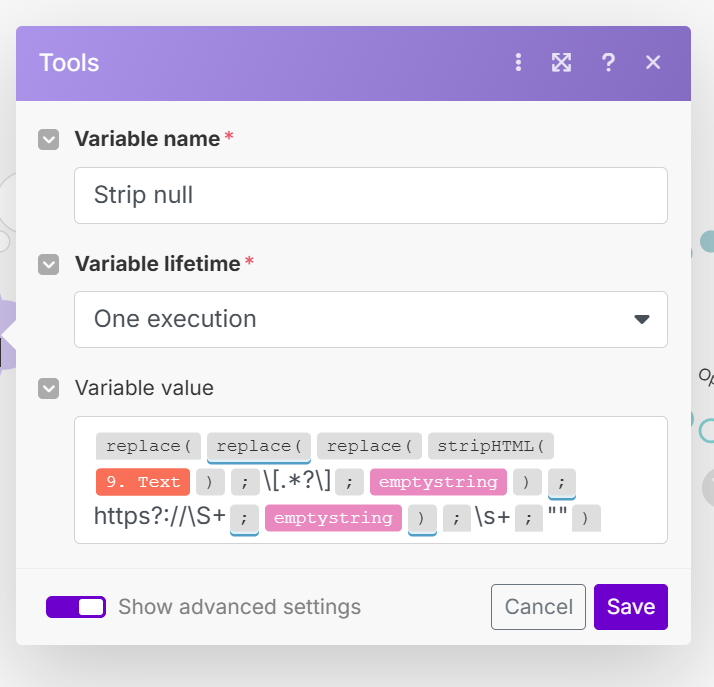
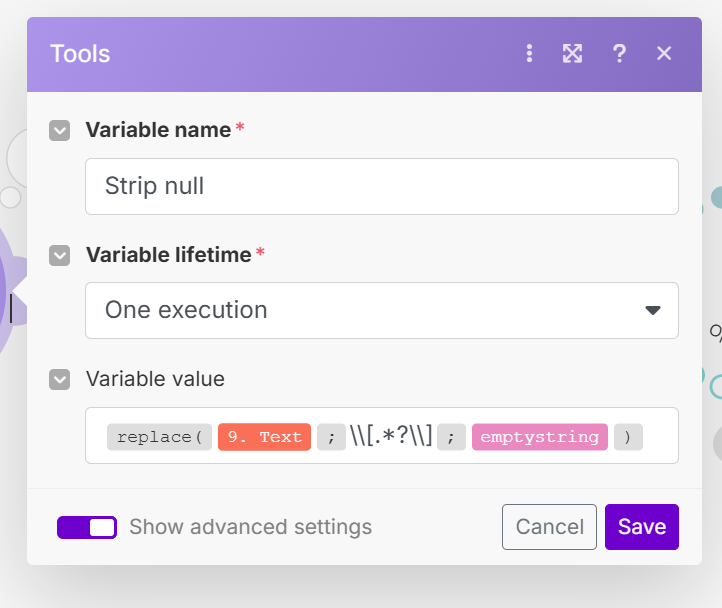
Now I’ve tried combining all the cleanup steps into a single Set Variable, just like you recommended (screenshot attached). But for some reason, the output is exactly the same as the input — none of the cleaning seems to be working. It’s still full of brackets, links, nulls, and white space.
Also, just to clarify — in my flow, the JSON module comes after ChatGPT. I use it only to store the final lead classification into Airtable. Since I’m feeding raw website text into GPT for evaluation, I didn’t see a need to structure the input as JSON.
I know you’re using Apify in your setup, which makes a lot of sense. I might look into that at some point. But for now, I’m really trying to make this work with Make’s native scraping and cleaning tools — more of a personal mission at this point, just to figure it out properly after spending quite a bit of time on it.
Any idea why the current formula might not be doing anything?
Thanks again!
Hi Carlos,
Yes, I do know why the current formula is not working. The string that you are searching for, is currently between quotation marks. For example, you are looking to replace \s+, so you need to type just that, and NOT “\s+”. These mistakes are easily made by ChatGPT as I mentioned in my first reply.
Also, note that you replace the last string (\s+) with a single space bar, for safety you should remove the space between the quotation marks.
I do not recommend website content scrapers from Apify if you are going to scrape thousands of websites, this will cost you at least hundreds of dollars. You might want to switch to Perplexity, as they offer scraped content for ~$0.01 per website. You can also adjust the prompt to give a summary of at most 150 words, focused on …
Also, in your broader use case, ChatGPT and all other LLM’s are pretty good with handling unstructured data, so you might pass in the scraped content directly into ChatGPT… maybe that is the real solution, but you can try the replace function first for cleanup.
Hope this helps, definitely let me now if this works now!
Hi Vdwintelligence
Thanks again for your help — I really appreciate it.
I’ve simplified the formula and applied your recommendations, but unfortunately it still doesn’t work. It seems like no matter what formula I use inside the Set variable module, it never actually cleans the text as expected.
ChatGPT was insisting that inside Set variable, all regex patterns need to be quoted (e.g. "\\s+"), but just to be sure, I tested both with and without quotation marks — neither worked.
I also tried experimenting with Perplexity’s API for scraping, but didn’t get great results — maybe I haven’t configured it properly yet. I looked into Apify after seeing your automation and as you mentioned I found out the pricing would get expensive fast. Maybe could be an only as a fallback when my current HTTP request fails in some websites.
Thanks again for your time — if you spot anything I might be missing, I’d be grateful for a nudge in the right direction.
Best regards,
Carlos
Welcome to the Make community!
You only need one module instead of seven.
see
Hope this helps! Let me know if there are any further questions or issues.
— @samliew
Hi Carlos,
That is frustrating. You can try debugging it by first starting with one replace function, run the scenario, check if it works and build the next replacement function around it.
I also think the links @samliew sends are worth looking at!
All the best with it 
Hi Samliew,
Thanks for the suggestion — I appreciate you taking the time to share it. My current setup uses 5 Make modules (excluding the Summary AI module), and it works reliably for around $4/month to process up to 1,000 websites — which is very cost-effective compared to most premium scrapers.
Right now, my focus is on keeping everything native within Make, even if it means accepting limitations on JavaScript-heavy or protected sites. I’m also actively working on reducing the number of modules in the flow to improve performance and keep operations lean — but still sticking with Make’s built-in tools as much as possible.
I’ll definitely keep alternatives in mind for edge cases that can’t be handled natively.
Cheers,
Carlos
Hi Vdwintelligence,
Good idea, unfortunately not even an isolated function works. I have contacted make support to see what what the problem is
Thanks again for your help!
If you want to use a regular expression pattern in a replace function, you need to include the start/end control characters, as well as the global flag if you want to match more than one.
/\[.+?\]/g
Hope this helps! Let me know if there are any further questions or issues.
— @samliew