Formula for pulling key/results into Set Variable

Hello,

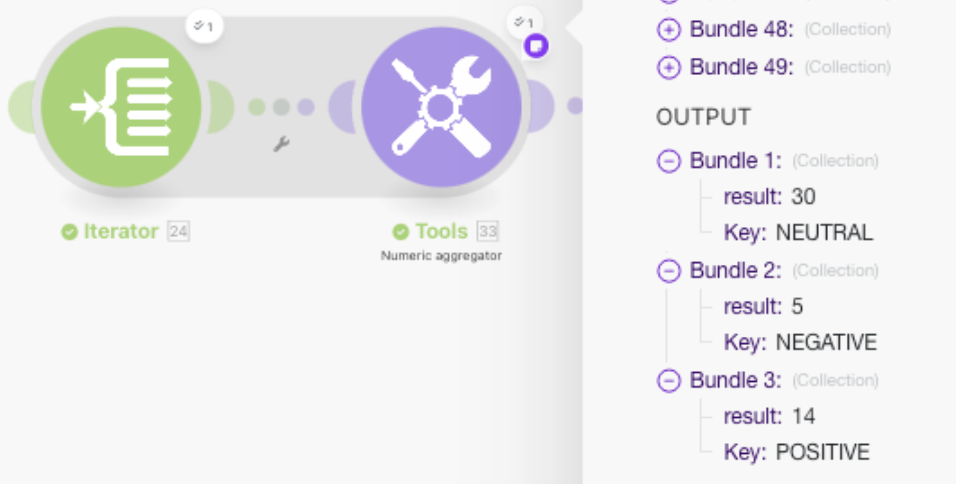
I can get a numeric aggregator to count total positive, negative and neutral values. I struggle to then have each of those values pulled into a set variable via a formula. I tried troubleshooting different functions, but can’t seem to get it to work.

Requirements: If there is a [POS, NEG, NEU] key - the result should appear. If there is no [POS, NEG, NEU] key, the result should be 0 (zero) value. FYI, later in the scenario, these are put into a Notion DB.

Please help share the right formula - something to the affect of, if a postive value shows in the bundles, that number should be pulled. If no positive key present, then place a 0 (zero) value. Thx!

Welcome to the Make community!

Insufficient details provided to be able to answer.

We’d love to help, however, you have not provided sufficient information to demonstrate the problem that would allow us to reproduce the scenario and any issue/s and/or error/s.

To allow others to assist you with your scenario, please provide the following:

1. All Relevant Screenshots

We need to see what you’re working with to give you the best advice. Screenshots are extremely important because Make is a visual editor — a picture provides us with more context.

It would help us identify the issue by having screenshots of:

  • the full scenario,
  • the zoomed in section of the scenario that you are referring to (if your scenario is huge),
  • a full scenario run/execution (showing output “speech” bubbles),
  • any error messages,
  • individual module fields,
  • relevant filter settings (conditions), and
  • each module’s output bundles
  • any external services (spreadsheet headers, sample data, regex101.com, etc.)

You can upload images here using the Upload icon in the text editor:

We would appreciate it if you could upload screenshots here instead of linking to them outside of the forum. This allows us to zoom in on the image when clicked, and avoid tracking cookies from third-party websites.

2. Scenario Blueprint

Please export the scenario blueprint. Providing your scenario blueprint file will allow others to quickly recreate and see how you have set up the mappings in each module, and also allows us take screenshots or provide module exports of any solutions we have for you in return - this would greatly benefit you in implementing our suggestions as you can simply paste module exports back into your scenario editor!

To export your scenario blueprint, click the three dots at the bottom of the editor then choose ‘Export Blueprint’.

You can upload the file here by clicking on this button:

3. Module Output Bundles

Please provide the output bundles of each of the relevant modules by running the scenario (you can also get this without re-running your scenario from the History tab).

Click on the white speech bubbles on the top-right of each module and select “Download input/output bundles”.

A. Upload as a Text File

Save each bundle contents in a plain text editor (without formatting) as a bundle.txt file.

You can upload the file here by clicking on this button:

B. Insert as Formatted Code Block

If you are unable to upload files on this forum, alternatively you can paste the formatted bundles.
Here are some ways to provide text content in a way that it won’t be modified by the forum.

  • Method 1: Type code fence manually
    Add three backticks ``` in a separate line before and after the content, like this,

    ```
    text goes here
    ```
    
  • Method 2: Highlight and click the “preformatted text” button in the editor

  • Method 3: Upload your file and share the public link
    (this method is only recommended for large files exceeding the forum upload limit)

Providing the input/output bundles will allow others to replicate what is going on in the scenario, especially if there are complex data structures (nested arrays and collections) or if external services are involved, and help you with mapping the raw property names from collections.

Sharing these details will make it easier for others to assist you.
Hi @LV

Depending on the optimization you need for credits, but here is a simple way to do it: just create a router with the N different values you want to process independently (POS, NEG, NEU, etc.). Add a filter on each route for the key you want, and in each branch run your aggregator, then save the result into a Set variable module.

On the final branch of the router, use Get multiple variables to pull together all of your saved results. This way, if a key doesn’t appear in the bundles, that variable will stay blank, but if it does appear, you’ll have the aggregated value ready to push into your Notion DB.

Thanks, @mr.G . I attempted your solution. It was successful in the final desired output; however, your opening note re: credit optimization might be an issue. In my instance, running the scenario used 39 credits. I’d expect it could run into 100+ in certain instances.

Knowing branches run in parallel, I falsely added a sleep module prior to Get Multiple Variable in hopes it’d run everything else first - then could aggregate in the Get Multiple Variables. That was wrong. It still used 39 credits.

Also attempted to run an Array Aggregator prior to Get Multiple Variables - as I thought it’d run after all the branches. I was wrong. Again, got the correct output; however, used 39 credits.

Thoughts?

quick check in, @mr.G - curious if you had any guidance? appreciate it.

Without the additional details requested, we can only take a stab in the dark since it is impossible to know what the exact issue is. Additionally, what you’re asking may be an X-Y problem. Once you’ve provided them below, do ping us to take a second look.

@samliew

HI @LV

With automation there’s always a balance between achieving the solution and managing credit usage, especially as scenarios scale. It’s important to analyze the whole setup to spot where credit efficiency can be improved. Depending on the array structure, you might optimize by applying formulas or restructuring the data flow. Another option is using an AI module to process the array and return all computed results in one step, while it consumes AI credits, in some cases this can be more efficient than running multiple router cycles.

Just a quick clarification on the router behavior: branches don’t actually run in parallel, they execute sequentially in branch order. For each bundle that reaches the iterator, the data is processed and aggregated per branch, and then flows into the final branch. That’s why there’s no need for timers like Sleep modules in this setup. If your goal is to aggregate results across multiple bundles from the iterator, you’ll need a different approach. A helpful tip is to use the “Explain Flow” (airplane) icon at the bottom, it gives you a clear view of how your data is moving through the scenario.

hi @mr.G , very appreciative of the knowledge and time spent assisting. good tips. will look into the options/actions presented. best.