How to properly download a translated document from DeepL API in Make?

Hi everyone,

I’m trying to build a scenario in that uses the DeepL document translation API, and I’m stuck on the final step: downloading the translated file.

According to the DeepL API docs:

You need to make a POST request to
https://api.deepl.com/v2/document/{document_id}/result
with the Authorization header and document_key in the body (x-www-form-urlencoded).

I’ve set up the HTTP module like this:

This runs, but I get an error:

400 Bad Request
{"message":"Operation invalid due to a previous error"}

I confirmed that:

  • document_id and document_key are coming directly from the /document upload response
  • The status from /document/{id} is “done” before I try to download

Is there anything special I need to do to capture the binary file that DeepL returns?

Any ideas or working examples from someone who got this working?

2 Likes

Hey @mbsm Welcome to the community!

Can you share screenshots of scenario and module configuration?

Best,
@Prem_Patel

Here is a screenshot. The only issue is with the final HTTP call to download the document. As per DeepL’s documentation I need to perform this call to download a file

curl --request POST
–url ``https://api.deepl.com/v2/document/{document_id}/result``
–header ‘Authorization: xxxx’
–header ‘Content-Type: application/x-www-form-urlencoded’
–data document_key=xxxx
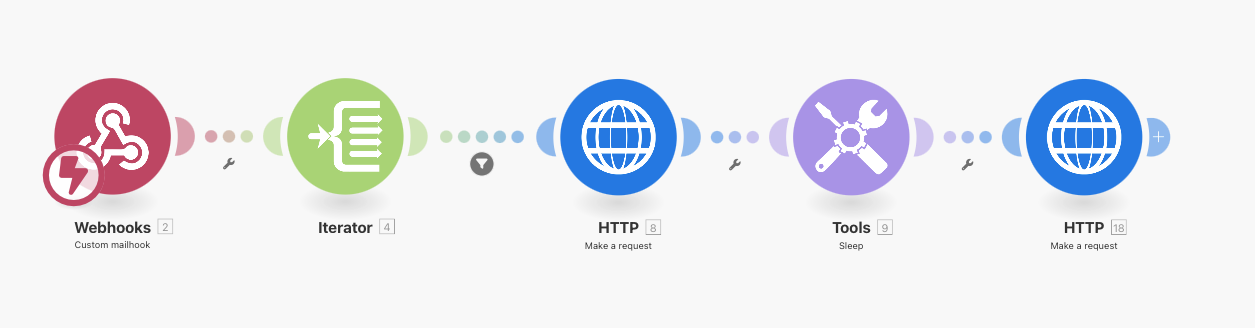
However it seems the HTTP request module doesnt support downloading files. And the HTTP module to download file doesnt support POST requests with parameters.

1 Like

Welcome to the Make community!

To do this, you can try using the HTTP “Get a file” module —

Downloads a file from a given URL.

For more information about the Get a file module and HTTP app, see the corresponding Integrations page and the Help Centre documentation.

Hope this helps! Let me know if there are any further questions or issues.

@samliew
P.S.: investing some effort into the tutorials in the Make Academy will save you lots of time and frustration using Make!

The get a file module does not support POST requests nor adding form data and custom authorization headers, unfortunately.

See the curl example of the request to be performed:
curl --request POST
–url ``https://api.deepl.com/v2/document/{document_id}/result``
–header ‘Authorization: xxxx’
–header ‘Content-Type: application/x-www-form-urlencoded’
–data document_key=xxxx

Hmm, that looks like an oversight then. We’ll need to contact support to get POST added in.

Heyy @mbsm You can use Make An API call module of DeepL and do the configuration as per documentation.

Best,
@Prem_Patel