HTTP v4 pagination — Items path incorrectly treated as object (should be array)

:bullseye: What is your goal?

I am trying to configure pagination in the new HTTP v4 module

:thinking: What is the problem & what have you tried?

My API response (parsed by the module) looks like this:

[
  {
    "statusCode": 200,
    "headers": [...],
    "cookieHeaders": [...],
    "data": [ {...}, {...}, ... ],   // <-- This is the array of items I need
    "fileSize": 29453
  }
]

Because I can only enter the path after data, what am I supposed to put in Items path? I’ve tried /empty_string, data, data.data, . … But none of these actually worked. Is there some kind of special symbol to put when Items array is directly in “data”? Thank you!

:clipboard: Error messages or input/output bundles

Error in pagination setup: did not point to an array. The path led to object instead of an array.

That HTTP v4 pagination error basically means the value you mapped into Items is not an array.

In the pagination settings, Make takes the JSONPath you put in Items, runs it on the response body, and expects a list.

Your path at the moment lands on a single object instead of a list, so the module throws an error.

I hope this clears it up for you!

1 Like

Welcome to the Make community!

From your screenshot / output bundle, it appears that you have an array of items. What do you do when you have an array?

“Looping” Through Array Items

When you see an array in a module’s output, think of using an Iterator module. This allows you to individually access and process each item in the array.

In this example, this variable is an array of items (collections). You’ll want to map this variable in an Iterator module.

Question: Have you tried mapping your array variable into an Iterator module, ran the scenario once, and view the output? Then …

Combining Bundles Using Aggregators

Every result/item from some module types (like Trigger / Iterator / List / Search / Match modules) can potentially and likely output more than one bundle. These multiple bundles will individually run subsequent modules once per bundle, which is not optimal in most cases:

  • one operation per bundle per module, which could lead to…
  • use of multiple credits per bundle per module (some modules use more than one credit)
View example screenshots

Aggregator Example

The “Search Rows” module runs one time, returning 999 results (999 bundles).

  • Without Aggregator: the tools module run 999 times (999 operations)


    (and if there are more modules, they run 999 times each)

  • With Aggregator: the tools module only runs 1 time (1 operation)

:warning: Warning: :police_car_light:
This can easily use your entire quota of credits if you are not careful or fail to understand this concept.

To “combine” multiple bundles into a single variable, so that you can process all of the items in a single operation, you’ll need to use an aggregator. Aggregators is a type of module that accumulates bundles and outputs one bundle (unless you are using “Group By”). An example of a commonly-used aggregator module is the Array aggregator module.

You can find out more about some other aggregator modules here:

Question: Which is the best aggregator do you think you’ll need for your use-case?

Mapping a Complex (Collection) Structure Into an Array Field

The Array Aggregator module is very powerful because it allows you to build a new complex array of collections that matches a later module’s array field to map multiple items (collections) to it. Such fields initially may allow you to manually add individual items, but toggle the “Map” switch on, and you can map an array variable (from an Array Aggregator) containing multiple collections.

Simply select the respective “Target structure type” in an Array Aggregator module.

As you can see from the above example, the “Map” toggle on complex fields are used when you have an array variable (like from an array aggregator).

:clipboard: Note: :light_bulb:
Other combinations of modules may also allow you to generate an array that matches a future module field’s array structure, like “Aggregate to JSON + Parse JSON”, or “Create JSON + Parse JSON”, but this is an advanced topic.

Question: Are you mapping your array into a field that accepts more than one item/collection?

Example

Here is an example of how your scenario could look like:
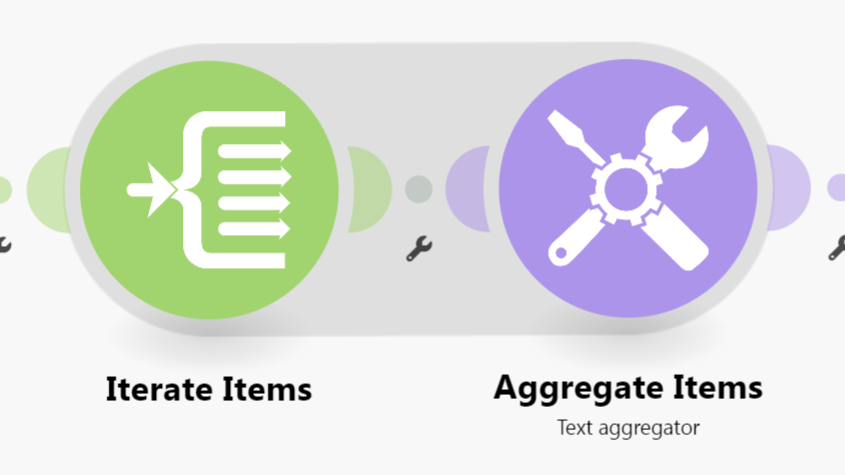
This is just an example. Your solution may or may not look like this depending on requirements and actual data.

For more information, see “Mapping with arrays” in the Help Centre. I also suggest going through the Make Academy, which also covers the use of Iterators & Aggregators.

@samliew
P.S.: investing some effort into the tutorials in the Make Academy will save you lots of time and frustration using Make!

Hey all!

Thank you so much both of you to find a time helping, but I think none of you understood the problem I am having. Please accept my apologies for not making it crystal clear. I made some screenshots which I think will be better to understand.

The output response of one our API is simply Data array in which i have collection I want to use, I made an example where pagination is not really necessary, but lets imagine there are more than 50 results (by the way the screen I posted was made using legacy HTTP module).

But here comes the problem because in Pagination response config you are supposed to determine the path array of items, which in my example is simply called data, but the info tab is saying that you should put path after the data, so when I put data in there it is actually looking for data.data if I am correct, which in this situation is wrong right? But I can’t really put a empty string there which will result in error that you can’t have an empty field.

Like so..

On completely other example where array of items is called results it works perfetly fine and I love it, but unfortunately the example above is making my hair go thinner. Thank you again for replying and I will thank you again even more, when you help find me the solution for this pickle.

Yah that’s exactly what Sam posted. This isn’t pagination issue. You have an array of collections, so you need an Iterator module to go through them one by one.

That is something I would use afterwards, yes. But that is not the main issue.

I have an endpoint lets say https://<api_endpoint>.com/items, and this endpoint will fetch me 50 items in one bundle (based on limit), but there are 250 items, and with the old method I had to create a Repeater module and calculate how many times the Repeater goes. And afterwards I would use Iterator module like you suggested to do additional work on an array. But with the latest update on HTTP v4, I can’t even set it up, because I have the issue mentioned above.

So question to to your reply, how can I set up a Iterator module, when I don’t get the response from endpoint? Maybe it doesn’t work for endpoints like this one?

Thank you for replying though, I appreciate very much, but this is really going over my head.

Can you show a screenshot of what the output looks like when it hits the limit and needs to paginate to the next 50?

Sure there you go, I had to do it using the old method (HTTP Legacy), because like I mentioned before I can’t do it using HTTP v4.

This how pagination works using Repeater module (i had to hide some personal/secret info)

This is what legacy HTTP looks like where at the end of an endpoint is &page=i

A this is what I get as response.

The default limit is 50 on this endpoint

OK so in the output it doesn’t say what the total amount is? Or which “page” you are on?

Is it offset based to get the next 50? Can you show the api documentation of the endpoint?

Well it is actually a page based, but these value are in the headers.

You start on page=1 and iterate until total-pages.

API documentation: Freshteam

And when you put just “data” as the path it doesn’t work? Sounds like you need to contact Make support about this and check what that value expects instead. Cause yeah, the array is under data.
Assuming you are also able to map the current page and total page from the header as well.

Can you try sending a “per-page” variable in the request and test increasing it? The API states that the default value is 50, usually this means that you can change it.

Also you can just disable the pagination and build it the old way with the repeater and setting the next page manually for the time being.

This makes sense now!

Since this module (and pagination) is a beta feature, you’ll need to contact support to get the field changed to allow the base “Data” to be selected.

Try mapping the “Data” as “body” into the field to see what happens.

1 Like

You cant “map” it, its in the same module…