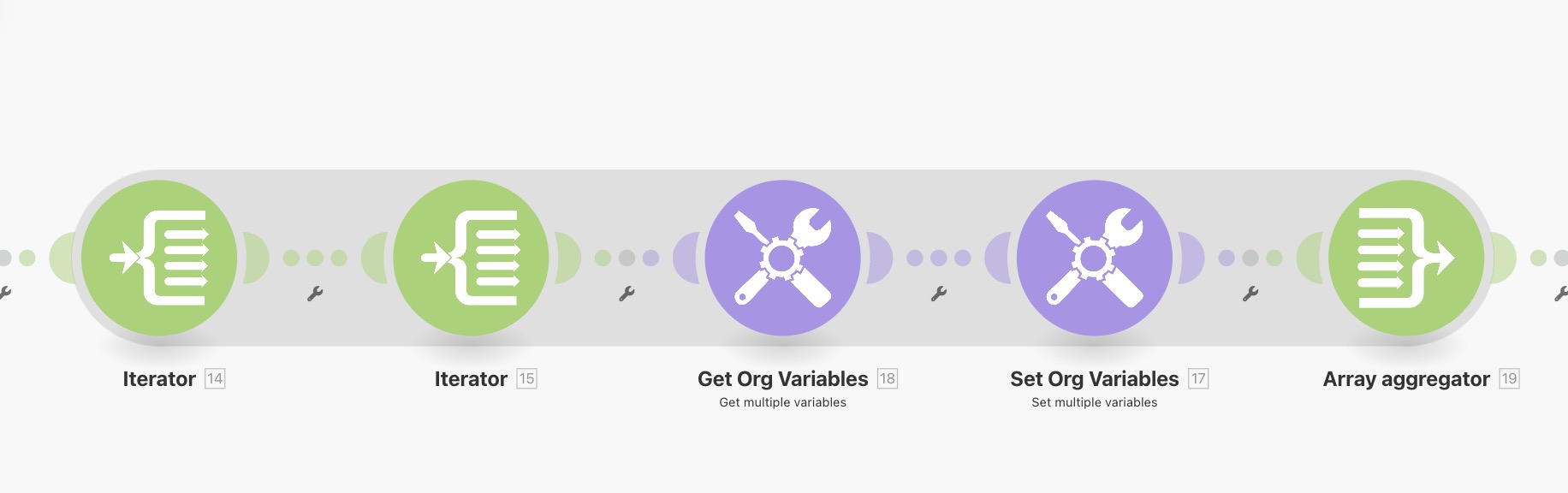
I have an automation that performs an HTTP callout which returns a collection of records. Each record in this collection contains a sub-collection of records.
My goal is to extract data from that nested sub-collection and use it to set boolean variables that indicate whether there are sandbox or production orgs.
To achieve this, I’ve:
Added an iterator to loop over the first (outer) collection.
Added a second iterator to loop over each sub-collection (OrgModels) within the first loop.
Added Get Variable and Set Variable modules to retrieve and update variables based on values in the sub-collection.
I previously before the iterators set the variables to either “false” or null to ensure that the variables already have values so that I can check if its already been set by using = this text string.
As the automation iterates through each OrgModel, it should:
Get the current value of the variable (e.g., HasSandbox, HasProduction).
Set it to true if any sub-collection record meets the criteria.
Retain the true value across iterations so that it’s not overwritten or reset.
Example:
If HasSandbox is already true, subsequent iterations should not reset it to null or false.
Actual Behavior
When the Get Variable or Set Variable modules run within the nested iteration:
The variable appears to lose its value between iterations.
Even if it was previously set to true, the next iteration reads it as null.
This causes the formula logic to fail because it cannot correctly determine if the variable has already been set.
Impact
This prevents me from accurately tracking whether any sandbox or production orgs exist within the nested collection.
The automation resets the variables on each loop, resulting in incorrect final values.
that’s an interesting way of doing things that got me testing as well.
From what I can see your formula is the issue - it checks if the variable was false and the value is true and if they are sets it to true, otherwise it sets it to false. So if it was true to begin with it will not pass the check and set it to false. Form what I gather, the majority of cases it will set it to false.
Also your first false is the text string false and not the boolean operator {{false}}.
{{if(4.test = true; true; 3.IsSandbox)}}
I tried with this → checks if the variable is true and if its not, sets the value coming from the iterator. So the moment the iterator provides a value of {{true}}, the variable will become and stay {{true}} as well.
So I actually changed my formula to this now:
{{if(18.SandboxConnected = “true” | 36.isSandbox = true; true; false)}}
Which in normal language is, IF( (SandboxConnected = true) or (IsSandbox = true), true, false)
Which essentially means if the value is already set to true it stays as true, if its not true and IsSandbox is true it becomes true, otherwise stays false. But this also does not work.
Whenever I run it, it seems that the get variables get reset.
Okay, so if I use that formula I can use one to work out if there are sandboxes, one to work out production. What is this formula doing? Is it just turning it back to raw JSON and then searching for the string within it?
So Sandbox Connected = {{contains(map(flatten(map(13.data; “sf”)); “IsSandbox”); true)}}
Production Connected = {{contains(map(flatten(map(13.data; “sf”)); “IsSandbox”); false)}}
Now for the tricky formula.
I want to look within the collection to see if there is one item where IsSandbox = false, then for that item return that items OrgId. How would I do that?
Those formulas you gave that I have slightly modified to fit the scenario work!!
Sandbox Connected:
{{contains(map(flatten(map(13.data; “sf”)); “isSandbox”); true)}}
So now I just need help with this part.
Now for the tricky formula.
I want to look within the collection to see if there is one item where IsSandbox = false, then for that item return that items OrgId. How would I do that?
It takes the master array and creates a primitive array from it with only the subarrays. Then flattens it so it becomes one array with collections. Then from that one creates another primitive array with only the IsSandbox values. Then it checks if that array contains the {{true}} value (or the {{false}} one in the second case).
Now I dont see OrgId in the sample data but something like this: