Make AI Agent - not able to choose a different AI provider when creating the Agent

What are you trying to achieve?

I’m trying to add a different AI provider (ChatGPT or Anthropic) to my AI agent.
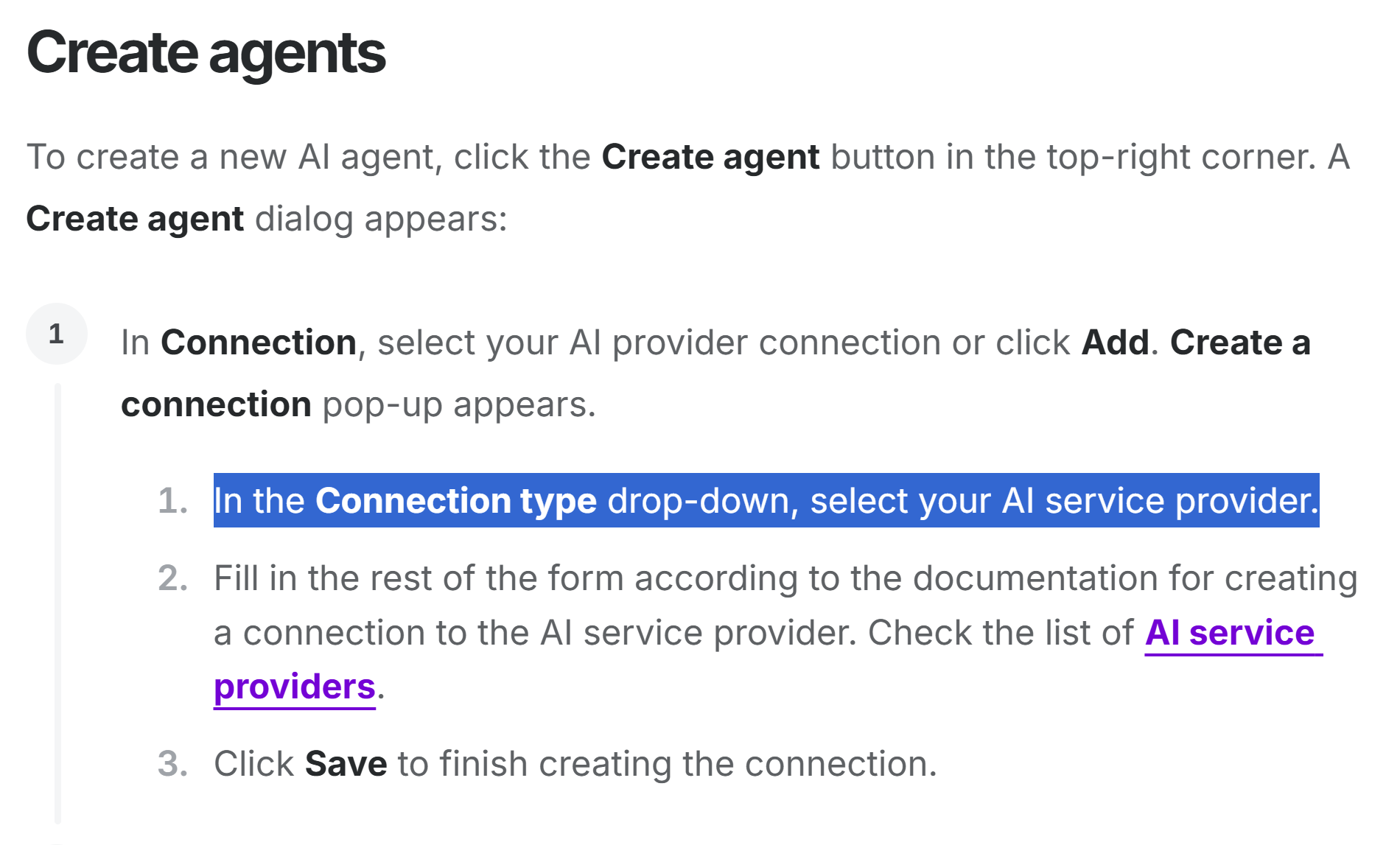
However, on the Create agent > Create Connection step, only option available is Make AI providers and its 3 models. I’ve seen on the help center that there should be a dropdown option with the list of current associated AI services providers.
That dropdown is not appearing for me.

Steps taken so far

I already went to Create agent > Create Connection step, but I can only see a text saying “If you’re using Make’s AI Provider, this module consumes credits for AI tokens. Learn more”. No drop down menu appears, as you can see on the image attached.

Screenshots: scenario setup, module configuration, errors

1 Like

same here. no gemini, no open ai… wtf ??? What am I missing here ? no information anywhere ? why ?

1 Like

Looks like a bug. I have agents currently running on Anthropic Claude, but indeed there is no option other than Make AI to create a new one.

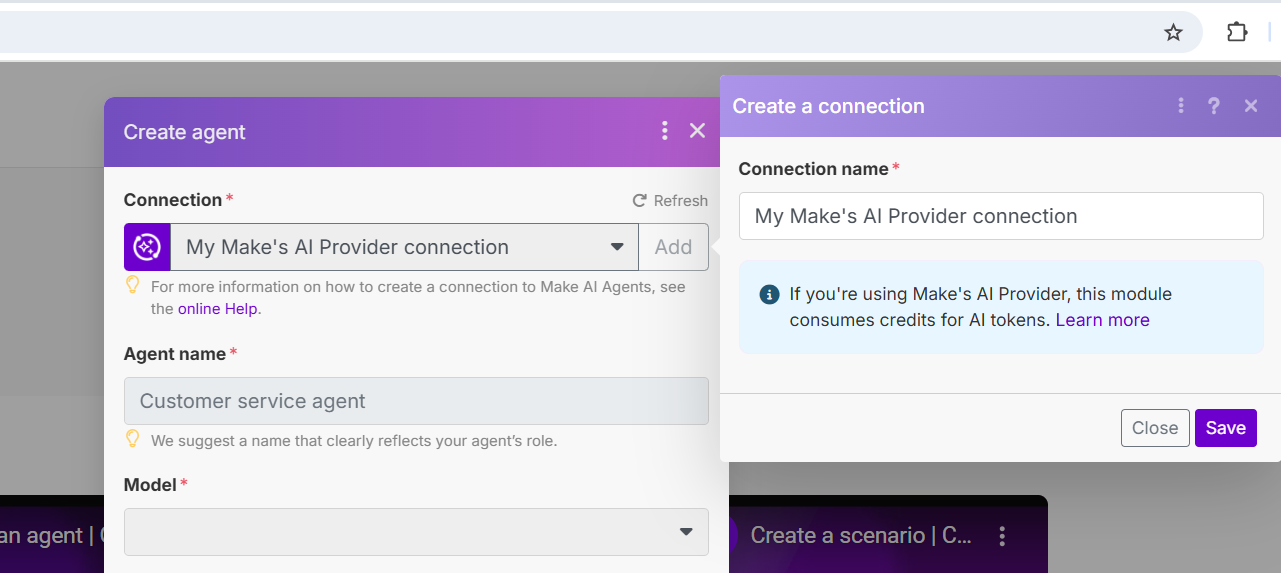
There is no “Connection type drop-down” anymore. :upside_down_face:

1 Like

I am having the same issue..

1 Like

Hello everyone, thank you for bringing this up in the community.

We’d like to clarify that this isn’t a bug but a recent change in our pricing structure regarding AI Agents and AI Tools.

  • The option to connect Make AI Agents and Make AI Tools with your own LLM key from external AI providers (e.g., OpenAI, Anthropic) is now available on Pro, Teams, and Enterprise plans.

  • All plans, including Free and Core, continue to have access to Make AI Agents and the Make AI Toolkit through the built-in Make AI Provider.

→ You can find more information on our pricing page and in this announcement.


2 Likes

It’s very unintuitive
Even in documentations I couldn’t find any info about it

e.g. https://www.make.com/en/how-to-guides/build-ai-agents

Select your provider (such as OpenAI) and enter your API key. This gives your agent the ability to understand and generate responses
Or here

Fill in the rest of the form according to the documentation for creating a connection to the AI service provider. Check the list of AI service providers

2 Likes

Hi @Michaela

Thank you for the clarification. That’s really bad news.

I invested a lot of time into mastering Make and now I don’t feel safe recommending it to my clients, as rules can change midgame.

If you don’t mind some feedback, I believe this is a very bad move.

Bringing AI to automation is a must, but you guys are trying to capture some of the value from it, without adding any value with your service. You are forcing us to either pay you more, to be able to use someone else’s models, or pay only to you to use your inferior models.

That’s not choice, that’s the definition of Vendor Lock-in.

Don’t get me wrong. Make.com needs to join the AI hype, that’s for sure. However, you shouldn’t be trying to compete on generic AI models with the likes of OpenAI, Anthropic or Google, IMO. You are going to lose. That’s not even your business.

For people who need basic stuff, like some unstructured data parsing, you can very well build and offer your own specialized AI apps. This way, the user who doesn’t want to hire yet another API provider can solve their problems with make itself.

But for people that need AI for complex reasoning, there must be the option to choose something else. And you shouldn’t build a paywall just to let me get to another paid service, especially one you cannot fulfill at the same level. You see, it’s not about the $7 difference in plans, it’s about the company’s mentality.

I believe you should stick to being great at automation. You have all the data about how people use AI in their scenarios, so make data-driven decisions.

Anyway, I’m in absolutely no way pretending to know better how you should run your business, it’s just my 2 cents as a customer.

@damato
3 Likes

Are you familiar with the term “User Experience” ?
You dont have to bother answering to that question becouse I already know the answer!

It was wonderfull 1,5 working day off becouse i couldn’t find anywhere information about this. I was convinced that is a bug…

This is total ignorence and disrespect to your customers in the most terrible way.

Your communication of the changes is TERRIBLE. SOME ANNOUCMENTS SHOULD BE WRRITEN BY EXPERIENCED COPYWRITER NOT AI.

Why are you showing that there was annoucment… Don’t be redicolus. This is garbage not annoucement

BOLD TEXT IN THIS “ANNOUCMENT”(haha) SAYS:

Your current plan and price stay exactly the same

while 2 sentences later you write . “Your plan will change”

Are serious ?

THERE IS NO INFO IN DOCUMENTATION!!!

THERE IS NO INFO IN UI !!!

**pathetic, pathetic, pathetic

THIS IS GOLD EXAMPLE OF ULTRA BAD EXPERIENCE. GOOD BAY MAKE.COM**

1 Like

Hey everyone :slightly_smiling_face:,

I’m Petr, I work on special projects in our revenue team, and I’ve been directly responsible for leading the move to credits and how AI billing works, so I wanted to step in personally.

First, thank you for being direct with your feedback – it’s valuable and helps us improve.

Most importantly, I want to provide additional clarity. In our announcement we said “your current plan and price stay exactly the same.” What we meant was that your price tag stays the same. That part is correct — the amount you pay hasn’t changed. But we should have been clearer that there are some changes in what’s included in the plans themselves.

Specifically:

  • If you’re on Free or Core, AI Agents can currently only be used with Make’s AI provider. In this case, credits are calculated dynamically based on token usage, so depending on the size of the task, consumption can be higher than 1 credit.

  • On Pro and higher plans, you can connect any supported external AI provider (OpenAI, Claude, Gemini, etc.) via your own API key. In that case it’s always a flat 1 credit per run, and the token costs are billed directly by your provider.

The bigger picture: the move to credits was about making billing more transparent. For 99% of modules, nothing changed (1 operation = 1 credit). For advanced AI features, costs are aligned with actual resources consumed. For those who’d like to dive deeper, we’ve published a detailed explainer on how features use credits here. We’re also working on making it clearer with our documentation team.

There are some key takeaways for us: We’ll update our documentation, in-app guidance, with clearer announcements going forward. Thanks again for your feedback :folded_hands: It really helps us improve both how we communicate and how we design Make for you.

3 Likes