Hello everyone! I REALLY need your help.
I’m trying to use map() to iterate through an Array Aggregator output but cannot access the specific fields within each array element.
Setup:
-
Google Sheets Search Rows → Array Aggregator → Telegram Send Message
-
Array Aggregator receives correctly 4 bundles with fields Tarea (C) and Persona (D)


Issue: Array Aggregator creates the array correctly, all the 4 outputs bundles are there when checking the individual module, but afterwards, all map() attempts in the Telegram Message module return a completely empty output:
My trys:
join(map(12.Array[]; 1.Tarea (C) + " → " + 1.Persona (D)); newline)
join(map(12.Array[]; 1.2 + " → " + 1.3); newline)
join(map(12.Array[]; 1["2"] + " → " + 1["3"]); newline)
A couple of screenshots of the different ways I’ve tried (listed above):

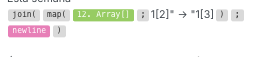
All of them get a completely empty output.
Also, when I used this:
-
join(map(12.Array[]; 1); newline) -
I got this result:
-
{object}1{object}1{object}1{object}
**
But raw array output shows data exists:** {{12.Array[]}} returns:

So,
What is the correct syntax to access specific fields within an array generated by Array Aggregator using the map() function in Make.com? The fields appear as numeric properties (“2”, “3”) in the raw array output. What I’m doing wrong?
Technical Configuration:
-
Array Aggregator: Custom target structure, Tarea (C) and Persona (D) fields selected, Group by empty
-
Array contains 4 valid elements according to IMTAGGLENGTH: 4
Thank you for your help. Already 2 days stuck hours in this!
