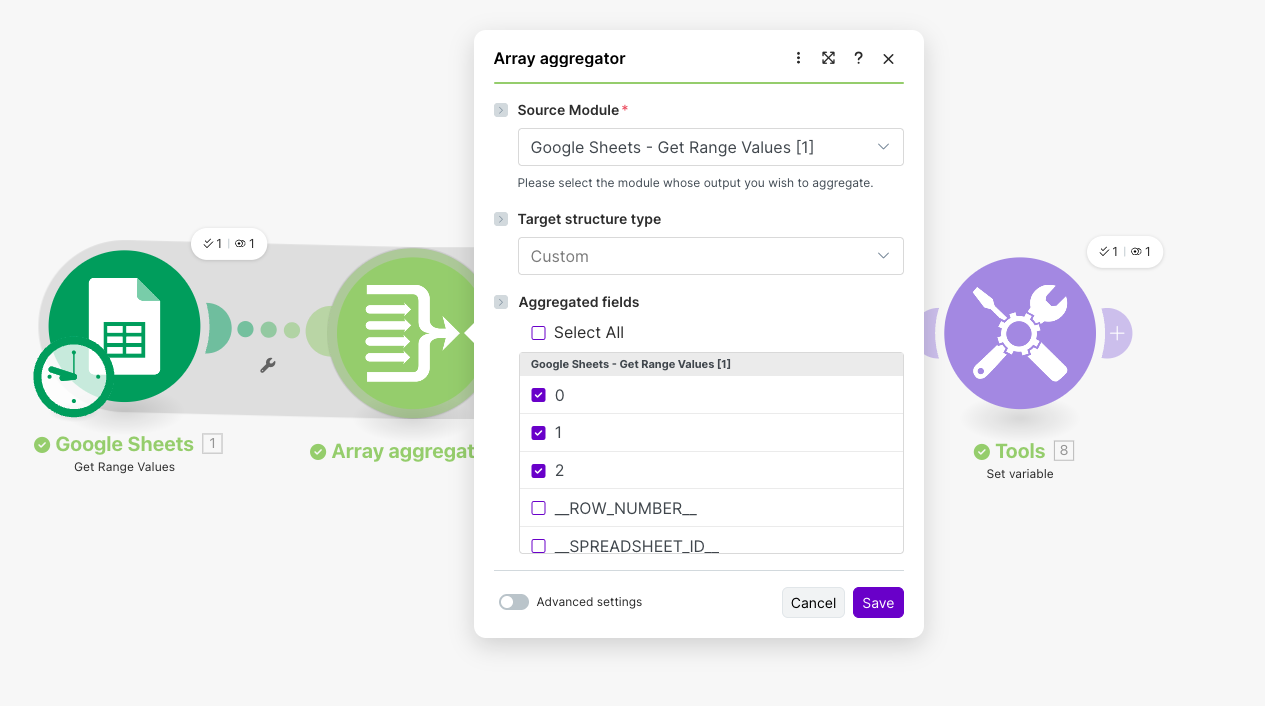
What is your goal?
I want to take the JSON output returned by OpenAI for every row, then group all items by Category, concatenate all vendor names in that category, and sum all TotalSpent values.
 What is the problem & what have you tried?
I tried using Iterator → Array Aggregator → Variables, but the Array Aggregator in Make does not allow adding custom fields (Vendor list, TotalSpent sum). I also tried Tools → Set Variable, but it only stores single values and cannot group data by dynamic categories.
I need a working method to aggregate:
all vendors under the same category (comma-separated)
total spent using sum
one output per category
But Make does not accept custom mapping fields during aggregatio
 Error messages or input/output bundles
No error message — the issue is that Array Aggregator does not support adding custom aggregation fields for JSON coming from OpenAI.
I can provide bundles if needed.
 Screenshots (scenario flow, module settings, errors)
What I want
After processing all rows, I need this output:
{
  "Category": "Medical",
  "VendorList": "ABC, XYZ, KLM",
  "TotalSpent": 25000
}
Meaning:
-
Group all records by Category
-
Join vendor names in that category
-
Sum TotalSpent values
-
Output one bundle per category
Hi Jayesh,
It looks like the results from the Google Sheet is creating 3 bundles which are then being processed one at a time by ChatGPT.
If you add an array module after ChatGPT (rather than an Iterator) you’ll be able to combine all of the data back into one Array.
From there if you pass the Array into a Text Aggregator this will create a String of the data.
Next you can create a custom function to wrangle the data as you want and pass the String into that.
I’ve tried to replicate to give you an idea (I’ve pulled data directly from google, rather than ChatGPT, but it still creates multiple bundles).
Take a look at the images below.
Obviously the “magic: happens in the Customer Function which will be able to categorise the data and sum as you want. If you need help writing a Custom Function you can use any AI. Just give it the input string, and the output JSON you want and explain the calculation you want and it will write the code for you.
Hope that helps
Replace the iterator with an aggregator, set the source module to the search module and not the openai one, then change the grouping to Category.
You don’t need both the array and the text aggregator, it’s either or.
openAI return 3 output-
and the group by cetagory is not working.
it return 3 items in the end.
but it still not work.
You’re really close.
The main issue is what you’re aggregating.
Right now you’re trying to aggregate directly from the OpenAI module, where the data is inside Result (nested JSON). The Array Aggregator groups best when the fields are top-level values, so you need to flatten them first.
Here’s the simple pattern you can suggest:
-
OpenAI → Tools – Set multiple variables
In Tools, create three variables and map from the OpenAI result:
-
Array Aggregator (source = Tools module)
-
Source module: the Tools step above
-
Target structure: Custom
-
In Aggregated fields, tick:
-
vendor
-
total_spent
-
category
-
In Group by, select category.
-
Set aggregation functions:
-
For vendor → use Concatenate (separator: , )
-
For total_spent → use Sum
-
For category → use One item / First
Now the Array Aggregator will output one bundle per category, with:
{
  "Category": "Medical",
  "VendorList": "ABC, XYZ, KLM",
  "TotalSpent": 25000
}
Again - you aggregate the module producing the extra bundles. In your case that is the 1st module in the scenario, the Search module. Change the source module for the aggregator.