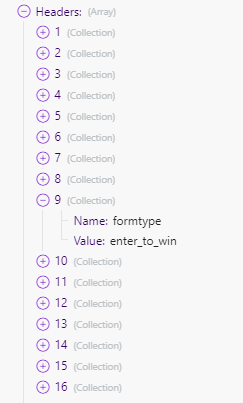
I have a custom webhook that is working well and I am able to get all of the data sent in the body. I have turned on the Get request headers setting and I can see all of this in the response data:
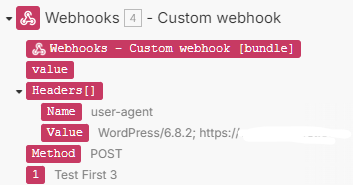
However, I can only access the last item in that collection in downstream modules–the user-agent. How can I access all of the rest of this information? I am sending 2 pieces of custom information that I want to use downstream, but can’t seem to access it. This is what I see in any downstream module from this request:
that’s not a collection, that’s an array of collections. If you want to use specific items from the array you can either use the map() function to find them or use their order index to get them directly (provided the array is always the same and they will always have the same orderindex).
Thanks @Stoyan_Vatov Based on some tests, they are not showing up in the same order. So, if I wanted to pull out the value from the key formtype, where would I put that map function? Inside the field where I want to write that value? Could you give me a quick example for this? I really appreciate your help!
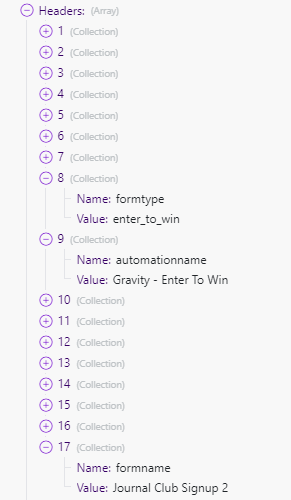
I would like to extract the Value from each of these custom headers I pushed. So for example for formtype, I want to return enter_to_win
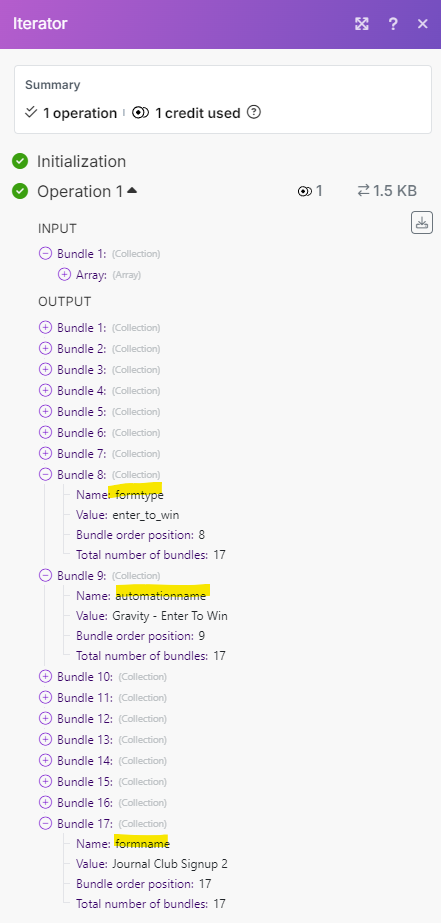
Thanks @llirik ! I can see these values in the iterator now–could you explain how I can pull the value out for specific keys? They will not be in the same order each time. These are the keys for the values I need:
This worked @Stoyan_Vatov and did not need to add any other functions–brilliant! I did have to re-map the headers since just copying and pasting from above removed the brackets, but it did work. This is how it looks in my field: