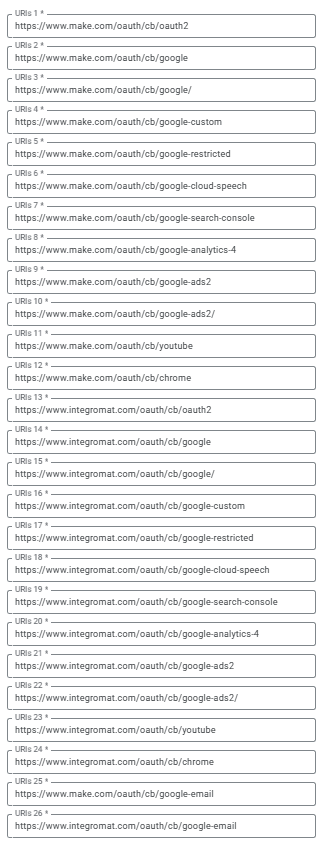
We are trying to connect to our Google Workspace. I know that there are several posts out there which all have the same issue and they always get it running by the description of samliew.
We followed everything by the book like samliew described here:
But in our case it just won’t work and I don’t know what to do next. We still get the error
Error 400: redirect_uri_mismatch
You cannot sign in to this app because it does not comply with Google’s OAuth 2.0 guidelines.
If you are the app developer, register the redirect URI in the Google Cloud Console.
Why is your point about using custom OAuth if you are using Google Workspace?
It is mandatory for personal Gmail accounts.
Regarding your question about testing vs. published:
Testing: If you keep your project in the Testing status, you will be required to reauthorize your connection in Make every week. To avoid weekly reauthorization, update the project status to In production.
In production: If you update your project to the In production status, you will not be required to reauthorize the connection weekly. To update your project’s status, go to the Google Auth Platform, the Audience section, and click Publish app.
What do you mean exactly? We followed the documentation for Google Workspace Admins and there the article says:
In order to use OAuth2 with your Google apps, you need to create your own project and a custom OAuth client in Google Cloud Console. This is useful for connecting restricted Google services, like Google Drive or Gmail, to Make.
Organizational use (Internal use within a business or other organizationGoogle Workspace (formerly GSuite) users that prefer to use a custom OAuth client)
So we presumed that this is the way to connect to our Google Workspace…
If you don’t have any extra security policies requiring you to use only custom apps internally- as Workspace users you can use modules out-of-the-box with Make.com Google Connection.
Just add connection name, click “Sign in with Google”, follow oAuth flow and… you should be good to go.
In case of any problems- fell free to ask. If you will solve your problem- mark solution- it will help others.
It was a mistake on our part. We thought we could use Google Workspace groups in the same way as personal Google users. But apparently that doesn’t work or isn’t supported. Thank you for the help anyway.