Hi everyone,
I’ve been going in circles with this and could really use some help.
The flow is: Tally (trigger) → Create record (Airtable) → GPT → JSON → Update record (Airtable).
Everything after the GPT step works fine, but I’m struggling to pass all the relevant data from the Create a record step into GPT.
The output from the record creation includes both Airtable column names and answers (e.g. “Brake issue – true”), but the GPT input only shows the answers (e.g. “true”, “false”), with no context. This makes it hard for GPT to return an accurate diagnosis.
I’ve mapped all the needed fields manually into the GPT module, and have tried using ChatGPT, aggregators, and set variables—but I still can’t get the input to include both questions and answers together.
It’s also worth noting that the Airtable output includes fields I don’t want to send to GPT (like email addresses or internal fields that aren’t relevant to the diagnosis).
Any ideas? I’d really appreciate some guidance!
Heyy @Patrick_Evans Welcome to the community!
Can you please share the screenshots of JSON related Instructions added, expected outputs required to help you on this case?
Ideally if you give the Expected response json format, GPT will rercognize it for 1 or more items in JSON array so it’s better to give that json format example in instructions. Like Que as key and answer as value {“Question”:“answer”} or question and answers as keys and respective text as value {“question”:“question text”,“answer”:“answer text”}
I hope this helps!
Best,
@Prem_Patel
Hey @Prem_Patel , thank you!
The JSON output from the GPT module is working perfectly. I’ve defined the structure in the prompt, and the responses are correctly mapped into Airtable via the JSON and ‘Update a record’ modules.
The problem lies earlier in the flow: the ‘Create a record’ module outputs the full question/column titles alongside user responses, but this context is being lost when passed into GPT. Without these labels, GPT lacks the detail needed to generate an accurate response.
See the attached screenshot comparing the ‘Create a record’ output with the GPT input and scenario setup for reference.
It is essential that GPT input contains the questions/column titles as context to form an accurate response for the user.
Hi @Patrick_Evans,
each module now offers an option to use the complete bundle as a variable (the very first variable of each module).
Maybe that helps in your case? 
Alternatively, you could use the HTTP Module to make a request, do not parse the output and insert the output into your AI module
Best,
Richard
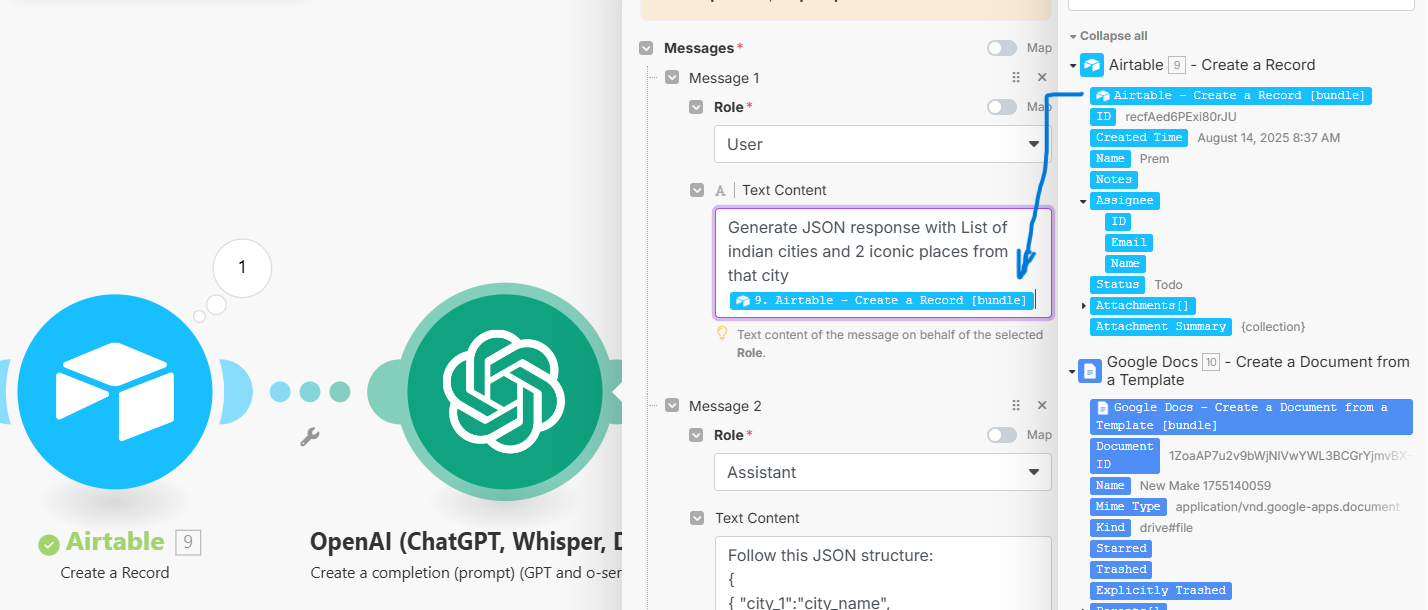
@Patrick_Evans You can map the whole Airtable output Bundle as shown in image below
Best,
@Prem_Patel
Thanks @Prem_Patel for the screenshots, that’s exactly what I was referring to!