Managing multiple social media platforms can be overwhelming, especially when you’re trying to stay consistent and relevant across LinkedIn, Instagram, Facebook, Threads, Reddit, Pinterest, and more. Copy-pasting captions, re-uploading images, and customizing every post eats up valuable time that could be spent on growth.
To solve this, I built the Social Media Machine — a fully automated, AI-powered content distribution system using Make.com.
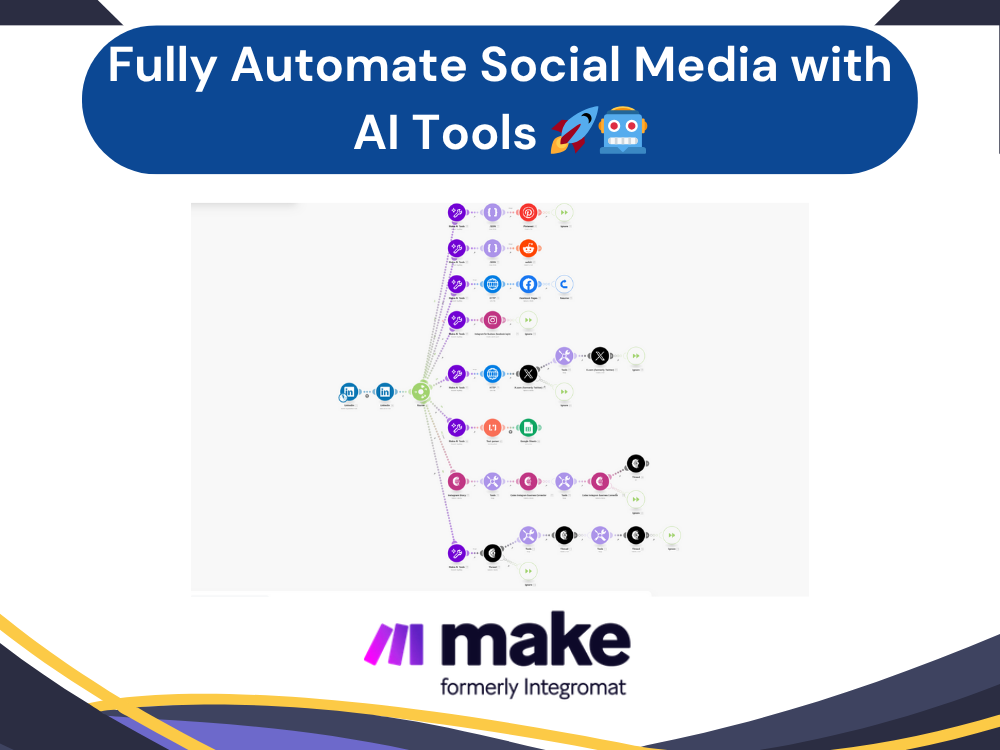
This scenario helps you post once and publish everywhere, turning a single action into a multi-platform rollout — with AI-generated captions tailored to each platform.
 What It Does
The Social Media Machine is designed to eliminate repetitive tasks and streamline your social content workflow. Here’s a breakdown of its key functionality:
- Monitors for a new LinkedIn post with an image and caption.
- Extracts and downloads the image so it can be reused across other platforms.
- Generates new platform-specific captions using Make.com’s native AI tools.
- Automatically republishes the content to multiple social platforms:
- Instagram Feed
- Instagram Story
- Facebook Page
- Threads
- X.com (Twitter)
- Logs post details (captions, timestamps, image URLs) into Google Sheets for tracking and reporting.
- Triggers a separate automation that takes the sheet data and republishes it to Google My Business as a local update.
This way, you get full visibility and consistency across all your social channels — with minimal effort.
 How It Works Behind the Scenes
The automation uses a modular setup inside Make.com, with one main trigger (a new LinkedIn post) and multiple branches that execute in parallel:
1. Image Processing
Once a LinkedIn post with an image is detected, the system:
- Pulls the image content using Make’s HTTP tools
- Makes it publicly accessible for reuse on platforms that require hosted media
2. AI Caption Generation
The original LinkedIn caption is sent through Make’s AI tools, which are pre-configured with platform-specific prompts:
- A fun and casual tone for Threads
- A hashtag-optimized caption for Instagram
- A professional summary for Facebook
- A concise version for X.com
Each variation is generated independently, giving every platform its own unique style.
3. Multi-Channel Publishing
Once the image and caption are ready, the automation publishes the content to each platform:
- The Instagram Story and Feed modules handle visual formats.
- Threads and X.com receive their respective AI-written captions.
- Reddit and Pinterest modules format the data via JSON before posting.
- Facebook Pages and other native modules complete the social coverage.
4. Content Logging
Every post is logged in a Google Sheet:
- Post caption
- Platform name
- Posting time
- Image link
This makes it easy to track what was posted, where, and when.
5. Google My Business Update (Optional Add-On)
A secondary automation is connected to the Google Sheet. When a new row is added, it triggers a local business update on Google My Business, ensuring your content also reaches local search visibility.
 Why This Matters – The Real-World Impact
With this setup, posting content becomes a single-action process. Here’s what it saves you:
 Time: What used to take 30–60 minutes per platform can now be done in one click.
 Mental effort: No need to manually customize captions or log into multiple accounts.
 Consistency: AI ensures every post stays on-brand but fits the tone of the platform.
 Visibility: Reaches multiple audiences across platforms without duplication.
Whether you’re an agency owner, content creator, social media manager, or a solopreneur — this automation is a serious time-saver.
 Who It’s For
This solution is especially useful for:
- Agencies managing multiple client brands
- Small businesses wanting to stay active everywhere
- Creators and coaches building personal brands
- Marketing teams who want to automate their distribution
 Fully Customizable
The best part? This scenario is modular. You can easily:
- Add or remove platforms
- Tweak the AI prompts for tone or language
- Include analytics or UTM tagging
- Integrate with Notion, Airtable, or CRMs
 Final Thoughts
This automation has changed the way I (and my clients) handle content. It removes bottlenecks, increases visibility, and brings the joy back into content creation by removing the grind of manual distribution.
If you’re using Make and want to maximize your content ROI, I highly recommend building or adapting something like this.
Let me know in the comments how you’re automating your content workflows — happy to connect or help anyone building something similar!