I’m using the Brevo – Watch Contacts module. By default, it seems to watch all new contacts across Brevo.
What I need is to limit this to a specific list only.
So far, I haven’t found a way to set this directly in the module.
Is there any option, filter, or workaround (maybe using “Search Contacts” or a router filter) to run this module only for contacts belonging to one defined list?
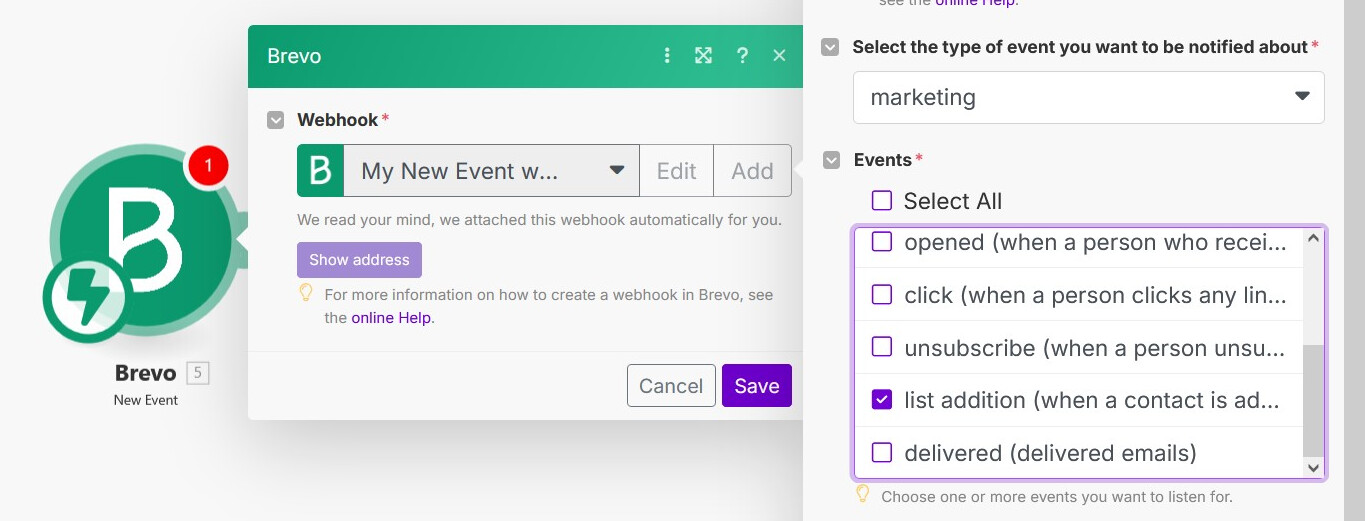
Not sure, if this module would help you in the workflow, since I am not sure what’s the specific use-case for the flow. But there is a ‘New Event’ module available where you can select the ‘list addition’ marketing event as a trigger as follows:
You could explore filtering the contacts received from this module based on the list ID it belongs to and then further pass the contact in the flow if the condition matches. In case, only fresh contacts are added to the list in your project, this should help in solving that use-case as a workaround. Hope this gives you some idea.
In case, you want the first module to be triggered only when a contact is added to the specific list via Make and not rely on filtering, I am curious if there is an in-built approach for this.
The ‘Watch Contacts’ module does not seem to be instantaneous as a trigger while the New event is an instant trigger, meaning it will trigger your workflow the moment the event happens. That being said, as samliew mentioned above you can add a filter after your trigger module to ensure that the workflow only proceed if the contact is in the specified list. It will however trigger your first module irrespectively, but you can ensure you don’t exhaust operations for the rest of the workflow.
 Is there any option, filter, or workaround (maybe using “Search Contacts” or a router filter) to run this module only for contacts belonging to one defined list?