i am doing Cold outreach via e-mail. I am using 5 different emails to send email.
While using 1 email i dont have any problems but when i am connecting 5 gmail modules using router. same person is getting the e-mail 5 times (1 from each gmail module).
I am posting the module that works. Please suggest how do i make it work using 5 gmail modules (using 5 different email addresses)
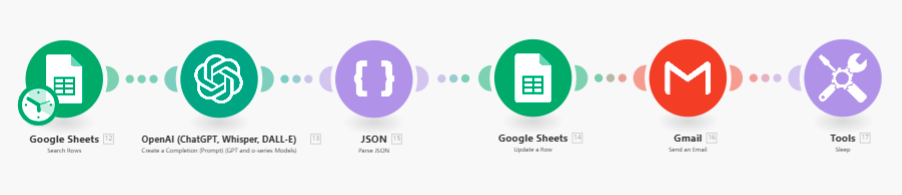
Hey Ashish,
you need filters with different conditions after the router to make sure only one of the paths is executed.
can you give an example.
An example of what? You click on the dotted line between two modules and you define a filter there. It will stop that path from being executed unless it matches the conditions you defined.
Hey Ashish,
This is a late reply and you probably (hopefully) already have this solved. If I understand your problem correctly, you want to send from 5 different e-mail addresses to increase outreach while avoiding spam-filters by Google (which are easily triggered when sending >40 e-mails from one e-mailadress), but you do NOT want them to target the same person more than one time right? Reasoning from this, the mistake is probably caused as follows:
The limit in your first module is set to 1, which means that it will only return one bundle/lead from your lead list. Mapping the e-mailadress from this person into each of the five Gmail modules, will give the result that you desribe: this one lead gets 5 the same emails from 5 different senders.
The solution to this is not straightforward, but it is possible (wherever I do not think it’s fancy):
In your lead list, create an extra column called whatever you like, maybe behind the emailadress of the lead itself. In this column, you want to repeatedly have YOUR emailadresses as follows: row 1 → email 1, row 2 → email 2, row 3 → email 3, … all the way up to row 5, and repeat this all the way to your last lead.
Now going back to your scenario (with the router), you can filter EACH route as follows: map YOUR email variable column that you just created, and use text operator to set it equal to ONE of your emails. I will upload an image that will make this more clear.

Subsequently, you can do this for every route, you map your email column and set it equal to your second email, third email, … In this way, you send from 5 different e-mails without using extra operations.
Hope this helps, but maybe you already figured it out.
P.s. you can leave the limit in your first module (the number of returned rows) to 1 now.
Thank you so much, exactly the resolution i was looking for.
that makes complete sense.
I will implement this and reply again.
Glad to help! Let me know if you solved it and if not, you can reply with a picture of your current scenario and what’s going wrong.