Email text to multiple variables

:bullseye: What is your goal?

From a standard outlook email with a meeting confirmation I want specific rows in the text to get put into variables so I can select them with recognizable names in Notion properties. Such as meeting date, attendee, email address, LinkedURL. Then In Notion I can create a new meeting/activity that will carry on my automation.

This is the email format:

LET OP, DEZE AFSPRAAK DIENT NOG DOOR U MIDDELS EEN OUTLOOKINVITE BEVESTIGD TE WORDEN AAN DE PROSPECT
AFSPRAAKGEGEVENS


Campagne: XXX Marketing - 2025
Project: XXX Marketing - 2025 - test
Afspraaknr.: 010675251120002203001
Ctpid: 9745
Profieleigenaar: XXX@XXX.nl
Afspraakdatum: vrijdag, 21 november 2025 om 09:45 uur
Afspraak voor: XXXX first name last name
Gemaakt door: XXX first name last name
Resultaatcode: Afspraak test

BEDRIJFSGEGEVENS


Bedrijfsnaam: XXX
Adres: Test 1 a
Postcode en Stad: 1544NC XXX
Telefoon: 06XXX

GEGEVENS CONTACTPERSOON:


Geslacht: De heer
Voornaam: XXX
Tussenvoegsel: X
Achternaam: XXX
Functie: Coach
Telefoon: 06XXXXX
Mobielnr.: 06XXXXXXX
E-mail: XXX@XXX.nl
LinkedIn: https://www.linkedin.com/in/XXX-XXX/

GEINVENTARISEERDE INFORMATIE


Heb je een verkoopstrategie gericht op droomaccounts? Heb je heldere boodschappen voor je doelgroepen?: .
Zet je AI in voor verkoop en content?: .
Zijn er nog andere punten die je wilt bespreken?: .

OVERIGE INFORMATIE


25-11-2025 14:05:51 Test

Met vriendelijke groet,

XXX

I run the scenario with actual example data but for privacy reason’s I put XXX here.

:thinking: What is the problem?

I use the following modules for now: search emails (once the automation works it would need to be get emails), HTML to text. These two work and gives me the body of the email in text.

Then I was trying to get multiple variables with the set multiple variables modules. As I am not a programmer or product owner, I have been using chatgpt and MakeAI to set the variable value. However, everything I’ve tried to fill in there with chat either generates the whole code with the whole email text, the whole email text, the wrong part/word of the email text or the output is empty.

:test_tube: What have you tried so far?

My latest code is as follows to get the Ctpid output which is a number: {{trim(get(split(get(split(1.text; """Ctpid:"""); 2); """Profieleigenaar:"""); 1))}}

However, the output is empty.

With this code I got the wrong part of the text up until Ctpid: which I added as a screenshot.
{{trim(substring(1.text; indexOf(1.text; "Ctpid:") + length("Ctpid:"); indexOf(1.text; newline; indexOf(1.text; "Ctpid:") + length("Ctpid:")) - (indexOf(1.text; "Ctpid:") + length("Ctpid:"))))}}

This was the was closest to what I needed as it is close to the number of the Ctpid.

The problem is also not it being a number instead of text as I also tried it for the other output values which are text.

I also tested it with the outlook Body content from the outlook module instead of text of the HTML to text module.

I also tried different versions within the code: “Ctpid” “Ctpid:” "Ctpid: " I also tried clicking on the make blocks instead of copying the code.

Can you help me find a working scenario? I think I might need a different module.

:camera_with_flash: Screenshots: scenario setup, module configuration, errors


1 Like

Hey Jessica,

you want to get the number after Ctpid: right? The first formula looks correct but with too many quotation marks around the two text strings.

{{trim(first(split(get(split(1.text; "Ctpid:"); 2); newline)))}}

Hi, yes indeed! I think when I copy the code to text here, it looks different than in Make. I added a screenshot of what the blocks look like in Make. What do you think?

Thats what its supposed to look like yes. Do you get the correct result when you run it?

Welcome to the Make community!

You can use a Text Parser “Match Pattern” module with this pattern (regular expression):

^\s*(?<key>[a-z].+?)\s*:\s*(?<value>.+?)\s*$

Proof https://regex101.com/r/nGkBDf/1

Important Info

  • :warning: Global match must be set to YES!
  • :warning: Case sensitive must be set to NO!
  • :warning: Multiline must be set to YES!

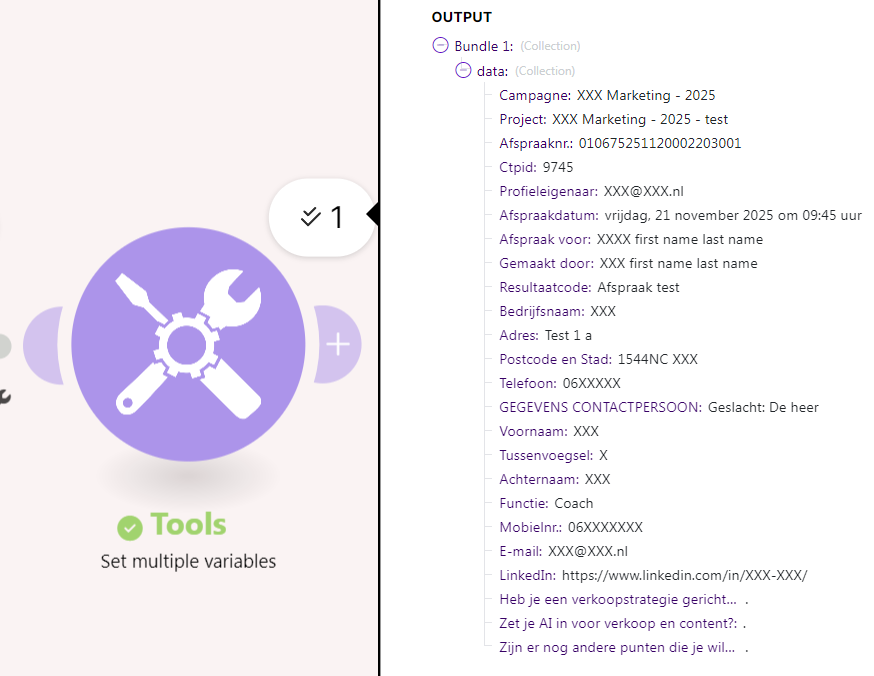
e.g.:
Screenshot 2025-12-10 003451

Output


For more information, see the Text Parser page in the Make Help Center:

Match Pattern
The Match pattern module enables you to find and extract string elements matching a search pattern from a given text. The search pattern is a regular expression, which is a sequence of characters in which each character is either a metacharacter, having a special meaning, or a regular character that has a literal meaning.

Module Export - quick import into your scenario

You can copy and paste this module export into your scenario. This will import the modules (with fields/settings/filters) shown in my screenshots above.

  1. Move your mouse over the line of code below. Copy the JSON by clicking the copy button on the right of the code, which looks like this:

  2. Enter your scenario editor. Press ESC to close any dialogs. Press CTRLV (paste keyboard shortcut for Windows) to paste directly in the editor.

  3. Click on each imported module and re-save it for validation. There may be some errors prompting you to remap some variables and connections.

JSON module export — paste this directly in your scenario

{"subflows":[{"flow":[{"id":45,"module":"util:SetVariable2","version":1,"parameters":{},"mapper":{"name":"html","scope":"roundtrip","value":"LET OP, DEZE AFSPRAAK DIENT NOG DOOR U MIDDELS EEN OUTLOOKINVITE BEVESTIGD TE WORDEN AAN DE PROSPECT\r\nAFSPRAAKGEGEVENS\r\n\r\n\r\nCampagne: XXX Marketing - 2025\r\nProject: XXX Marketing - 2025 - test\r\nAfspraaknr.: 010675251120002203001\r\nCtpid: 9745\r\nProfieleigenaar: XXX@XXX.nl\r\nAfspraakdatum: vrijdag, 21 november 2025 om 09:45 uur\r\nAfspraak voor: XXXX first name last name\r\nGemaakt door: XXX first name last name\r\nResultaatcode: Afspraak test\r\n\r\nBEDRIJFSGEGEVENS\r\n\r\n\r\nBedrijfsnaam: XXX\r\nAdres: Test 1 a\r\nPostcode en Stad: 1544NC XXX\r\nTelefoon: 06XXX\r\n\r\nGEGEVENS CONTACTPERSOON:\r\n\r\n\r\nGeslacht: De heer\r\nVoornaam: XXX\r\nTussenvoegsel: X\r\nAchternaam: XXX\r\nFunctie: Coach\r\nTelefoon: 06XXXXX\r\nMobielnr.: 06XXXXXXX\r\nE-mail: XXX@XXX.nl\r\nLinkedIn: https://www.linkedin.com/in/XXX-XXX/\r\n\r\nGEINVENTARISEERDE INFORMATIE\r\n\r\n\r\nHeb je een verkoopstrategie gericht op droomaccounts? Heb je heldere boodschappen voor je doelgroepen?: .\r\nZet je AI in voor verkoop en content?: .\r\nZijn er nog andere punten die je wilt bespreken?: .\r\n\r\nOVERIGE INFORMATIE\r\n\r\n\r\n25-11-2025 14:05:51 Test\r\n\r\nMet vriendelijke groet,\r\n\r\nXXX"},"metadata":{"designer":{"x":457,"y":746}}},{"id":46,"module":"regexp:Parser","version":1,"parameters":{"pattern":"^\\s*(?<key>[a-z].+?)\\s*:\\s*(?<value>.+?)\\s*$","global":true,"sensitive":false,"multiline":true,"singleline":false,"continueWhenNoRes":false,"ignoreInfiniteLoopsWhenGlobal":false},"mapper":{"text":"{{stripHTML(45.html)}}"},"metadata":{"designer":{"x":706,"y":748},"parameters":[{"name":"pattern","type":"text","label":"Pattern","required":true},{"name":"global","type":"boolean","label":"Global match","required":true},{"name":"sensitive","type":"boolean","label":"Case sensitive","required":true},{"name":"multiline","type":"boolean","label":"Multiline","required":true},{"name":"singleline","type":"boolean","label":"Singleline","required":true},{"name":"continueWhenNoRes","type":"boolean","label":"Continue the execution of the route even if the module finds no matches","required":true},{"name":"ignoreInfiniteLoopsWhenGlobal","type":"boolean","label":"Ignore errors when there is an infinite search loop","required":true}]}},{"id":48,"module":"builtin:BasicAggregator","version":1,"parameters":{"feeder":46},"mapper":{"key":"{{46.key}}","value":"{{46.value}}"},"metadata":{"designer":{"x":954,"y":747}}},{"id":49,"module":"util:SetVariables","version":1,"parameters":{},"mapper":{"variables":[{"name":"data","value":"{{toCollection(48.array; \"key\"; \"value\")}}"}],"scope":"roundtrip"},"metadata":{"designer":{"x":1196,"y":745}}}]}],"metadata":{"version":1}}

Hope this helps! If you are still having trouble, please provide more details.

@samliew
P.S.: investing some effort into the tutorials in the Make Academy will save you lots of time and frustration using Make!

3 Likes

This worked! Thank you so much! :smiley: