Error 400 in the uri

:bullseye: What is your goal?

conect mi personal gmail

:thinking: What is the problem?

Hello, good afternoon. I’ve been trying to automate my personal email for a couple of days and I keep getting this error. I already read a conversation in this forum. I’m going to attach some photos so you can see that the URI addresses are correct, and that the problem happens when I try to re-authorize the Gmail connection in the connections section. I noticed that the Client ID and Secret ID are the same on both sides, but it only gives me an error in the connections area. Could someone help me? Thank you very much.

:test_tube: What have you tried so far?

I’ve tried multiple URI addresses, various credentials, I’ve accepted all the permissions, I’ve followed Make’s help guide, and nothing.

:camera_with_flash: Screenshots: scenario setup, module configuration, errors


A 400 error happens when the Google OAuth redirect URI doesn’t match exactly. Make sure you copy the redirect URL directly from the Make connection window, no extra slash or space, and confirm your OAuth consent screen is published. Fixing the URI and re, saving the credentials usually solves it.

I’ve already found the solution thanks to ChatGPT’s deep research mode. Basically, you have to delete the connection and create it again. I also added another URI address, and I’m not sure if that affected it, so I’ll leave it here: https://www.make.com/oauth/cb/google-email.
Thanks anyway for trying to help me.

2 Likes

Welcome to the Make community!

Good job on finding the right OAuth callback URI! You could also add the rest in case you are using the other Google modules in future. Here are the full instructions:

How to Connect and Use Google APIs in Make!

0. Prerequisites

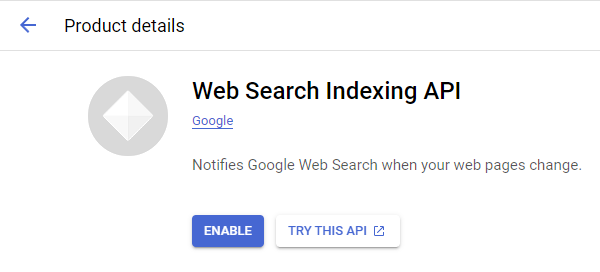
1. Enable Google APIs


2. OAuth Client

Direct Link: https://console.cloud.google.com/apis/credentials

  • 2a. Create “OAuth client ID” Credentials

  • 2b. Insert all the Google Redirect URIs for your app

    Insert All Google Redirect URIs

    Here are some commonly-needed redirect URIs you need for your Google Cloud Console OAuth app. If you set these up, you can reuse the same GCP app for other Google apps and modules on Make.

    https://www.make.com/oauth/cb/oauth2
    https://www.make.com/oauth/cb/google
    https://www.make.com/oauth/cb/google/
    https://www.make.com/oauth/cb/google-email
    https://www.make.com/oauth/cb/google-custom
    https://www.make.com/oauth/cb/google-restricted
    https://www.make.com/oauth/cb/google-cloud-speech
    https://www.make.com/oauth/cb/google-search-console
    https://www.make.com/oauth/cb/google-analytics-4
    https://www.make.com/oauth/cb/google-ads2
    https://www.make.com/oauth/cb/google-ads2/
    https://www.make.com/oauth/cb/youtube
    https://www.make.com/oauth/cb/chrome
    

    Including These Google Redirect URIs

    You are also required to insert the legacy URLs below from the old Integromat system that not been migrated to Make yet (same as the above list, but replace “make” with “integromat”):

    https://www.integromat.com/oauth/cb/oauth2
    https://www.integromat.com/oauth/cb/google
    https://www.integromat.com/oauth/cb/google/
    https://www.integromat.com/oauth/cb/google-email
    https://www.integromat.com/oauth/cb/google-custom
    https://www.integromat.com/oauth/cb/google-restricted
    https://www.integromat.com/oauth/cb/google-cloud-speech
    https://www.integromat.com/oauth/cb/google-search-console
    https://www.integromat.com/oauth/cb/google-analytics-4
    https://www.integromat.com/oauth/cb/google-ads2
    https://www.integromat.com/oauth/cb/google-ads2/
    https://www.integromat.com/oauth/cb/youtube
    https://www.integromat.com/oauth/cb/chrome
    

    Note 1: Due to inconsistencies in Make’s implementation of the connections, there are two separate entries where has one is google and another ending in a forward slash google/ - you might need one or the other, so we have to use both!

    Note 2: Once you’ve set these up, you can use/reuse the same Google OAuth App ID + Secret for all the supported Google connections and modules on Make - you’ll just have to enable the relevant Google APIs!


3. OAuth consent screen

Direct Link: https://console.cloud.google.com/apis/credentials/consent/edit

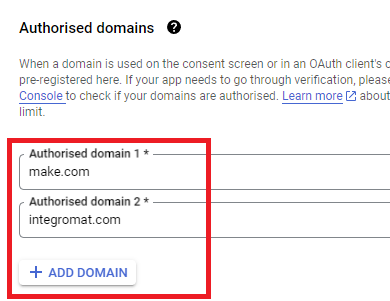
  • 3a. Insert Two Authorised Domains

    • Insert make.com and integromat.com

    • Fill in other required fields

    • Click “Save and Continue”.

  • 3b. Add All Scopes

    • Click “Add or Remove Scopes”

    • Select 100 “Rows per page”, for each page, check all the rows, OR

    • Manually type in the scopes you need

    • Click “Update” at the bottom

  • 3c. Step through and go to dashboard

    At the last step/page, click “BACK TO DASHBOARD” instead of “Prepare for Verification”

  • 3d. Publish your GCP OAuth2 app

    You will need to set your OAuth application to “Production”, otherwise the credentials expire very frequently.

    • To do this, go back to “OAuth consent screen

    • Then click the “PUBLISH APP” button

    • Then click the “CONFIRM” button


4. Create New Connection (HTTP, or respective Google module)

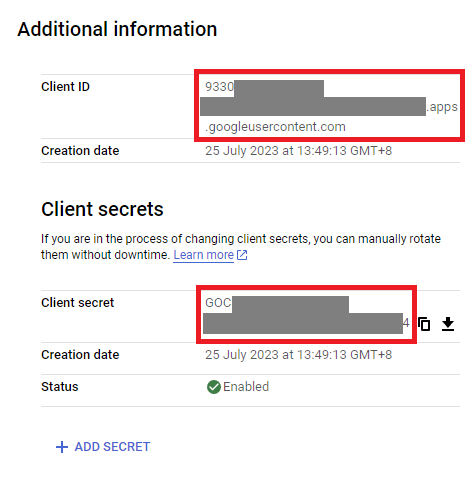
You can find the Client ID and Client Secret in the OAuth2 app you created in GCP, on the right-hand side of where you inserted the callback URLs in step 2:

  • 4a. Specific Google module (Sheets, Docs, Drive, Gmail, etc.)

    Insert the GCP app client ID and secret here BEFORE clicking “Sign in”

    (Gmail example)

    OR,

  • 4b. HTTP OAuth 2.0 Request module

    You need a “Authorize Parameters” key of redirect_uri with the above Make OAuth2 callback URL.


Related Topics:

Hope this helps! If you are still having trouble, please provide more details.

@samliew
P.S.: investing some effort into the tutorials in the Make Academy will save you lots of time and frustration using Make!