I used Google Sheets with (username @ gmail com) with no issues (did not have to do any other steps). I upgraded my Gmail account to (username @ mydomain com) and it stopped working. As I undersand, there is extra configuration required in (console cloud google com) which I made, following the Make article about Google Drive, but when I attempt to add the Google Sheets module, provide Client ID and Client Secret, and sign in to authorize, I still get an error.
- Error displayed inside the module - No access token specified.
- Error displayed trying to sign into my Google account to authenticate the request - Access blocked: This app’s request is invalid. You can’t sign in because this app sent an invalid request. You can try again later, or contact the developer about this issue. Error 400: redirect_uri_mismatch
**
Authorized Redirect URI’s** (had to remove real URL, as I could only share 5 links in this post)
www-make-com/oauth/cb/google-custom
www-make-com/oauth/cb/google
www-integromat-com/oauth/cb/google-custom
integromat-com
www-integromat-com/oauth/cb/google
www-make-com/oauth/cb/google-restricted
www-intexgromat-com/oauth/cb/google-restricted
I am attaching photos of my config. Please be kind to help identify what I am doing wrong.
Thank you in advance.


Welcome to the Make community!
Please see Step 2b: Create OAuth Client and Step 3d: Publish the OAuth app below.
How to Connect and Use Google APIs in Make!
0. Prerequisites
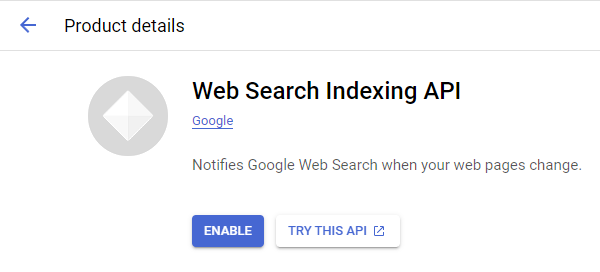
1. Enable Google APIs
2. Create OAuth Client
Direct Link: https://console.cloud.google.com/apis/credentials
-
2a. Create “OAuth client ID” Credentials
-
2b. Insert all the Google Redirect URIs for your app
Insert All Google Redirect URIs
Here are some commonly-needed redirect URIs you need for your Google Cloud Console OAuth app. If you set these up, you can reuse the same GCP app for other Google apps and modules on Make.
https://www.make.com/oauth/cb/oauth2
https://www.make.com/oauth/cb/google
https://www.make.com/oauth/cb/google/
https://www.make.com/oauth/cb/google-email
https://www.make.com/oauth/cb/google-custom
https://www.make.com/oauth/cb/google-restricted
https://www.make.com/oauth/cb/google-cloud-speech
https://www.make.com/oauth/cb/google-search-console
https://www.make.com/oauth/cb/google-analytics-4
https://www.make.com/oauth/cb/google-ads2
https://www.make.com/oauth/cb/google-ads2/
https://www.make.com/oauth/cb/youtube
https://www.make.com/oauth/cb/chrome
Including These Google Redirect URIs
You are also required to insert the legacy URLs below from the old Integromat system that not been migrated to Make yet (same as the above list, but replace “make” with “integromat”):
https://www.integromat.com/oauth/cb/oauth2
https://www.integromat.com/oauth/cb/google
https://www.integromat.com/oauth/cb/google/
https://www.integromat.com/oauth/cb/google-email
https://www.integromat.com/oauth/cb/google-custom
https://www.integromat.com/oauth/cb/google-restricted
https://www.integromat.com/oauth/cb/google-cloud-speech
https://www.integromat.com/oauth/cb/google-search-console
https://www.integromat.com/oauth/cb/google-analytics-4
https://www.integromat.com/oauth/cb/google-ads2
https://www.integromat.com/oauth/cb/google-ads2/
https://www.integromat.com/oauth/cb/youtube
https://www.integromat.com/oauth/cb/chrome
Note 1: Due to inconsistencies in Make’s implementation of the connections, there are two separate entries where has one is google and another ending in a forward slash google/ - you might need one or the other, so we have to use both!
Note 2: Once you’ve set these up, you can use/reuse the same Google OAuth App ID + Secret for all the supported Google connections and modules on Make - you’ll just have to enable the relevant Google APIs!
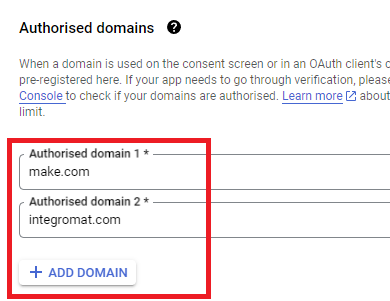
3. OAuth consent screen
Direct Link: https://console.cloud.google.com/apis/credentials/consent/edit
4. Create New Connection (HTTP, or respective Google module)
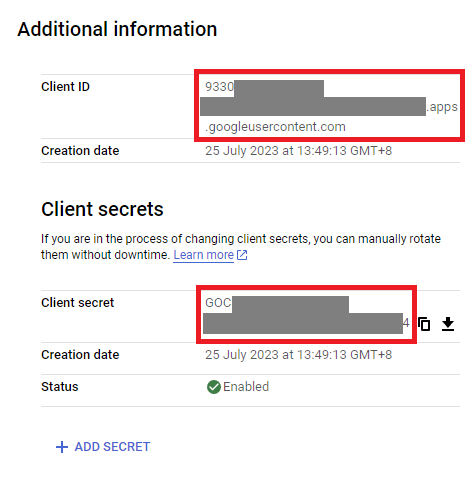
You can find the Client ID and Client Secret in the OAuth2 app you created in GCP, on the right-hand side of where you inserted the callback URLs in step 2:
Related Topics:
— @samliew
P.S.: investing some effort into the tutorials in the Make Academy will save you lots of time and frustration using Make!