
I want to create a scenario to fetch messages from a private channel in slack and perform operations on the text like find certain words from the text and aggregate the result from each Text Parser into a text separated by commas and pass it to the google sheet so, each comma separated word can go in the appropriate column. Is this the correct approach I am taking as my current scenario doesnt work. Any help is appreciated.
It’s hard (for me) to tell without more information. What is not working?
L
1 Like
We’d love to help, however, you have not provided sufficient information to demonstrate the problem that would allow us to reproduce the scenario and any issue/s and/or error/s.
To allow others to assist you with your scenario, please provide the following:
1. All Relevant Screenshots
We need to see what you’re working with to give you the best advice. Screenshots are extremely important because Make is a visual editor — a picture provides us with more context.
It would help us identify the issue by having screenshots of:
- the full scenario,
- any error messages,
- individual module fields,
- relevant filter settings (conditions), and
- each module’s output bundles
- any external services (spreadsheet headers, sample data, regex101.com, etc.)
You can upload images here using the Upload icon in the text editor:

We would appreciate it if you could upload screenshots here instead of linking to them outside of the forum. This allows us to zoom in on the image when clicked, and avoid tracking cookies from third-party websites.
2. Scenario Blueprint
Please export the scenario blueprint. Providing your scenario blueprint file will allow others to quickly recreate and see how you have set up the mappings in each module, and also allows us take screenshots or provide module exports of any solutions we have for you in return - this would greatly benefit you in implementing our suggestions as you can simply paste module exports back into your scenario editor!
To export your scenario blueprint, click the three dots at the bottom of the editor then choose ‘Export Blueprint’.

You can upload the file here by clicking on this button:

3. Module Output Bundles
Please provide the output bundles of each of the relevant modules by running the scenario (you can also get this without re-running your scenario from the History tab).
Click on the white speech bubbles on the top-right of each module and select “Download input/output bundles”.

A. Upload as a Text File
Save each bundle contents in a plain text editor (without formatting) as a bundle.txt file.
You can upload the file here by clicking on this button:
B. Insert as Formatted Code Block
If you are unable to upload files on this forum, alternatively you can paste the formatted bundles.
Here are some ways to provide text content in a way that it won’t be modified by the forum.
-
Method 1: Type code fence manually —
Add three backticks```in a separate line before and after the content, like this,``` text goes here ``` -
Method 2: Highlight and click the “preformatted text” button in the editor —

-
Method 3: Upload your file and share the public link —
(this method is only recommended for large files exceeding the forum upload limit)
Providing the input/output bundles will allow others to replicate what is going on in the scenario, especially if there are complex data structures (nested arrays and collections) or if external services are involved, and help you with mapping the raw property names from collections.
Sharing these details will make it easier for others to assist you.
@L_Duperval @samliew sorry, I should’ve provided more details.
here is my scenario’s blueprint
scenario.blueprint (1).json (32.7 KB)
Overview: When I send a message in the slack message something like
“worked on CI-1992 with project code 0.0.4 and spent 1 hour on it. Investigated the ticket initially”
The text parsers should fetch the following data from the text
CI-1992
0.0.4
1
Investigated the ticket initially
and the aggregator should aggregate the data separated by comma and pass it to the google sheet where I am mapping the each comma separated data into specific columns.
CI-1992, 0.0.4, 1, Investigated the ticket initially.
In my scenario the flow goes from Slack module to the first Text parser module and finish on the google sheet it never goes through all parsers to aggregate the data and then insert a new row with the relevant data.
If you want to use text parsers to do this, the data must always look the same.Otherwise, it will be difficult for the text parsers to extract the information if the data is not always exactly the same. If it does not look always exactly the same, then you probably will need some type of AI tool to parse the content. You could use the OpenAI module or possibly the Make modules.
That said, a text aggregator expects to work with more than one bundle. If you’re working with a simple message, you don’t need a text aggregator. You can get by with a single regexp.
Here is a suimplified version of your blueprint that will only work with messages that are formatted exactly like your message above.
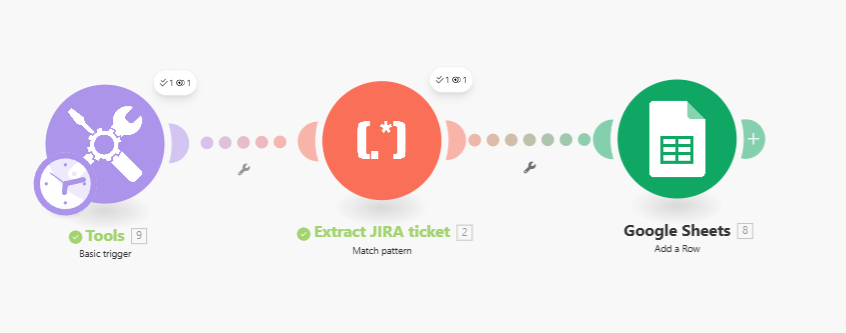
If you want to go the LLM way, a prompt like this:
You will receive a single-message work log written in natural language (structure may vary). Extract these fields in this exact order and output ONE line only:

1) Ticket key (Jira-style: 2–10 letters/digits starting with a letter, hyphen, then 1–6 digits; e.g., CI-1992, ENGOPS-12)
2) Project code in x.y.z form (three dot-separated integers; e.g., 0.0.4)
3) Hours worked (integer or decimal; accept “hour” or “hours”)
4) Notes (free text; everything meaningful after the “on it.” or equivalent sentence end)

Rules:
- Output exactly: TICKET,PROJECT_CODE,HOURS,"NOTES"
- Always wrap NOTES in double quotes; escape internal double quotes by doubling them.
- If a field is missing, leave it empty but keep its position (e.g., ",,," with quotes for notes: ,,,"").
- No extra spaces around commas. No extra lines, no explanations.

Examples of valid outputs:
CI-1992,0.0.4,1,"Investigated the ticket initially"
ABC-7,2.3.10,2.5,"Paired debugging; root cause: null ref"
And use a regexp like this
^\s*([A-Z][A-Z0-9]{1,9}-\d{1,6})?\s*,\s*(\d+\.\d+\.\d+)?\s*,\s*(\d+(?:\.\d+)?)?\s*,\s*"([^"]*)"\s*$
to parse it.
L
P.S. I did not test the prompt or the secong regexp.
scenario.blueprint-2025-09-22-0602.json (24.9 KB)