What is your goal?
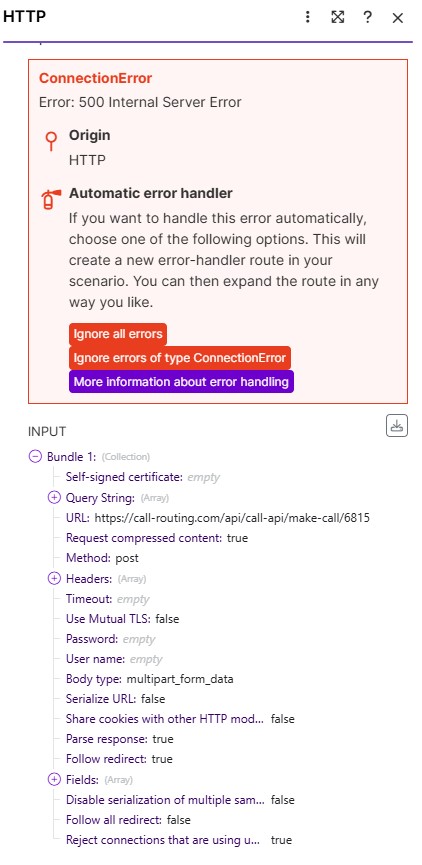
Hi, anyone who knows how to fix Error 500? The set up is correct as I followed youtube videos to create a scenario, can someone help?
Hey there,
server error 500 means the server failed to process the request. Either due to an issue server side, or more often than not, the JSON you are sending is broken.
Can you share the module configuration and what the input is?
The 500 error is coming from the call-routing API, not from Make.com.
That endpoint at https://call-routing.com/api/call-api/make-call/6815 expects JSON, not multipart/form-data, so it is rejecting your current payload.
Change the body type to Raw → JSON and send a JSON object instead of individual text fields.
{
“id”: 6815,
“name”: “{{1.Name}}”,
“email”: “{{1.Email}}”,
“phone”: “{{1.Phone Number}}”
}
Here’s a preview of what it should look like (JSON).
Can I just copy this and paste it on the “Request Content” tab?
I need the exact API documentation for https://call-routing.com/api/call-api/make-call/6815 so we can configure the Make HTTP module correctly. What I’ve sent you above is what (JSON) request content looks like.
Sorry where can I get that? I’m using call fluent
URL (Assuming 6815 is your agent_id)
https://api.callfluent.ai/api/call/make-call/6815
Method
POST
Header
Name
Content-Type
Value
application/json
Body (raw JSON) (Map your variables (data, phone_number, name, and email accordingly)
{
“data”: {
“phone_number”: “{{1.Phone Number}}”,
“name”: “{{1.Name}}”,
“email”: “{{1.Email}}”
}
}
On success, API returns JSON including status: true and a data object.
This helps a lot! Do you know where can I get the API key?
You’re welcome! You can obtain your API key from the CallFluent dashboard. Locate API keys or integrations. Generate API key.
Since CallFluent does not show an API key in your profile but instead gives you a Webhook URL for the agent, you do not need an Authorization header.
In your HTTP module, use only this header:
Name: Content-Type
Value: application/json
Please remove these from your header.
Name: Authorization
Value: Bearer {your_api_key}
Note: CallFluent’s API documentation is a bit unclear on this, but for the agent webhook URL, this header setup is sufficient.
Welcome to the Make community!
Looks like you won’t need an API key/token for the request. Just ensure you send a properly structured JSON string, and select JSON content type.
Hope this helps! If you are still having trouble, please provide more details.
— @samliew
 Screenshots: scenario setup, module configuration, errors