What is your goal?
Run Google Forms Watch Response modules on multiple forms in multiple scenarios without this erro.r
 What is the problem & what have you tried?
I have an automation that starts and quickly ends with an error when the Google Forms - Watch Response module returns error 429 (RESOURCE_EXHAUSTED). The scenario is set to run every 30 minutes. I am using my Google Account in other automations on Make.com; this happened on this one before, and today it happened in another automation as well.
 Error messages or input/output bundles
429: RESOURCE_EXHAUSTED - Quota exceeded for quota metric ‘Expensive Reads’ and limit ‘Expensive Reads per minute’ of service ‘forms.googleapis.com’ for consumer ‘project_number:{HIDDEN NUMBER}’.
 Create public scenario page
Not needed
 Screenshots (scenario flow, module settings, errors)
I saw other posts about this problem but I could not find any solution. Zapier replied to similar problem in 2023 by upping the API limits.
This is an issue in how Make connects to Google Forms. Make uses a shared Google API project across all of its users. Every scenario theoretically can draw from the same Google API quota. So even if your scenario does not have particularly high volume it can still get caught in an “Expensive Reads” quota from other scenarios.
You can either connect your own Google Cloud project credentials instead of Make’s default OAuth connection. Just make sure you enable the Forms API in the Google Cloud Console, so your quota is separate from everyone else’s project.
Something that is a better long term solution is to switch the trigger to a Google Apps Script webhook that will push to Make on a form submit. This would mean you have an event trigger rather than a polling trigger. That way no polling quota hit.
I appreciate your help. I could not find specific information about the limit, nor could I check the usage stats on Google’s side. However, I use the Google API through this account only on Make.com, and only for two scenarios: one checking a Google Form every 30 minutes, and the other checking another Form every 15 minutes. Even though I have usage I would call very low, I get this warning at random times every day.
I will try to migrate my workflows to Apps Script in the near future. This is just very frustrating for a no-code platform.
The frustration is understandable; 429 can error even at lower volumes and there isn’t really visibility into the quota usage. This shared API project is one of Makes biggest issues with integrating with Google.
The Apps Script webhook approach is really straightforward, just add a form submit trigger in the Apps Script and point it straight at the Make webhook URL. No need to poll and there will be no quota hits involved.
Hi Ondrej,
I see exactly what’s happening here. The ‘Expensive Reads’ error 429 specifically triggers when you have multiple scenarios polling the Google Forms API simultaneously using the default Make connection. Since it’s spreading to your other automations, your entire connection is likely being throttled.
You can fix this by:
Setting up a Custom Google Cloud Console Client ID to give your scenarios their own dedicated quota.
Or, more effectively, bypassing the ‘Watch’ module and using a Sheet-to-Webhook trigger, which consumes zero ‘Expensive Read’ quota.
Welcome to the Make community!
How to Connect and Use Google APIs in Make!
0. Prerequisites
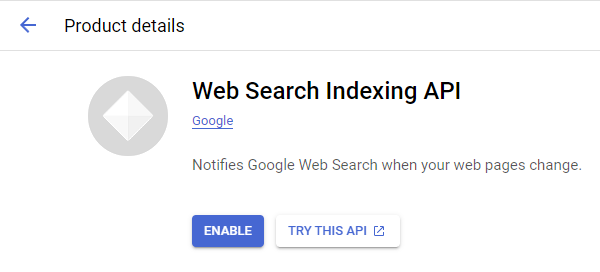
1. Enable Google APIs
2. Create OAuth Client
Direct Link: https://console.cloud.google.com/apis/credentials
-
2a. Create “OAuth client ID” Credentials
-
2b. Insert all the Google Redirect URIs for your app
Insert All Google Redirect URIs
Here are some commonly-needed redirect URIs you need for your Google Cloud Console OAuth app. If you set these up, you can reuse the same GCP app for other Google apps and modules on Make.
https://www.make.com/oauth/cb/oauth2
https://www.make.com/oauth/cb/google
https://www.make.com/oauth/cb/google/
https://www.make.com/oauth/cb/google-email
https://www.make.com/oauth/cb/google-custom
https://www.make.com/oauth/cb/google-restricted
https://www.make.com/oauth/cb/google-cloud-speech
https://www.make.com/oauth/cb/google-search-console
https://www.make.com/oauth/cb/google-analytics-4
https://www.make.com/oauth/cb/google-ads2
https://www.make.com/oauth/cb/google-ads2/
https://www.make.com/oauth/cb/youtube
https://www.make.com/oauth/cb/chrome
Including These Google Redirect URIs
You are also required to insert the legacy URLs below from the old Integromat system that not been migrated to Make yet (same as the above list, but replace “make” with “integromat”):
https://www.integromat.com/oauth/cb/oauth2
https://www.integromat.com/oauth/cb/google
https://www.integromat.com/oauth/cb/google/
https://www.integromat.com/oauth/cb/google-email
https://www.integromat.com/oauth/cb/google-custom
https://www.integromat.com/oauth/cb/google-restricted
https://www.integromat.com/oauth/cb/google-cloud-speech
https://www.integromat.com/oauth/cb/google-search-console
https://www.integromat.com/oauth/cb/google-analytics-4
https://www.integromat.com/oauth/cb/google-ads2
https://www.integromat.com/oauth/cb/google-ads2/
https://www.integromat.com/oauth/cb/youtube
https://www.integromat.com/oauth/cb/chrome
Note 1: Due to inconsistencies in Make’s implementation of the connections, there are two separate entries where has one is google and another ending in a forward slash google/ - you might need one or the other, so we have to use both!
Note 2: Once you’ve set these up, you can use/reuse the same Google OAuth App ID + Secret for all the supported Google connections and modules on Make - you’ll just have to enable the relevant Google APIs!
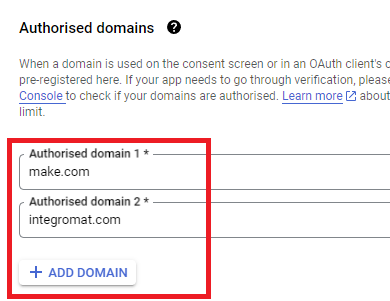
3. OAuth consent screen
Direct Link: https://console.cloud.google.com/apis/credentials/consent/edit
4. Create New Connection (HTTP, or respective Google module)
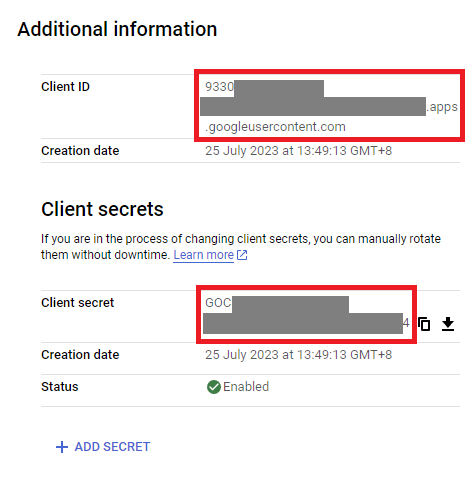
You can find the Client ID and Client Secret in the OAuth2 app you created in GCP, on the right-hand side of where you inserted the callback URLs in step 2:
Related Topics:
— @samliew