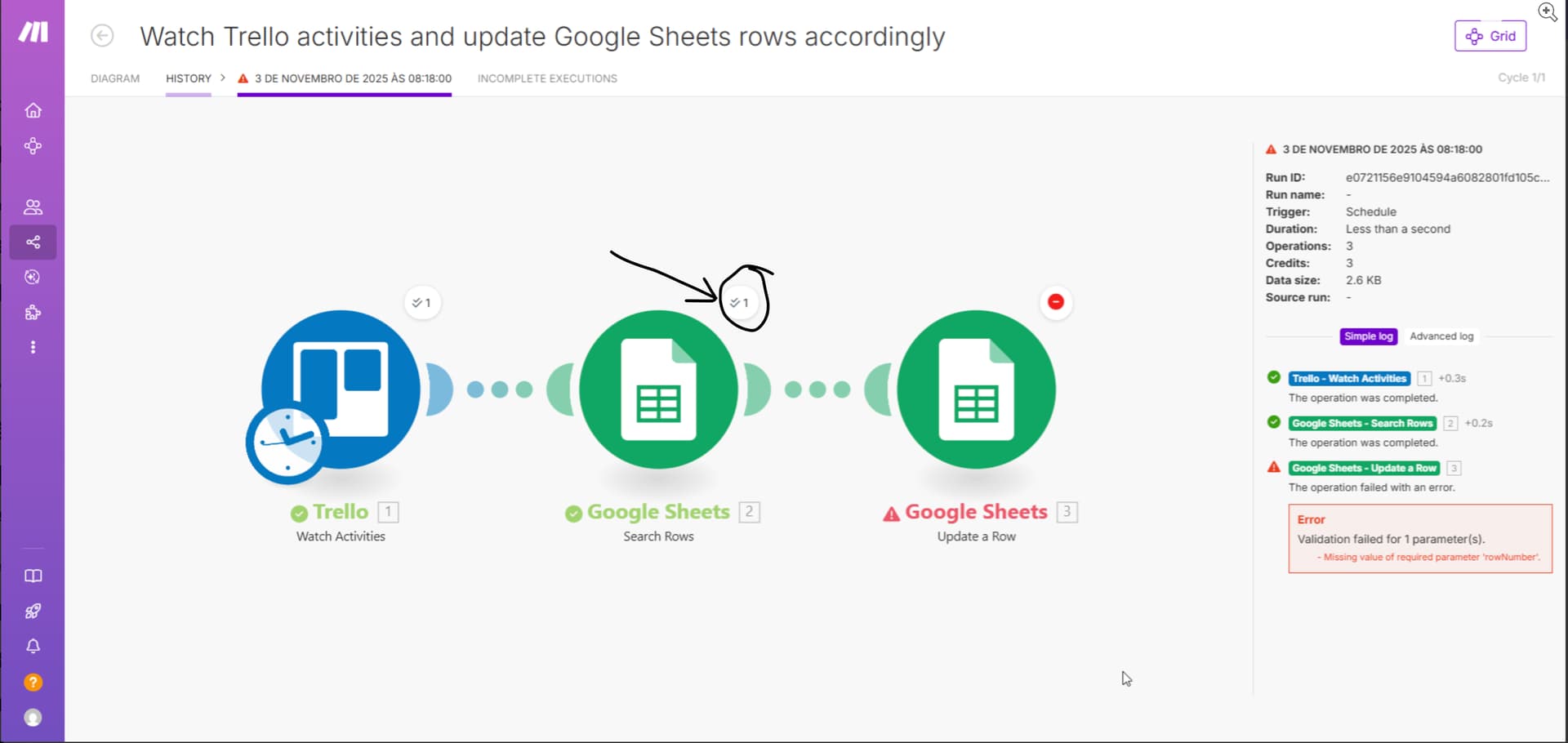
I’m trying to build a workflow that monitors Trello activities and updates corresponding Google Sheets rows automatically, but the automation isn’t working as intended.
Setup Overview
Here’s my scenario structure:
Trello — Watch Activities
→ triggers when a card is moved, updated, or commented on.
Google Sheets — Search Rows
→ searches for the row that matches the Trello card name or ID.
Google Sheets — Update a Row
→ should update specific cells in the same row with the new Trello data (e.g. status, list name, due date, etc.).
Here are some more details about my setup and what I’m trying to achieve:
I’m working with a shared Trello board with my team, and we’d like to sync the cards automatically with a Google Sheet (or Excel file).
The goal is to have:
Each Trello card listed as a row in the spreadsheet.
Whenever a card is moved, updated, or commented on, those changes (list name, due date, status, etc.) should automatically update in the same row.
This way, we can have a clear timeline and history of actions directly in the spreadsheet.
Here’s my current scenario: Trello – Watch Activities
→ Triggers whenever a card is updated. Google Sheets – Search Rows
→ Searches for the matching card name or ID. Google Sheets – Update a Row
→ Should update the corresponding row with the latest Trello data.
However, the automation fails at step 3 with the following error:
“Validation failed for 1 parameter(s): Missing value of required parameter rowNumber.”
As shown in the screenshots, even though the “Search Rows” module finds the correct row, the “Update Row” module doesn’t seem to receive the Row number value properly.
I’m not sure if I’m mapping the Row number incorrectly or if the “Search Rows” module returns the data in a way that the “Update Row” module can’t interpret.
Any suggestions on how to correctly pass the row reference between these modules would be greatly appreciated!


 Trello – Watch Activities
 Google Sheets – Search Rows
 Google Sheets – Update a Row