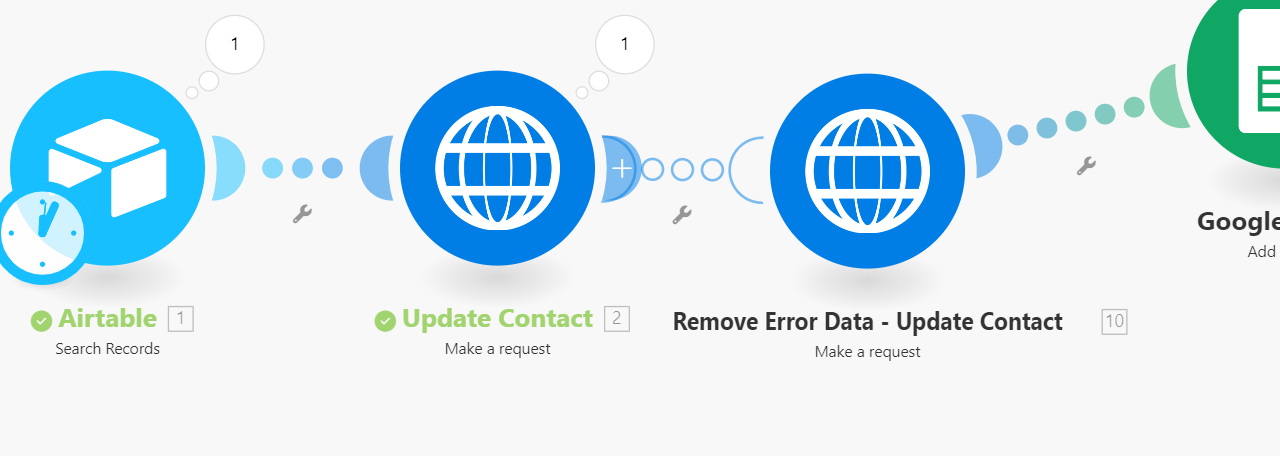
I created a HTTP request to push data to my CRM. It works until I make a request with a duplicate email or duplicate phone number. Is there any way to ignore the duplicate email (or phone) and still post the rest of the data? Or any other suggestions work arounds?
Here is the error from the output.
“data”: “<?xml version=\"1.0\" encoding=\"UTF-8\"?>\n\n Phone number ‘800-555-1212’ has already been taken\n\n”,
Here is the entire output
[
    {
        "statusCode": 422,
        "headers": [
            {
                "name": "date",
                "value": "Wed, 17 Jul 2024 04:46:51 GMT"
            },
            {
                "name": "content-type",
                "value": "application/xml; charset=utf-8"
            },
            {
                "name": "content-length",
                "value": "126"
            },
            {
                "name": "connection",
                "value": "keep-alive"
            },
            {
                "name": "cache-control",
                "value": "no-cache"
            },
            {
                "name": "set-cookie",
                "value": "_sunrise_session=BAh7BzoPc2Vzc2lvbl9pZEkiJTg4NDU5OWQ1YjEwOWRkNzNiNmE5OWQ0ODUxYTUwMmNhBjoGRUY6EF9jc3JmX3Rva2VuSSIxcDJZYkFBVzdJa3RYYUlUai9STE5kUVBsdDE5a0oxRDFmRlh2VHFaOXdXTT0GOwZG--8ab6ed7b963c74c9e43dfd56e54ea576b77df7b3; path=/; HttpOnly; secure"
            },
            {
                "name": "status",
                "value": "422 Unprocessable Entity"
            },
            {
                "name": "strict-transport-security",
                "value": "max-age=31536000"
            },
            {
                "name": "x-frame-options",
                "value": "SAMEORIGIN"
            },
            {
                "name": "x-hrhq-version",
                "value": "deploy:rails; ref:ad5a95297680e962026171d778540e7bcbae18e8"
            },
            {
                "name": "x-request-id",
                "value": "f349013c06be5e5f14fa6b3a35191b9e"
            },
            {
                "name": "x-throttle-count",
                "value": "1"
            },
            {
                "name": "x-throttle-horizon",
                "value": "2024-07-17T04:46:55Z"
            },
            {
                "name": "x-throttle-max",
                "value": "150"
            },
            {
                "name": "cf-cache-status",
                "value": "DYNAMIC"
            },
            {
                "name": "server",
                "value": "cloudflare"
            },
            {
                "name": "cf-ray",
                "value": "8a47973508d4061c-IAD"
            },
            {
                "name": "alt-svc",
                "value": "h3=\":443\"; ma=86400"
            }
        ],
        "cookieHeaders": [
            "_sunrise_session=BAh7BzoPc2Vzc2lvbl9pZEkiJTg4NDU5OWQ1YjEwOWRkNzNiNmE5OWQ0ODUxYTUwMmNhBjoGRUY6EF9jc3JmX3Rva2VuSSIxcDJZYkFBVzdJa3RYYUlUai9STE5kUVBsdDE5a0oxRDFmRlh2VHFaOXdXTT0GOwZG--8ab6ed7b963c74c9e43dfd56e54ea576b77df7b3; path=/; HttpOnly; secure"
        ],
        "data": "<?xml version=\"1.0\" encoding=\"UTF-8\"?>\n<errors>\n  <error>Phone number '800-555-1212' has already been taken</error>\n</errors>\n",
        "fileSize": 126
    }
]