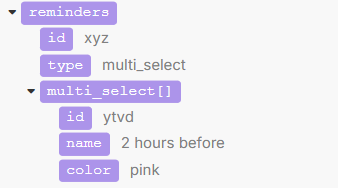
The scenario starts (pre-Make) with a form in Softr that feeds to a Notion DB, where a new item triggers the webhook that officially starts the scenario. The Notion DB includes a multi-select property, “Reminders.”
The Gmail module works fine and is not relevant to this question.
The Search objects in Notion module takes the data from the webhook and looks in a separate DB for the item that has the same full name, to find that person’s email address.
The Create a database item in Notion [11] works fine and isn’t relevant to this question.
The Create a database item in Notion [12] is where the issue arises. The intent is to populate a set of checkbox properties that correlate to the options in the Reminders multi-select property. In other words, for example, if the person selects “5 minutes before” and “30 minutes before,” the 5 minutes and 30 minutes checkboxes will be checked, and the three remaining options will remain unchecked. I tried to accomplish this by mapping with a formula:
Oh! I didn’t realize that there was a token for the equals sign. That ALMOST solved my problem. (You are the BEST, by the way. When I ask questions that don’t relate to Notion, I never get assistance as promptly as you offer for Notion questions. I cannot tell you how much I appreciate you.)
Now, only one of the selections is getting mapped. They are both coming through the webhook:
so I am assuming that I am missing a module to handle there being more than one response. I played around with the array aggregator tool yesterday but couldn’t figure out where it would go in the scenario. Are you able to point me in the right direction on this?
Try this - notice how since Reminders is an array (multi-select), you can use contains() in the IF statement to find if the value is contained within the array.
This makes so much sense, but I’m still having trouble. I have tried the formula both with and without the IF() (since contains() returns a boolean, I thought I might not need the IF()), but I continued to get errors.
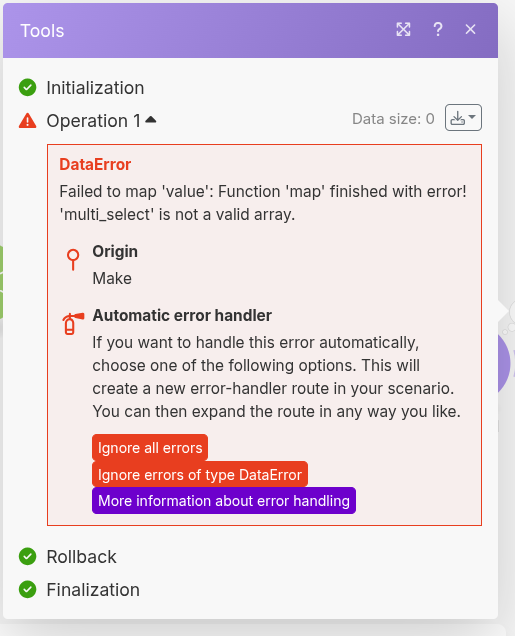
To try to identify the problem myself, I added a “set variable” module, which allowed me to isolate the map() part of the formula.
The set variable module is:
The first argument of the map() function must be an ARRAY. Currently, in the screenshot provided, it is a TEXT. Instead of the multi_select “name” field, see if you can use the multi_select field without “name”
Thinking that I could just be misinterpreting the output of the “set variable” module, I connected the “Create Database item” module and modified the mapping to:
Which I think is the equivalent of your recommendation in your 2nd reply above, though again without the if() because contains() outputs true/false already. No error, but no checkboxes checked:
Got it thank you for the additional context - I recreated the data structure in a Make scenario and the contains() function works there for some reason. I attached screenshots, let me know if you notice any difference in the data structure you see in your scenario.