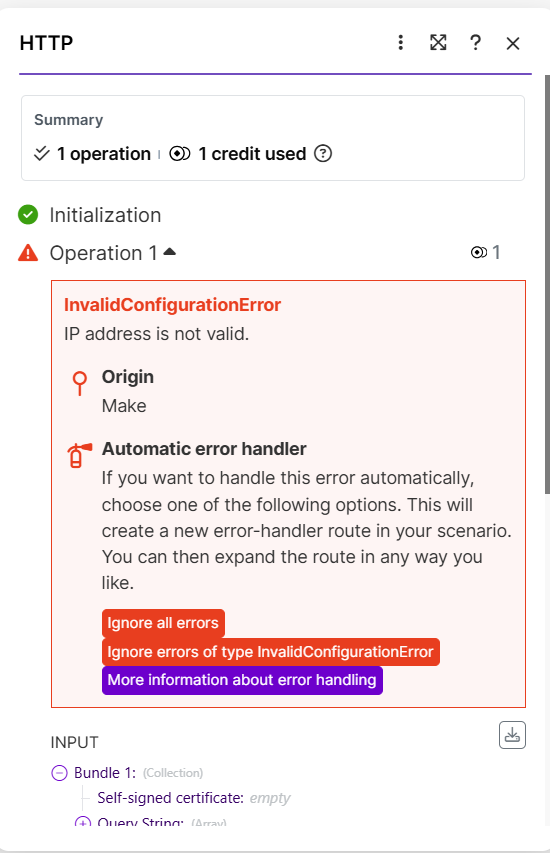
InvalidConfigurationError IP address is not valid

:thinking: What is the problem?

I’m using the HTTP module with the make request function. My server is fabweb, the audio is fine, I’ve already run all the tests and it keeps returning the error “InvalidConfigurationError
IP address is not valid.” I used GPT to help me, I did several tests and nothing worked. Can anyone help me?

:test_tube: What have you tried so far?

I tested it using Google’s own website, www.google.com, and it worked. Then I used my FTP link, https://trenmixdigital.com/audios/AC49C12D8436BF255806C04EA9A2E4A5.ogg, and it’s still giving an error.

:camera_with_flash: Screenshots: scenario setup, module configuration, errors


The problem is on your server side, Make can’t resolve the domain’s IP. Google works, so your HTTP module is fine. Have your host fix the DNS/IP setup or use a fully public file path.

Entrei em contato com o suporte do meu servidor e eles me deram essa resposta.

A configuração está correta sim. Eu já verifiquei isso. Se você quiser reportar pra eles que o IP está correto, que é o IP 166.0.186.20 e que aponta para o seu site.

Usando esse IP você com certeza não terá nenhum problema.

Atenciosamente,
Fabweb Soluções Corporativas

Eles disseram ainda que tem outros clientes deles que utilizam o make e nunca viram esse tipo de erro.

Será que alguém consegue resolver isso, pois estou fazendo um curso de automação e já estou atrasado nos estudos por causa desse problema que ninguém consegue resolver.

Aguardo um breve retorno

Obrigado

I contacted my server support and they gave me this response:

The configuration is correct. I’ve already checked that. If you want to report to them that the IP is correct, it’s 166.0.186.20 and it points to your website.

Using this IP you certainly won’t have any problems.

Sincerely, Fabweb Corporate Solutions

They also said that they have other clients who use Make and have never seen this type of error.

Could someone please resolve this? I’m taking an automation course and I’m already behind in my studies because of this problem that nobody seems to be able to solve.

I await a prompt reply.

Thank you.

https://trenmixdigital.com/ is not accessible. Is that supposed to be an API endpoint that you can hit with a get request? Cause that’s not happening even from a browser.

You can test with postman as well if you’d like.

Until you can open the exact same URL in a browser from a normal network, do not spend more time tweaking the Make module. Fix reachability first, then test again in Make.

Welcome to the Make community!

:warning:

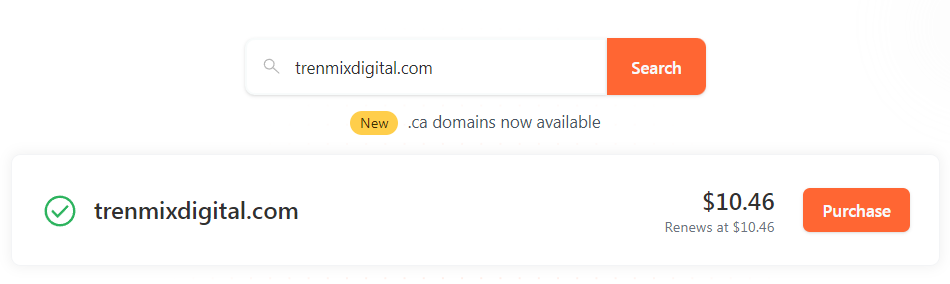
You currently do not own trenmixdigital.com!

Looks like the domain you are using (trenmixdigital.com) isn’t even owned yet!
Anyone can snatch/steal it by purchasing it themselves!

:warning:

For more information, see the following domain name registrars by clicking on the image links:

Namecheap

image

Cloudflare

image

To fix this, simply purchase your domain first, from one of the options above.

Hope this helps! If you are still having trouble, please provide more details.

@samliew

2 Likes

The website you opened is incorrect; the correct website is www.trendmixdigital.com, which is the one I’m having problems with. I’ve already done all the debugging tests, isolating the modules, and even with the IP address. When I use the IP address, Make communicates with the server, but when I use the domain www.trendmixdigital.com, Make simply ignores it and doesn’t even try to communicate with the server.

Subject: Possible bug in HTTP module with specific domain (InvalidConfigurationError: IP address is not valid)

Hi Make Support,

I’m having a persistent issue with the HTTP module that looks like a bug related to how Make validates a specific domain.

Domain involved: trendixdigital.com
Example file URL:
https://trendixdigital.com/audios/AC62F8FDB4F0D7B942AFB935C378623F.ogg

Below is a summary of the debugging steps I’ve done.


1. Original error

When I configure the HTTP module like this:

  • Method: GET

  • URL: https://trendixdigital.com/audios/AC62F8FDB4F0D7B942AFB935C378623F.ogg

I consistently get this error:

InvalidConfigurationError – IP address is not valid
Origin: Make

This happens before any real HTTP request reaches my server (there is no log entry for /audios/... on the webserver).

The same error appears whether I use:

  • https://trendixdigital.com/...

  • or http://trendixdigital.com/...


2. URL and scenario configuration validated

To ensure the URL was correct and not malformed:

  1. I used a Tools > Set variable module right before the HTTP module to build the URL exactly as used in the HTTP module.

  2. The variable output shows the URL is well-formed, for example:

https://trendixdigital.com/audios/AC62F8FDB4F0D7B942AFB935C378623F.ogg

  1. In the same HTTP module, if I change only the URL to something like:

https://jsonplaceholder.typicode.com/posts

the request works and returns 200 OK.

So the module configuration and general HTTP setup are correct; the error happens only when the domain trendixdigital.com is used.


3. Server / DNS side checks

On the hosting side:

  • trendixdigital.com and www both resolve to A record 166.0.186.20.

  • There is no AAAA (IPv6) record for the domain.

  • The site and the audio URL work normally in a browser (HTTPS with a valid certificate for trendixdigital.com).

  • When the HTTP module returns InvalidConfigurationError, the webserver logs show no request for /audios/...ogg, confirming that Make is not even reaching the server.


4. Tests using the raw IP address

Then I tested using the IP directly in the HTTP module:

4.1. HTTPS with IP

URL:
https://166.0.186.20/audios/AC62F8FDB4F0D7B942AFB935C378623F.ogg

This gives a different error:

ERR_TLS_CERT_ALTNAME_INVALID: Hostname/IP does not match certificate's altnames: IP: 166.0.186.20 is not in the cert's list

This is expected (the certificate is for the domain, not for the IP) and proves that:

  • Make can reach the server at 166.0.186.20.

  • The IP itself is valid from Make’s perspective.

4.2. HTTP with IP

URL:
http://166.0.186.20/audios/AC62F8FDB4F0D7B942AFB935C378623F.ogg

This returns:

  • 404 Not Found, with the default LiteSpeed 404 page.

This shows that the connection is working and the server is responding, but the request is going to the default virtual host (not the trendixdigital.com vhost), which is expected when calling only the IP.


5. Working workaround

Finally, I tried:

  • URL:
    http://166.0.186.20/audios/AC62F8FDB4F0D7B942AFB935C378623F.ogg

  • Method: GET

  • Header added manually:

    • Host: trendixdigital.com

With this configuration, the HTTP module returns:

  • Status code: 200

  • Binary data of the .ogg file (buffer + fileSize).

So:

  • Make can reach the server.

  • The IP is valid.

  • The virtual host for trendixdigital.com works correctly when I set the Host header.

The only configuration that fails is when I use the domain trendixdigital.com directly in the URL (http or https), where Make immediately returns:

InvalidConfigurationError – IP address is not valid (Origin: Make)

without sending any request to the server.


6. Why I think this is a Make bug

Given all of the above:

  • The HTTP module works with other domains.

  • The HTTP module works with the same server when using the IP + Host header.

  • DNS for trendixdigital.com is a simple A record (no IPv6).

  • The error only happens when Make resolves and validates the hostname trendixdigital.com.

It looks like there is a bug (or overly strict validation) in the way Make validates this particular hostname / IP combination, causing it to throw InvalidConfigurationError – IP address is not valid before actually sending the request.


7. Request

Could you please:

  1. Check if there is any known issue in Make’s HTTP module related to host/IP validation for specific domains?

  2. Investigate why the domain trendixdigital.com is being rejected with InvalidConfigurationError – IP address is not valid, while:

    • the IP 166.0.186.20 itself is accepted, and

    • the HTTP call works correctly when using IP + Host: ``trendixdigital.com.

For reference, this is happening in scenario [[YOUR_SCENARIO_NAME_OR_ID]] and the tests above were run around [[DATE/TIME + TIMEZONE]].

In the meantime I’m using the workaround (IP + Host header over HTTP), but I’d really like to use the normal HTTPS URL with the domain name directly.

Thank you in advance for your help!

Best regards,
Wellington Descrove

The website I tried is the one from your post. And the new one you are linking is also not opening.

Subject: Bug report – HTTP & WordPress modules cannot reach my domain (trendixdigital.com) from Make Europe region

Hi Make Support,

I’m opening this ticket again because the previous replies only stated that my website URL “does not open”, which is not accurate and does not address the actual problem.

This is not an issue with my website being down.
It is a very specific connectivity/validation issue between the Make Europe environment and my domain trendixdigital.com.

I’ll summarize first, and then give all the detailed tests I’ve done.


1. TL;DR (summary)

  • From any browser or external tool (outside Make), my domain trendixdigital.com works normally:

    • website loads,

    • WordPress REST API at https://trendixdigital.com/wp-json/ works,

    • static files (including .ogg files) are accessible.

  • From Make (Europe region), whenever I use the hostname trendixdigital.com in the URL, I get errors such as:

    • InvalidConfigurationError – IP address is not valid (HTTP module)

    • EAI_AGAIN – The service ... is temporarily unavailable (WordPress module).

  • However, from Make I can reach the same server by using its raw IP 166.0.186.20 and setting the Host: trendixdigital.com header manually. In that case, requests return 200 OK and the file/API responds correctly.

  • DNS on my side is simple (A record only, no AAAA), SSL certificate is valid for trendixdigital.com, and the hosting provider confirms the site is working.

  • This strongly suggests a bug or misconfiguration on Make’s side (in host/IP validation or DNS resolution in the Europe region) for this specific hostname.

I kindly ask that you escalate this to engineering/infra instead of just checking the website from a browser and saying it doesn’t open.


2. Environment / region

  • Make account profile:

    • Timezone: Europe/Lisbon (GMT+00:00)

    • Country: Portugal

  • All scenarios are running in the Make Europe data center/region.

  • The issues described below were reproduced several times in the Europe region on [[DATE/TIME + TIMEZONE]].


3. Problem 1 – HTTP module with audio file URL

I have a scenario where I need to download audio files from:

https://trendixdigital.com/audios/AC62F8FDB4F0D7B942AFB935C378623F.ogg
(and similar files in the same folder).

3.1. Failing configuration

HTTP module:

  • Method: GET

  • URL:
    https://trendixdigital.com/audios/AC62F8FDB4F0D7B942AFB935C378623F.ogg

  • No headers, no body, Parse response = No.

Result in Make:

InvalidConfigurationError – IP address is not valid
Origin: Make

Important:

  • This error occurs before any request reaches my server.

  • Webserver logs show no request for /audios/....ogg when this error happens.

The same error appears if I switch to:

  • http://trendixdigital.com/audios/...

So, both HTTP and HTTPS using the hostname fail with InvalidConfigurationError – IP address is not valid.

3.2. URL correctness validated

To make sure the URL itself was not malformed:

  1. I added a Tools > Set variable module right before the HTTP module.

  2. I built the URL exactly as used in the HTTP module.

  3. The variable output shows a well-formed URL, for example:

    https://trendixdigital.com/audios/AC62F8FDB4F0D7B942AFB935C378623F.ogg

  4. In the same HTTP module, if I only change the URL to a public test endpoint, like:

    https://jsonplaceholder.typicode.com/posts

    the request works and returns 200 OK.

So the HTTP module and scenario configuration are correct; the error happens only when the hostname trendixdigital.com is used.


4. Problem 2 – WordPress module connection

I also tried to create a connection using the official WordPress app in Make, with:

  • WordPress REST API base URL:
    https://trendixdigital.com/wp-json/

  • API Key: generated by the Make Connector plugin in my WordPress site.

The connection test fails with:

EAI_AGAIN: The service https://trendixdigital.com/wp-json/wp/v2/users/me is temporarily unavailable.

Again, this is not an API/authentication issue:

  • The endpoint https://trendixdigital.com/wp-json/wp/v2/users/me works correctly when called from a browser.

  • The Make Connector plugin is installed and configured.

  • The error EAI_AGAIN is a DNS / host resolution error from Node, which indicates Make is having trouble resolving or reaching the hostname trendixdigital.com.


5. Server / DNS side (hosting checks)

On my hosting side:

  • trendixdigital.com and www.trendixdigital.com both have an A record pointing to 166.0.186.20.

  • There is no AAAA (IPv6) record for the domain.

  • SSL certificate is valid for trendixdigital.com and *.trendixdigital.com.

  • The web interface (DirectAdmin) and logs show normal activity.

  • When Make returns InvalidConfigurationError or EAI_AGAIN, no request for /audios/... or /wp-json/... appears in the webserver logs.

I have also asked the hosting provider to check for:

  • firewall/WAF rules,

  • IP/ASN blocks,

  • any special treatment for data center IP ranges,

and so far they confirm there is no explicit block for Make’s IP ranges and that the site is reachable from the internet in general.


6. Tests from Make using the raw IP

To isolate the problem, I ran several tests using the raw IP 166.0.186.20 from the same scenario in Make.

6.1. HTTPS with IP

URL:
https://166.0.186.20/audios/AC62F8FDB4F0D7B942AFB935C378623F.ogg

Result:

ERR_TLS_CERT_ALTNAME_INVALID: Hostname/IP does not match certificate's altnames: IP: 166.0.186.20 is not in the cert's list

This is expected, because the certificate is issued for trendixdigital.com, not for the IP.
The important point is:

  • Make now reaches the server and tries to establish the TLS connection.

  • So the IP 166.0.186.20 is valid and reachable from Make.

6.2. HTTP with IP (no SSL)

URL:
http://166.0.186.20/audios/AC62F8FDB4F0D7B942AFB935C378623F.ogg

Result:

  • Make receives 404 Not Found with the default LiteSpeed 404 page.

This indicates:

  • The connection is working.

  • The request is hitting the default virtual host (which is typical when using only the IP, without the proper Host header).

6.3. Working workaround – IP + Host header

Finally, I tried:

  • URL:
    http://166.0.186.20/audios/AC62F8FDB4F0D7B942AFB935C378623F.ogg

  • Method: GET

  • Headers:

    • Host: trendixdigital.com

With this configuration, the HTTP module returns:

  • Status code: 200

  • Binary data of the .ogg file (Data: Buffer (binary), fileSize etc.)

So, from Make:

  • The IP is reachable.

  • When I explicitly set Host: ``trendixdigital.com, the correct virtual host responds and the file is served normally.

The only configuration that consistently fails is when the hostname trendixdigital.com is used directly in the URL (http or https), where Make returns:

InvalidConfigurationError – IP address is not valid
or, in the WordPress module, EAI_AGAIN,

before any request reaches my server.


7. Why this looks like a Make-side bug

Based on all the tests:

  1. HTTP module works with other domains in the same scenario.

  2. HTTP module works with this same server when using the IP + Host header.

  3. WordPress module fails only when using https://trendixdigital.com/wp-json/.

  4. DNS for trendixdigital.com is a simple A record (no AAAA), SSL is valid.

  5. The hosting provider confirms that the site and REST API are reachable from the internet.

  6. Errors InvalidConfigurationError – IP address is not valid and EAI_AGAIN occur only from Make, not from browsers or other tools.

This strongly suggests an issue in:

  • how the Make Europe region resolves or validates the hostname trendixdigital.com, or

  • an internal rule/filter affecting this specific hostname/IP combination.


8. What I’m asking from you

Please:

  1. Escalate this to your engineering/infra team for deeper investigation.

  2. Specifically check, from the Europe region:

    • how trendixdigital.com is being resolved (DNS resolvers used, cached records, etc.);

    • whether there is any internal validation that could wrongly classify the IP as “not valid”;

    • whether there are any firewall / security rules on Make’s side affecting this hostname or IP.

  3. Let me know if you need:

    • scenario ID,

    • exact module IDs,

    • or timestamps of my last test runs for correlation.

In the meantime, I am using the workaround (HTTP module with http://166.0.186.20/... + Host: ``trendixdigital.com), but I would very much like to use the normal HTTPS URLs with the hostname directly, and the official WordPress module.

Thank you for your attention, and I appreciate a detailed, technical reply rather than just a generic “the website does not open” answer.

Best regards,
Wellington Descrove

Hi everyone, thanks for your replies.

Let me clarify a few things, because there seems to be some confusion about the domain and where the issue actually is.

  1. Correct domain and reachability

The correct domain is:

  • https://trendixdigital.com/ (with d, not trenmix :slightly_smiling_face:)

From multiple browsers and normal networks I can:

  • open https://trendixdigital.com/

  • open https://trendixdigital.com/wp-json/ (WordPress REST API index)

  • open audio files such as
    https://trendixdigital.com/audios/AC62F8FDB4F0D7B942AFB935C378623F.ogg

So the statement “the site is not accessible from a browser” is not true on my side.
The hosting provider also confirms the site is up, DNS is correct (A record only, no AAAA), and SSL is valid.

I fully agree that if the URL didn’t open from a normal network, I shouldn’t blame Make – but here it does open normally.


  1. What happens specifically from Make (Europe)

The problem only appears when the request comes from Make (Europe region) and uses the hostname trendixdigital.com.

Examples:

  • HTTP module with
    https://trendixdigital.com/audios/AC62F8FDB4F0D7B942AFB935C378623F.ogg
    InvalidConfigurationError – IP address is not valid (Origin: Make)
    and no request hits my server (nothing in the logs).

  • WordPress app connection with base URL
    https://trendixdigital.com/wp-json/
    EAI_AGAIN: The service https://trendixdigital.com/wp-json/wp/v2/users/me is temporarily unavailable.

In the same scenario, if I change only the URL in the HTTP module to something like:

  • https://jsonplaceholder.typicode.com/posts

it works and returns 200 OK.
So the HTTP module itself and the scenario are fine.


  1. Tests with raw IP from Make

To isolate server/DNS issues, I tested using the raw IP of my host:

  • https://166.0.186.20/audios/... → I get
    ERR_TLS_CERT_ALTNAME_INVALID (expected, cert is for the domain, not the IP)
    which proves Make CAN reach 166.0.186.20.

  • http://166.0.186.20/audios/... → I get 404 from the default LiteSpeed page
    (again, expected when hitting the IP without a Host header, because it goes to the default vhost).

  • http://166.0.186.20/audios/... + header Host: trendixdigital.com
    Make gets 200 OK, and the correct .ogg file is downloaded (binary buffer, fileSize, etc.).

So from Make:

  • the IP is reachable,

  • the virtual host for trendixdigital.com responds correctly when I set Host: ``trendixdigital.com,

  • but using the hostname directly in the URL (https://trendixdigital.com/... or http://trendixdigital.com/``...) causes Make to fail with InvalidConfigurationError / EAI_AGAIN before the request ever reaches my server.


  1. Why I don’t think this is “just fix your DNS”

I absolutely understand the default answer “fix your DNS/IP first”.
The thing is:

  • DNS on my side is simple (A record only, no AAAA).

  • The domain and API are reachable from browsers and other tools.

  • From Make, the same server works fine via IP + Host header.

  • Only hostname-based requests from Make Europe fail.

This looks much more like:

  • a host/IP validation issue, or

  • a DNS/resolver problem inside the Make Europe environment for this specific hostname,

than a generic “your DNS is broken”.


  1. Request

Could someone from the Make team please:

  • test https://trendixdigital.com/wp-json/ and https://trendixdigital.com/audios/... from the Europe region infrastructure, not just from a browser on a local machine, and

  • check how trendixdigital.com is being resolved/validated there (DNS resolvers, cached records, any internal blocking or heuristic that might label the IP as “not valid”)?

I’m happy to share:

  • scenario ID,

  • module IDs,

  • and timestamps of my last test runs

if that helps your engineering/infra team debug this.

Right now I have a workaround (using http://166.0.186.20/... + Host: trendixdigital.com in the HTTP module), but the WordPress module and normal HTTPS URLs with the hostname still don’t work, and I’d really like a proper fix.

Thanks in advance for taking a deeper look instead of assuming the website is simply down.

As this is a community (peer-led) forum, we can only help with using the Make platform (scenario building, troubleshooting error messages, etc.). We cannot assist with Make account, billing, or technical issues.

Contact Make Support

If you’d like to contact Make support directly about a potential bug, creating a ticket is the only official option available to Make customers.

Make support has access to your specific account details, scenario, execution history, server-side logs, and has internal tools to investigate the issue further. If the issue is with a custom app, Make support will be able to reach out to the external team responsible for maintaining it. Also, you might need to share potentially sensitive information about your account, organisation, scenario, and execution history logs, which is not advisable here on this public forum.

Search for Updates First

Before creating a support ticket, do try to look around if others are facing the same problem, and if there are further steps you can take. Here are some things you can do —

  1. Check the Make Status page to see if it is an ongoing network-wide issue/outage and view any updates (example).

  2. Search this Make forum to see if there are any discussions, updates, and workarounds. Here are some possible search terms you can use:
    tags:error  bug  "not working"

How to Create a Support Ticket

If you are logged-in, you can head to the new ticket page to submit a ticket. (If you are unable to login to your main account, it is advisable to create an account to access this page.)

Screenshot of the Create New Ticket page

After submitting your support ticket, you should receive a confirmation email with the subject “Ticket Created” together with a summary of what you submitted. If you do not receive this automated reply within minutes, try creating a ticket again. Example of email subject: [#1234567] Ticket created | Technical challenge

Priority of Tickets

If you do not receive a response from Make support, simply be patient. Make support receives thousands of tickets daily, hence tickets have to be prioritised based on the severity of the incidents and organisation’s plan. For more information about the different levels of customer support for each plan, refer to the “Support” section on the Pricing page, or on your organisation’s Subscription pag. If you are a free customer, you can create a Pro account to get quicker support via the ticketing system.

Resolution

When your issue is resolved one way or another, we’d love to hear more details about the cause, and how you managed to solve it (including use of workarounds). By sharing your findings and solutions, we are contributing to this knowledgebase to enable others to search for answers to similar problems.

Hope this helps! If you are still having trouble, please provide more details.

@samliew

Thanks @samliew.

I already opened a support ticket with all the technical details,
including DNS checks, HTTP module tests, and server logs.

If/when Make support confirms the root cause or a workaround,
I’ll post an update here so others can find it too.

For now I’ll continue working with the official support channel.

1 Like