Hi everyone,
I’m struggling with a persistent 400 Bad Request error when sending data from an HTTP module, and I’m out of ideas.
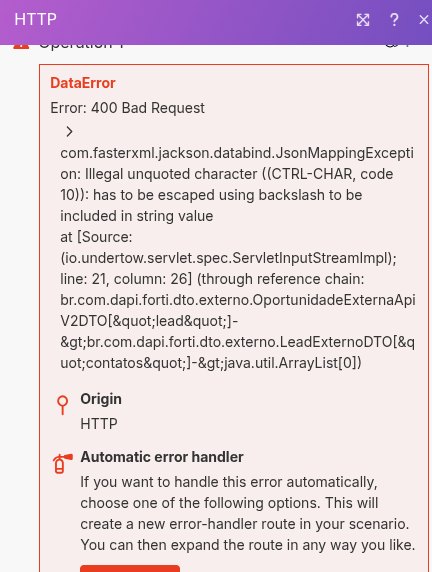
The Error: The HTTP module fails with a JsonMappingException: Illegal unquoted character ((CTRL-CHAR, code 10)): has to be escaped using backslash...
The Cause: My trigger is RD Station (New Opportunity). Some leads are filling out text fields with newlines (by pressing “Enter”). I’ve confirmed this by inspecting the output bundle, which looks like this:
{
“cf_qual_sua_principal_necessidade”: “This is the first line of text.\n\nThis is the second line after two ‘Enter’ presses.”,
“cf_qual_o_seu_cargo”: “Sócio/Diretor”
}
The \n (which is the code 10 error) is breaking the JSON parser in my destination API (a custom CRM).
My Scenario Architecture: To solve this, I added a “Tools” module to clean the data before it gets to the HTTP module.
My flow is: [1] RD Station (Watch New Opportunities) → [4] Tools (Set multiple variables) → [2] HTTP (Make a request)
1. “Tools” [4] Configuration: I am using Set multiple variables to create “clean” variables. My formulas look like this (as per my last attempt):
-
nomeLimpo={{replace(replace(stripHTML(toString(ifempty(1.name; ""))), lf, space), cr, space)}} -
necessidadeLimpa={{replace(replace(stripHTML(toString(ifempty(1.cf_qual_sua_principal_necessidade; ""))), lf, space), cr, space)}} -
(…and so on for all other text fields)
2. “HTTP” [2] Configuration: My JSON Request content correctly uses the “clean” variables from the Tools module:
{
“nomeLead”: “{{4.nomeLimpo}}”,
“contatos”: [{
“Problemaenfrentado”: “{{4.necessidadeLimpa}}”,
“Necessidade”: “{{4.necessidadeLimpa}}”
}],
“contato”: {
“nomeContato”: “{{4.nomeLimpo}}”
}
}
The Problem: Even with this 3-module setup, the code 10 error still happens on the HTTP module.
This means that my formula in the “Tools” module (replace(..., lf, space)) is failing to remove the newline character. The “dirty” data with the code 10 is somehow still being passed to the HTTP module.
We’ve confirmed the Tools module formulas are saving correctly (using space instead of " " which was being deleted by the UI).
Why would replace(..., lf, space) not remove the code 10 newline character? Is there a more powerful function or a different approach to sanitize this string before the HTTP module tries to build the JSON?
Thank you for any help! This bug is incredibly persistent.