Hello amazing community 
I’ve built a scenario in Make.com with the objective of detecting new rows added manually to an Excel 365 spreadsheet and notifying a Microsoft Teams chat when a new entry appears.
 Main Goal:
Trigger a notification in Microsoft Teams every time a new row is manually added to the Excel file stored in OneDrive.
The workflow also tracks which row was processed last via a Data Store, and only sends alerts for new additions.
 Scenario Overview (Real Flow):

| Module # | Name / Type | Purpose |
|---|---|---|
| 25 | Data Store – Get a Record |
Gets the last_row_id previously stored |
| 29 | Microsoft 365 Excel – List Worksheet Rows |
Retrieves the next row of data |
| Filter 1 | “es nuevo?” | Compares row ID (or Row A) with last_row_id |
| 14 | Data Store – Check existence |
Prevents reprocessing already-handled rows |
| Filter 2 | “Solo nuevos” | Ensures only valid new rows pass |
| 6 | Microsoft Teams – Send Message |
Sends alert to Teams if a new row is found |
| 16 | Data Store – Add/Replace |
Stores current row data with a key (e.g., “Estado”) |
| 27 | Data Store – Update Record |
Updates the last_row_id to the newly processed one |
 Excel File Setup:
-
Excel file stored in OneDrive
-
Using Excel 365 connector
-
Sheet name:
"Muestreos y solicitudes" -
Headers are in Row 8
-
Data starts at Row 9
-
New rows are added manually, usually only one at a time
-
Columns A–E are populated

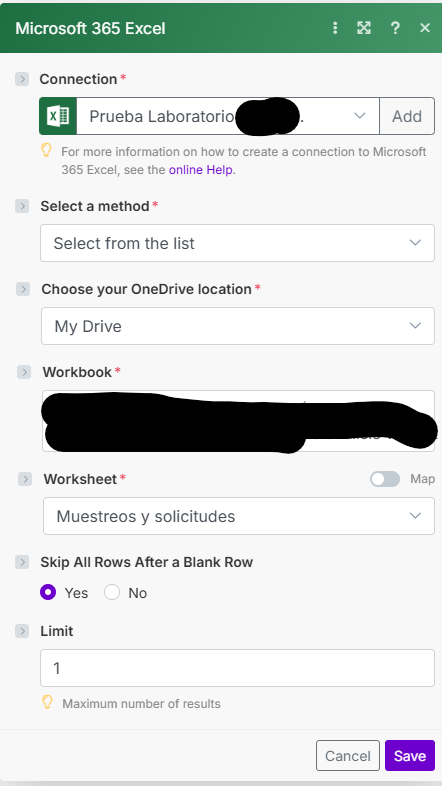
 Module 29 Configuration:
| Field | Value |
|---|---|
| Select a Method | legacy |
| Skip All Rows After Blank | (Enabled by default) |
| Limit | 1 |
| Worksheet | "Muestreos y solicitudes" |
| Table format |  Not used (not a table) Not used (not a table) |
Problem:
-
The module
List Worksheet Rows(29) does not return any bundles when a new row is added to the sheet. -
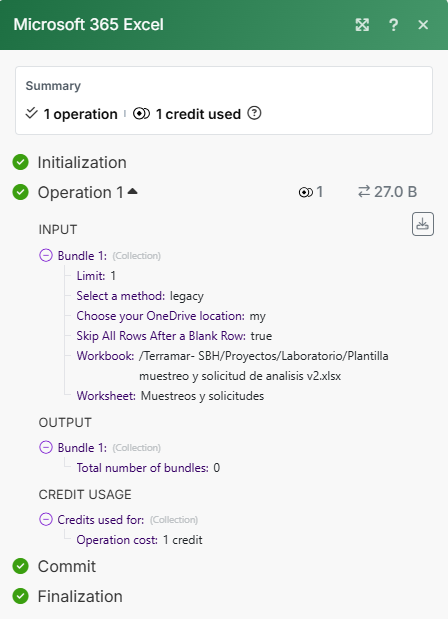
Output from module 29 shows:
Total number of bundles: 0 -
This blocks the flow entirely. The rest of the scenario (filter, Teams message, update) never runs.
-
The new row contains values in Columns A to D.
-
File is synced and saved
-
No empty rows between existing and new rows
-
The Excel sheet is not formatted as a table
What has been tested already:
-
Manually inserting a row → scenario does not detect it
-
Added values in columns A to D, even full row → no detection
-
Adjusted filter logic
-
Tried switching to
Watch Table Rows (ACID)→ it always increments Row ID even if the row is incomplete -
Saved Excel multiple times before running scenario
-
Disabled/Enabled “Skip All Rows After Blank Row” → still not detecting
-
Tried
Start from RowandRow Range(but options limited inlegacy)
 What we need:
-
Is there a reliable way to track new rows added manually to an Excel sheet that is not formatted as a Table?
-
Is there a better combination of:
-
Module method (
legacyvsmodern) -
Filter structure
-
Excel formatting
-
-
Has anyone successfully handled this without converting Excel into a table?
-
Is the community aware of alternatives (looping, start row, filters) that work with Excel 365 + OneDrive + non-table sheets?
 Attachments (as support):
-
Screenshot of module 29 output:
Total number of bundles: 0
If this is not the best solution please tell me which one works, as I think it should be very simple to make.
Thanks so much to the amazing Make community! 