What are you trying to achieve?
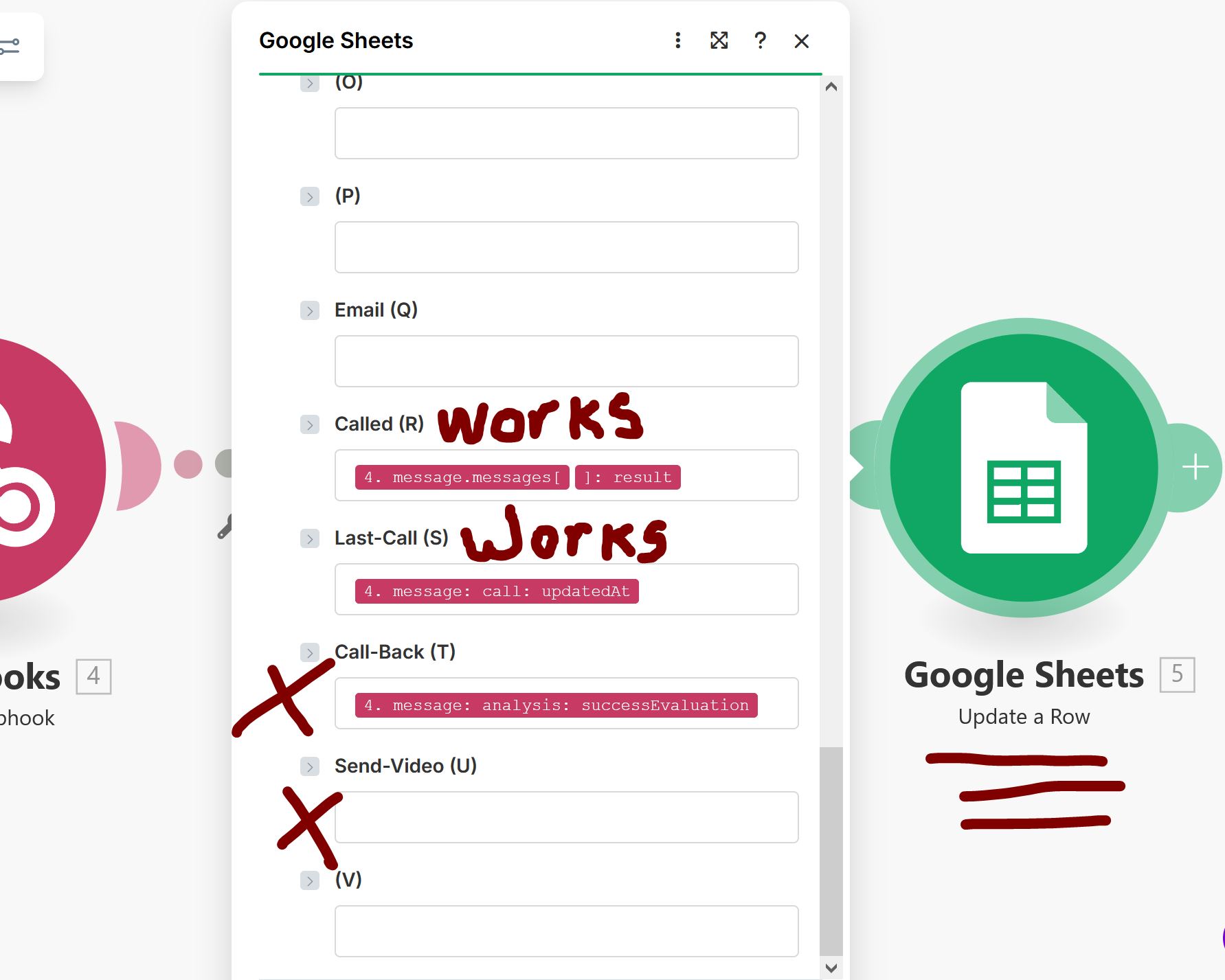
I’m using Vapi.com for a voice bot. It works perfectly and collects the information needed. Makes has WebHooks from Vapi… URL is perfect. Make seems to be recording the data from Webhooks BUT it is not updating 2 of the 4 fields needed. It updates 2 of them but not all 4.
Attempting to run 2 scenarios in MAKE:
- Search a row Data from G.Sheets / Vapi call / update a row in G.Sheets
- Webhooks / Search rows in G.Sheets / Update a row in G.Sheets
Make pulls the time and date and info for call connected BUT Make seems to be missing the email address and call call success data and the result is the G.Sheets spreadsheet is not being updated.
One of the things I noticed is, when configuring a value in sheets mod, the RED box for call analysis is not presented to select. I don’t know why???
All I am attempting to do is update a sheets row with an email address passed from Vapi and update success true or false if customer wants the video link. I’m very new and not sure of what some of the fields are actually asking.
Steps taken so far
Too many to list.
Hi and welcome to the Community!
Great to hear that you’re working with Vapi. We’ve been investing a lot of time with them - it’s a great platform.
Could you post some screenshots showing your scenario and the specific problem that you’re experiencing?
Hi Dave, thanks for responding. Here is some screenshots you requested. The screenshot that is missing is the data fields (RED and Green) that Webhooks returns for fields searched or updated. I think I would need to do another test call to have the little icon show up above and to the right of the large module icons.
I think there’s two things going on here:
- Vapi not sending all the structured data you expect
- The Custom Webhook not having recognized all the data that Vapi is sending
For the first, there’s two key issues:
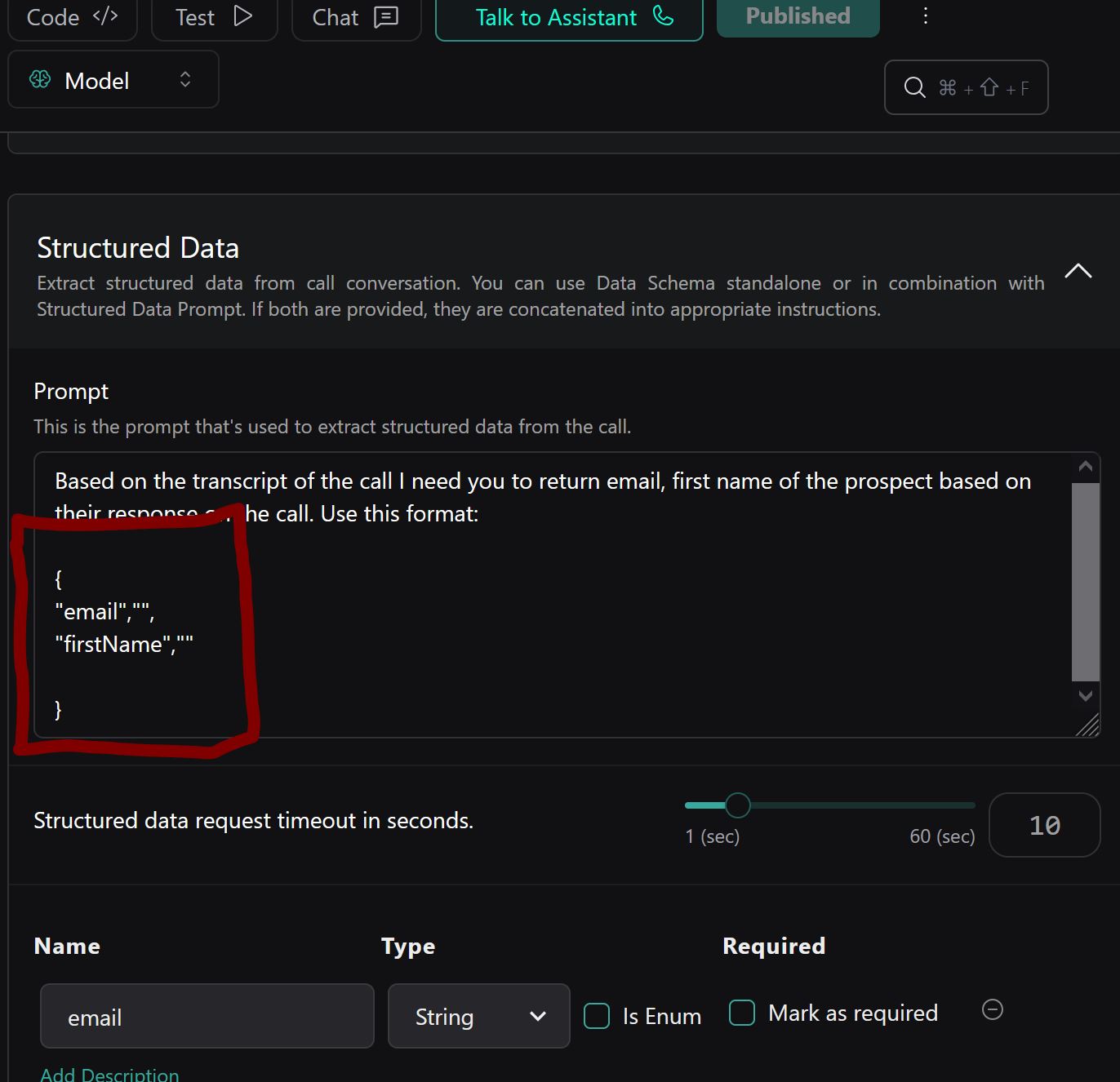
- You can’t just put an example JSON format in the Structured Data prompt. Instead you’ll need to use the API endpoints for Structured Outputs. For that, you’ll need to use the Vapi app’s
Make an API Call module (as there aren’t any modules for Structured Outputs).
- The format needs to be expressed as a JSON Schema, not an example JSON payload. There’s a variety of online JSON to JSON Schema converters that can help you with this.
Then, you’ll need to use the “Redetermine data structure” button on the Custom Webhook module and send a test payload from Vapi. That should allow the Custom Webhook to see all the data that’s being sent.
2 Likes
Hi Dave,
I want to reach out and commend you for assisting in pointing me in the right direction. I’m NOT a Dev so it took some time and some pounding of fists on the desk but I solved the issue. In short you were 100% spot on as to what needed to be done. Thank you.
On another topic (I’m including a screenshot so you know exactly the question). In my testing which is now successful I have Row 2 selected for (I assume) THE row to be searched and updated. So the question becomes when I go live and want to start producing leads what do I change that field to? As I understand it if I leave “2” in the field it will keep sending row 2 info to be called and updated over and over. Am I understanding that right? If I have it right then what should that fields be changed to when I want the system to systematically search and update all rows with data?
Again, thank you for your excellent guidance,
Rob
1 Like
Great to hear it solved your problem! Could I ask you to mark my post as a Solution?
I think you might have forgotten to add the screenshots of your new problem. In any case, it would be best to make a new post with that info so that it’s more easily found (together with any solution) by anyone later.
You are right, I did forget……file uploaded and original post amended
If the preceding module is Search Rows, then you’d map the Row number from that module into the Row number field in Update a Row.
Yes the first mod is “search”. yes I understand you want mods to match that field but you may have misunderstood the question:
I don’t want ONLY ROW 2 of the sheet searched and updated, I NEED it to go to the next row on the next call and repet until the end of the data rows is reached.
If I am misunderstanding your answer can you please provide a screenshot or two that would illustrate.
Thank
Rob
I think I’d need to see more of your scenario including all the parameters for both the Search Rows and Update a Row modules to be sure.
The Search Rows module will return ALL of the rows in the Sheet that match the search terms, up to a maximum of the Limit that you set. Each of those rows is a separate “bundle” in Make terminology.
The following modules (in this case the Update a Row module) are the executed for each bundle in turn.
I believe I have solved the issue and I am moving on to a larger test that will read the data in Sheets sent it to Vapi for calls then update MULTIPLE rows with call data.
To this point I have only been calling row number two for my tests. I intend to call 10 to 20 for this test. I have over 1,000 rows but only want a small test.
To this point, single call tests have been 97% successful. Only a few tweeks within Vapi (I believe will rectify the remaining issues.)
The question becomes, How do I set make to search and update multiple rows (10 to 20) or for that matter if all is successful and I want to run all the rows with data?
I am including screenshots of both A) the search Mod and B) the update Mod.
Hopefully I’m asking the right questions.
Your guidance is appreciated.
Rob
The first set of screenshots are Mods searching Sheets….
The next set of screenshots or Mod #2, handleing the call and updating sheets with data for leads
It there is Something I am missing, please box my ears in with it….. 
Great to see you’re taking a really pragmatic approach by limiting the number of operations (and hence credits) used in testing! That’s really important in order to avoid blowing through your credits.
I’d continue that approach as you test further, and aim to test groups of rows rather than just going for the whole lot.
Your approach in general looks solid from what I can tell (obviously you’ll need to change the Row number field in the final Update a Row module to be mapped from the preceding Search Rows module output.
Dave,
That is the issue I am having, I do not have an understanding of the field (((Row))) or how it functions.
I don’t know what the current setting of 2 should be replaced with….
or
As you stated identify small groupings of rows for testing….
and finally when testing is complete
change settings to handle a defined workload.
Can you please offer examples?
The Row field in the Update a Row module is simply the number of the row you want to update in the specified Sheet.
You’ll map it from the output of the preceding Search Rows module so that it runs the Update a Row module for every row that the Search Rows module finds.
I realized that you probably don’t need to worry about credits usage in testing as your scenario will only find a single row anyway, as your search criteria are very tight (a single phone number).