Multi-Page PDF Processing Issue (Vehicle Registration) & Outbound Bundle Duplication

Multi-Pa

ge PDF Processing Issue (Vehicle Registration) & Outbound Bundle Duplication

Hello Make Community!

I am working on automating data extraction from complex official documents, specifically Vehicle Registration Certificates (VRCs) from EU countries (Baltics, Poland).

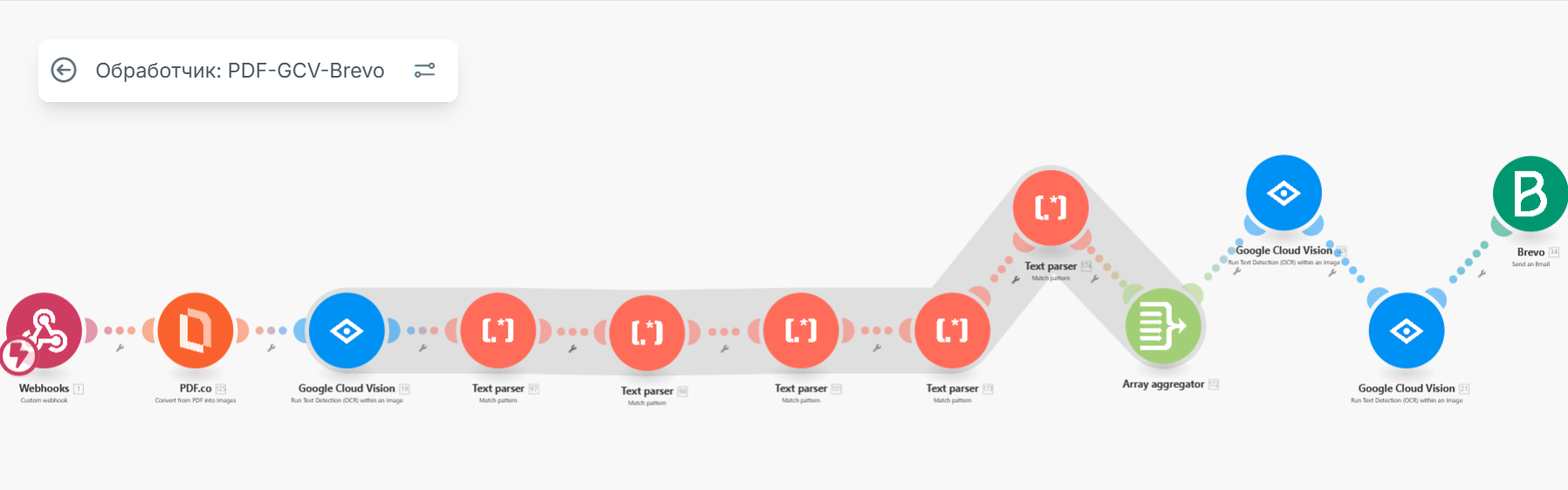
My current scenario flow:

  1. Receive the source file (PDF/PNG/JPG).

  2. Conversion (PDF.co).

  3. OCR Recognition (Google Cloud Vision).

  4. Field extraction (Text Parser) using RegEx.

  5. Consolidation (Array Aggregator).

  6. Email sending (Brevo/SendGrid).

The Core Problem:

  1. Extraction Instability: The Google Cloud Vision + Text Parser / RegEx combination is proving very fragile. Due to OCR errors (non-linear field layout, rotated text), the RegEx often fails or misses fields.

  2. Outbound Bundle Duplication (Primary Issue): Since the source documents are multi-page (2 pages in the PDF), the entire scenario iterates two or more times (one iteration per page). Despite using the Array Aggregator for consolidation, I still end up sending 2 or more emails for a single source PDF.

    • Note: The flow works correctly (1 document → 1 email) for single-page JPG/PNG files.

Questions for the Community:

  1. Specialized IDP Modules: What tools are you successfully using for extracting structured data from complex, non-linear documents (invoices, passports, VRCs)? Are there more reliable services in the Make.com ecosystem than the brittle Google Cloud Vision + RegEx setup?

    • Has anyone successfully implemented ComIDP, Azure AI Document Intelligence (Form Recognizer), or Amazon Textract? Do these services provide a single, structured JSON output that inherently solves the multi-page document aggregation problem?
  2. Consolidation/Aggregation: If you have encountered outbound duplication after processing a multi-page PDF, how did you guarantee that the complete data array was bundled into a single outgoing operation, ensuring the client only receives one email?

I would be grateful for any advice and practical solutions, especially regarding the use of specialized IDP (Intelligent Document Processing) modules!

Setting the Correct Aggregator Source

You need to set the “Source Module” field of the aggregator to where the bundles are coming from. This is usually an iterator module, but can also be a search/list/repeater module, or even the trigger module!

e.g.:

Combining Bundles Using Aggregators

Every result (item/record) from trigger/iterator/list/search/match modules will output a bundle. This can result in multiple bundles, which then trigger multiple operations in future modules (one operation per bundle). To “combine” multiple bundles into a single variable, you’ll need to use an aggregator of some sort.

Aggregators are modules that accumulate multiple bundles into one single bundle. An example of a commonly-used aggregator module is the Array aggregator module. The next popular aggregator is the Text Aggregator which is very flexible and can apply to many use-cases like building of JSON, CSV, HTML.

You can find out more about the other types of aggregator modules here:

Question: Which is the best aggregator do you think you’ll need for your use-case?

Mapping a Specific Structure Into a Complex Field

If you have an array of collections, in programming terms, this is called an array of objects, or an array with non-primitive data types (“complex”).

The Array Aggregator module is very powerful because it allows you to build a new complex array of collections that matches a later module’s field to map multiple items (collections) to it. Such fields initially would allow you to manually add items, but you can toggle the “Map” switch to the “on” state and map a whole array into a single field.

This is done by selecting the “Target structure type” in an Array Aggregator module.

As you can see from the above example, the “Map” toggle on complex fields are used when you have an array variable (like from an array aggregator). Other combinations of modules may also allow you to generate an array that matches a future field’s array structure, like “Aggregate to JSON + Parse JSON”, or “Create JSON + Parse JSON”, but this is an advanced topic.

Question: Are you mapping your array into a field that accepts more than one item/collection?

Hope this helps! If you are still having trouble, please provide more details.

— @samliew

2 Likes

Thank you very much for your detailed and helpful response! I ultimately solved the problem using other modules (1_Make AI Content Extractor > 2_Make AI Toolkit) that handle data recognition and structuring more accurately. Your recommendations helped me better understand the logic behind the aggregators, which was very helpful. Thank you for your support.

If I encounter similar issues in the future, I’ll definitely return to your advice. Thanks again!

1 Like