The problem I am experiencing is in a subscenario. I don’t think that the problem relates to the process of getting the inputs from the parent scenario, but I’m mentioning the structure for context.
When someone makes a donation to my organization (parent scenarios, depending on payment method), I want to assign certain tags to that person based on their donation history. So, for example a first-time donor should be tagged “donor” and “one-time donor” while someone who last donated over a year ago will have their “lapsed donor” tag closed.
The way I am doing this is:
- Bring data from the parent scenario. This data will be the DB ID number for the donor’s master record and the donor’s name (which is in the master record but it’s easier just to include that as an input).
- Get DB items for each of the donor-type tags.
- Search the “role history” database to find any entries for the donor that are any of the donor roles (from step 2) and that haven’t been closed (each entry has a start date and an end date; if the end date is empty, the role is still “open”).
- From there, there are routers and filters for managing the tagging process, which may or may not work, but I’m not there yet because I’m having trouble with the search role history DB step.
Using a donor who is already in our data for testing, I verified that the search role history DB module is incorrectly outputting zero bundles. Unlike with filters, though, where you can see which element(s) in a filter match or don’t match, the search objects module in Notion doesn’t give that information, so I have had to try to figure out where my error is, and that is what I am coming to you all for help with.
This is the relevant part of the scenario (the full scenario has about 5 more “get a DB item” modules between the two Notion modules here, along with the step 4 modules that follow):

Because all of these include relation properties (the donor type tags pull from a tags database, and the role history entries are all linked to the master record for each person) my suspicion was that the problem was based on different formats for DB item numbers (with dashes or without), but I’ve tried all four combinations and none are resulting in 1 or more output bundles:
- Person ID and tag ID with hyphens
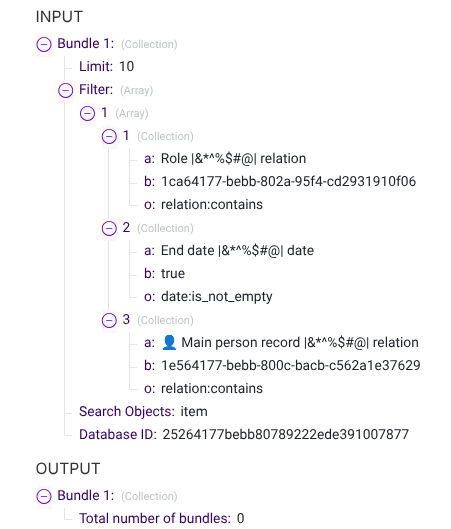

(The set-up here with “18, Page ID” was because I wanted to confirm that I wasn’t putting the hyphens in manually in the wrong place, so I added a search objects module for this test run.)
- Person ID with hyphens and tag ID without (not pictured)
- Person ID without hyphens and tag ID with (not pictured)
- Person ID and tag ID both without hyphens:
I created a variable to remove the hyphens from the tag ID:
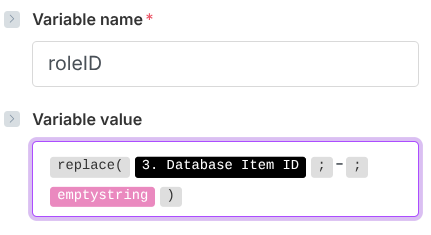
and set up the search objects module like this:

And ran the module with these inputs:
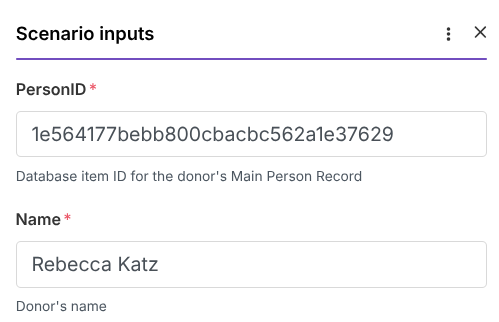
With this as the output:

So I officially am stumped. Any thoughts on where my mistake might be?
Thank you so much!
