I am attempting to build a high-ticket lead qualification funnel that routes raw text application data from a Carrd Webhook to the Google Gemini AI module for automated triage and summarisation.
The system consistently throws the following error when executing the Gemini module, even after extensive data sanitation:
Error Message:
Function ‘parseResponseSchema’ finished with error! Function ‘removeTypeKeys’ finished with error! Cannot read properties of undefined (reading ‘forEach’)
Scenario Flow:
Webhook (M1): Receives raw application data from a form (including long-form text answers).
-
Tools: Set Variable (M16, M17, M18): Used to clean ALL long-form user answers using the {{if(variable; variable; "default text")}} formula to eliminate undefined values.
-
Text Aggregator (M19): Used to bundle the three cleaned variables (M16, M17, M18) and the static prompt text into a single, guaranteed clean text string input.
-
Google Gemini AI (M10): Set to “Generate a response.” The Prompt field receives only the single output variable from the Text Aggregator (M19).
Troubleshooting Steps Taken (Failure Analysis):
| Attempt |
Solution Applied |
Result |
Conclusion |
| 1. |
Direct mapping of Webhook (1) variables to M10. |
CRASH: Failed immediately when an optional field was blank. |
Variables were undefined. |
| 2. |
Applied if(variable; variable; "default") directly inside the M10 prompt. |
CRASH: Failed with the same IMLError. |
Syntax conflict inside the prompt string. |
| 3. |
Implemented Set Variable modules (M16-M18) + Text Aggregator (M19) to feed a single, atomic, pre-validated string into M10. |
CRASH (Persistent IMLError). |
The Gemini API connector is failing to parse the standard Make.com Text Aggregator output bundle structure itself, not the data contents. |
Request: Has anyone encountered this specific structural failure when passing an aggregated text string to the Google Gemini AI connector? Is there a required JSON Schema or Custom Header setting that must be applied to the M10 module when the input is a complex, aggregated text payload?
I honestly want to stick with using Gemini, rather than abandon it and use another platform (which was the suggestions of my Gem chat!).
Screenshot of workflow:
Hey there,
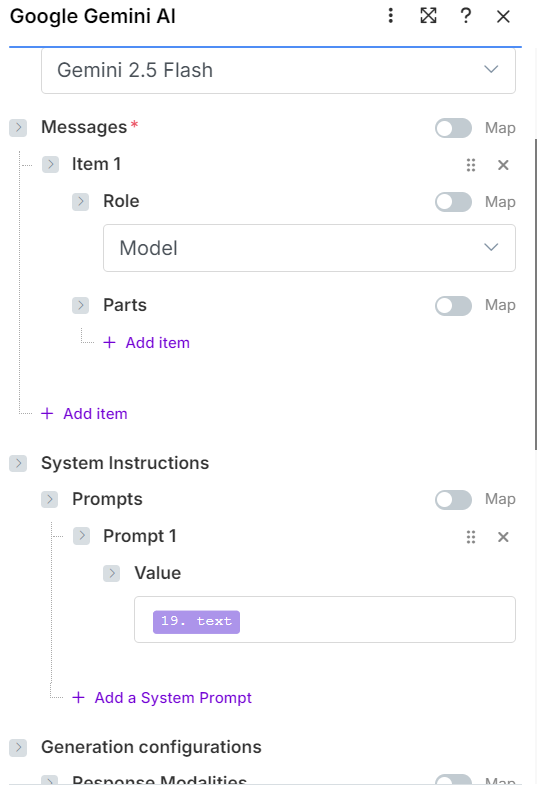
Can you show a screenshot of how the Gemini module is configured, what you are mapping inside and what the input looks like?
This setup reflects the final, cleaned architecture I implemented (using Modules M16, M17, M18 as the cleaners and M19 as the Aggregator).
1. The Final Data Input Structure (The Webhook Payload)
Since I fixed the blank data issue, the AI is receiving three clean text blocks.
| Field |
Source Module |
Expected Data Structure |
| Cleaned Reason |
M16 (Set Variable) |
A single string of text (e.g., "I want to fix my soil health." OR "No reason provided.") |
| Cleaned Consequence |
M17 (Set Variable) |
A single string of text (e.g., "We might have to sell the farm." OR "Applicant did not answer.") |
| Cleaned Results |
M18 (Set Variable) |
A single string of text (e.g., "Harvest 100kg of food, cut grocery bill by 50%." OR "No goals listed.") |
2. The Text Aggregator Configuration (M19)
This module’s purpose is to combine the three clean strings above into one atomic string, which then feeds the AI.
| Configuration |
Value/Mapping |
Note |
| Module: |
Text Aggregator |
|
| Input Text: |
See Prompt Structure below. |
This is the full prompt text, mapped with the three clean variables. |
The Text Aggregator (M19) Output (The Single String Input for the AI):
You are an executive assistant for a high-ticket resilience coach. Summarise the applicant's key pain points, motivations, and stated goals into three bullet points. Strict Mandate: Respond ONLY with the three bullet points under the bolded labels, and no other introductory or concluding text.

Applicant Data:
- Reason for 1:1: **[MAPPED: M16 (ReasonClean)]**
- Biggest Consequence: **[MAPPED: M17 (ConsequenceClean)]**
- Results Expected: **[MAPPED: M18 (ResultsClean)]**

Output Format:
- **Pain Point:**
- **Motivation:**
- **Success Goal:**
3. The Failing Gemini AI Module Configuration (M10)
This is the module that throws the error. It is set up to receive the single string output from M19.
| Configuration |
Value/Mapping |
Note |
| Module: |
Google Gemini AI: Generate a response |
|
| Connection: |
[Successfully connected account] |
|
| Prompt (Value): |
[MAPPED: M19 (Text Aggregator Output)] |
CRITICAL: The entire prompt is contained within this single mapped chip. |
| Model: |
gemini-2.5-flash |
Stable, fast model. |
| Maximum Tokens: |
512 |
Sufficient for a short summary. |
Conclusion:
The failure is happening when the Gemini connector attempts to process the single, large output variable (M19). The fact that the connector throws an error trying to read a property (.forEach) suggests it is incorrectly receiving an Array/Collection structure when it expects a Simple String, which points to a specific bug in how the Google connector internally handles aggregated inputs from standard Make modules. I spent several hours yesterday adding and removing modules, changing the input data to see the effect on the Gemini AI module but the IMLError has been consistent.
Does that mean you’ve solved the issue?
No absolutely not. No matter how I manage the modules or what data string I use or methods of cleaning the inputting data - the error remains.
Looks like the max tokens “512” is causing the issue. Try leaving that field blank.
Hope this helps! If you are still having trouble, please provide more details.
— @samliew
The error log is showing this response after trying again.
The operation failed with an error. Function ‘parseResponseSchema’ finished with error! Function ‘removeTypeKeys’ finished with error! Cannot read properties of undefined (reading ‘forEach’)
The only data chip in this module is {19. text} in the prompt area.
Looks like you are missing “Parts”.
Hope this helps! If you are still having trouble, please provide more details.
— @samliew
Thanks for your help. There were a few issues that I needed to correct, parts being one of them as well as the Role being user not model.
Here’s a clean FINAL image of the sequence.