What are you trying to achieve?
Hi Make community 
I’m facing an issue while automating the generation of a weekly B2B price list presentation using Google Sheets and Google Slides.
 Context:
I built a scenario that follows this flow:
Google Sheets – Get Range Values
Array Aggregator (used to build dynamic tags like {{producto_1}}, {{precio_1}}, etc.)
Tools – Set Variable (x2)
Google Slides – Create a Presentation from Template
Google Slides – Create Slide from Template Slide (multiple times)
Google Drive – Upload File
 Issues:
I cannot add more than one item (Tag + Replaced Value) in the Array Aggregator.
The “Add Item” button doesn’t appear.
It only lets me configure one replacement (e.g., producto_1), even though I need to map many fields (up to 60+: producto_1, precio_1, unidad_1, …).
The presentation is generated, but the values from the spreadsheet are not replaced.
The output file is just a copy of the template with tags still intact.
Variables like {{producto_1}} and {{precio_1}} are not being substituted.
Steps taken so far
 What I’ve checked:
Tag names exactly match between the Google Slides template and the tag configuration.
The spreadsheet is shared correctly and contains valid data (I tested with 28 rows).
The data is correctly fetched in the “Get Range Values” step.
Tried IMTINDEX, bundle order position, and other index methods in tag generation.
No errors appear in prior steps.
 Questions:
Is there a way to enable adding multiple Tag + Replaced Value pairs in the Array Aggregator?
Am I using the tag structure incorrectly?
Is there a limit to the number of tags supported in this module?
Is there an advanced configuration I might be missing?
Any help is much appreciated 
I’m happy to share screenshots or open access to my scenario for review.
Thanks in advance!
Screenshots: scenario setup, module configuration, errors
Hey Francisco,
that thing in the first screenshot in the Tags box is not a function. Its just a text string and you will get an array of those text strings. Can you show the data you are trying to aggregate and the result you are trying to get?
Hi Stoyan, thank you for your response.
Let me clarify what I am trying to achieve:
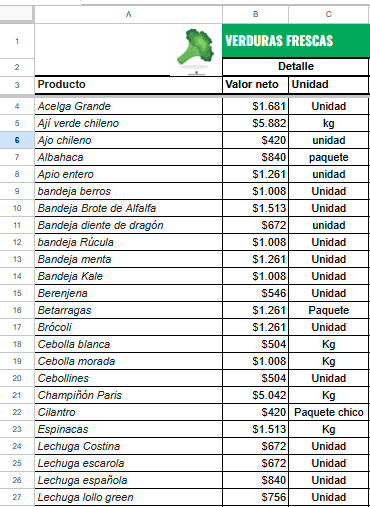
- Data I get from Google Sheets:
Each row in the sheet contains three main columns:
- Product
- Price
- UnitExample of the incoming bundle:
Bundle 1:
A: Acelga Grande
B: $1.681
C: Unidad
Bundle order position: 1
-
Expected result in Google Slides:
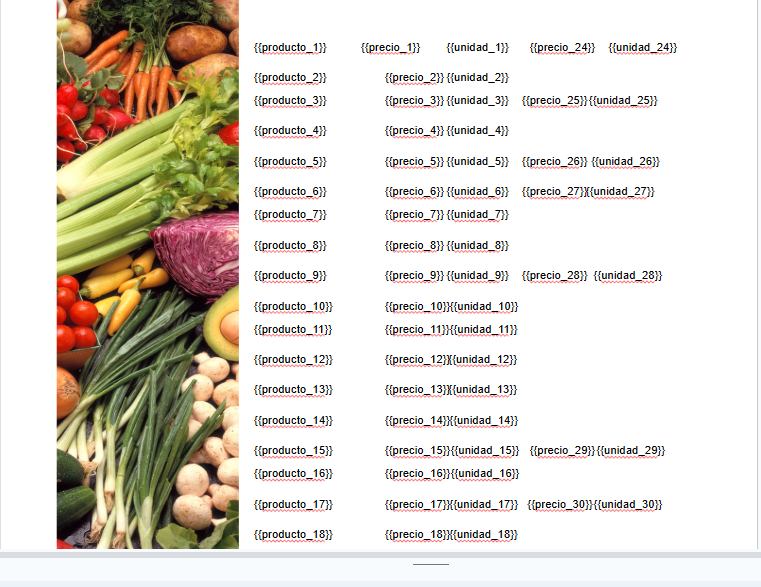
I use a presentation that has placeholders like {{producto_1}}, {{precio_1}}, {{unidad_1}}, {{producto_2}}, etc., up to {{producto_23}}.
What I want is for Make to automatically replace those fields in the template with the data from the spreadsheet, generating an updated price list with all 23 products.
-
My current configuration:
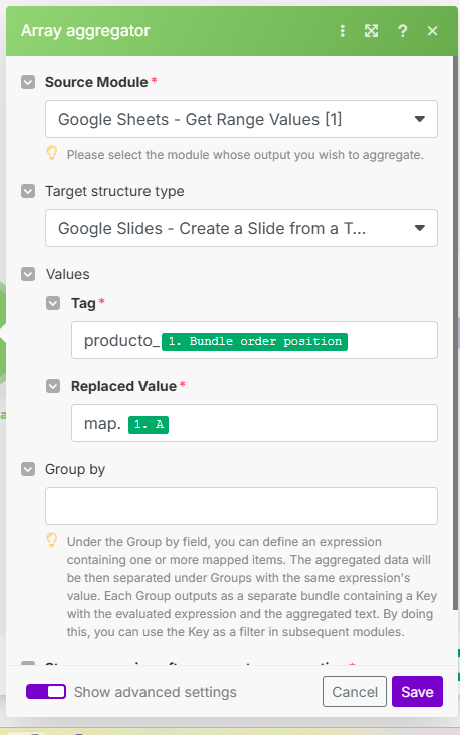
- In the Array Aggregator, I am using in the Tag field the function
concat("producto_", map[1. Bundle order position]) for the names, and map.A for the value.
- I do the same for price and unit.
- The problem is that the data does not appear in the final presentation; it just stays as an unfilled template.
What can I do to ensure that the Array Aggregator correctly associates the data from the sheet and replaces it in Google Slides?
I am attaching screenshots with the input bundle structure, the presentation design, and how I set up the Array Aggregator.
Thank you for your help!
Yeah cause there is no concat() function in Make and that is not how you use map().
Just put producto_ and follow it immediately with the bundle order position.
Hello Stoyan, thank you very much for the suggestion.
I tried setting the tag in the Array Aggregator as product_ followed directly by the bundle order position (for example: product_1), as you indicated. However, the result is not as expected:
When running the scenario, the corresponding fields in the Google Slides presentation are blank (the values are not transferred from the spreadsheet).
Only the structure is copied, but the data (products, prices, units) does not appear.
Is there any additional step I should review or any additional configuration I should apply so that the values are correctly replaced in the template?
I greatly appreciate the help.
OK and what outputs did you get from the array aggregator? Also what is the input to the module that creates the template?