Hey y’all. Had a decent amount of trouble with this in the past, having looked into the forums a decent amount and not finding this method mentioned. Sorry if this has been covered elsewhere already, but wanted to post it if not!
For context, in Zapier, many search modules have an option called “create new entry if no result found?”. This option structure allows for easy search and create conditional structures without requiring a deviation from the main workflow.
Unfortunately, in make, you previously needed to use routers to do this. This had the unpleasant side effect of branching off a scenario into two paths, without the option to merge them back into a singular path. For many people with less coding experience, this creates an organizational headache.
I wanted to call out the following method to (hopefully) help any others who may be looking for information on how to essentially ‘merge’ paths back together using subscenarios. This allows for significantly cleaner scenarios as a whole, and I’ve seen many people asking about how to do this in the forums.
Take a look at the following. I needed to incorporate a module into my workflow that searched a particular folder in drive for the current year, then either return that folder ID, or create a new one for the year if needed and return that ID to the main scenario. This would allow me to sort documents into folders according to the current year without having to manually create a new one each year and risk the scenario breaking.

The above ‘call a subscenario’ links to the following:
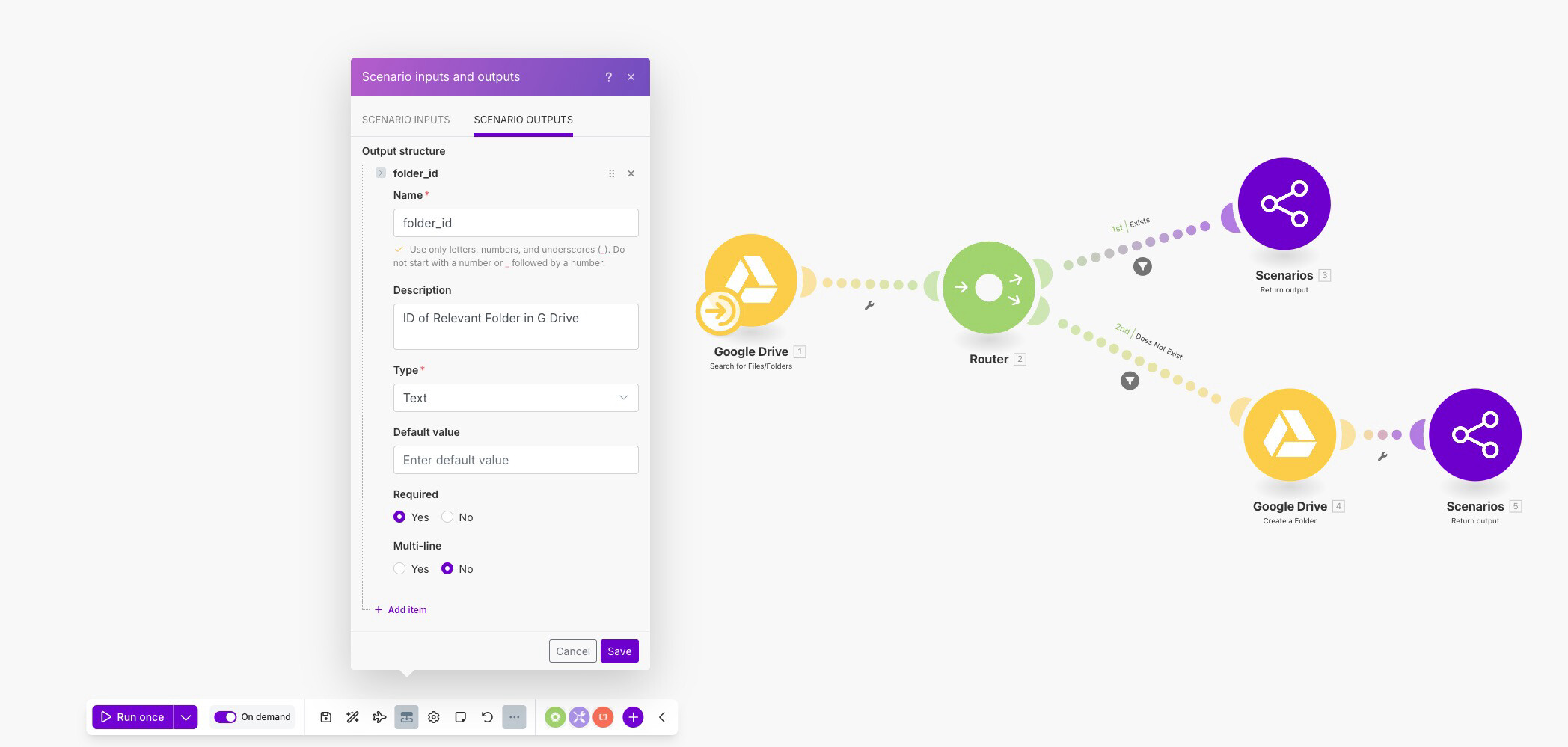
The subscenario searches the folder in Drive, routes out whether or not it exists, creates it if it doesn’t, and assigns the resulting ID from either path to the output variable folder_id, which is then returned back in the parent scenario. This effectively allows me to ‘merge’ the two routes back together 
This is how I have the subscenario module set up in the parent:

While my specific use case didn’t necessitate any input variables, you can use them to absolutely supercharge the possibilities of this workflow. I encourage anyone interested to check out the help article on Subscenarios to learn more about how input and output variables work.
Hopefully this helps anyone out there who is looking for ways to more effectively manage their filter paths! It was certainly a point of frustration for me in the past, but I’m now extremely excited to start experimenting with ways this can enhance my workflows.