Slopmachine?

:bullseye: What is your goal?

Scavenge Time I Invested In Make. Created 20+ scenarios with sweat. Came back year later it’s broken.

Tried with GooDrive One Drive pSync none of it works. I just want this scenario to work before I finish coding my own with python.

Idea of this scenario is take my local video file and suck into airtable with all the data and availability to eventually push it to video streaming sites.

:thinking: What is the problem & what have you tried?

Once is an accident
Twice is an anomaly
Thrice is a pattern

Fun fact: Even upload function and delete upload is not working on this forum as we speak

OneDrive - Apps Documentation

Connect OneDrive to Make

To establish the connection in Make:

  1. Log in to your Make account, add a OneDrive module to your scenario, and click Create a Connection.

  2. Note: If you add a module with an instant tag, click Create a webhook, then Create a connection.

  3. Optional: In the Connection name field, enter a name for the connection.

  4. Optional: Click Show advanced settings to enter your custom app client credentials, tenant ID, and add additional scopes as needed. For more information about the permissions, see the Microsoft Graph permissions reference.

  5. Click Save.

  6. If prompted, authenticate your account and confirm access.

  7. You have successfully established the connection. You can now edit your scenario and add more OneDrive modules. If your connection requires reauthorization at any point, follow the connection renewal steps here.

I get Access Denied

My Google Drive connection i made that was working 1 year ago got wrecked.

I redo it from scratch resulting in wasted time.

Finally tried pClous. Module not responding to uploaded files.

I’m just want to get off this platform, but I want to take the scenarios I already created with me to at least get some of the time back.

:camera_with_flash: Screenshots (scenario flow, module settings, errors)

Question 1:

How to Connect and Use Google APIs in Make!

0. Prerequisites

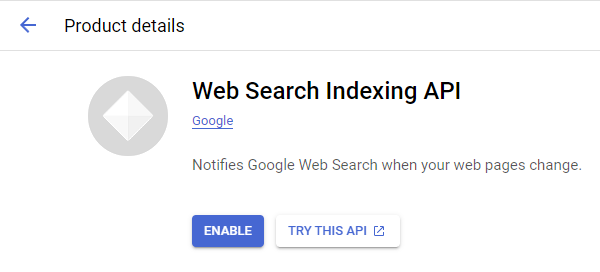
1. Enable Google APIs


2. OAuth Client

Direct Link: https://console.cloud.google.com/apis/credentials

  • 2a. Create “OAuth client ID” Credentials

  • 2b. Insert all the Google Redirect URIs for your app

    Insert All Google Redirect URIs

    Here are some commonly-needed redirect URIs you need for your Google Cloud Console OAuth app. If you set these up, you can reuse the same GCP app for other Google apps and modules on Make.

    https://www.make.com/oauth/cb/oauth2
    https://www.make.com/oauth/cb/google
    https://www.make.com/oauth/cb/google/
    https://www.make.com/oauth/cb/google-email
    https://www.make.com/oauth/cb/google-custom
    https://www.make.com/oauth/cb/google-restricted
    https://www.make.com/oauth/cb/google-cloud-speech
    https://www.make.com/oauth/cb/google-search-console
    https://www.make.com/oauth/cb/google-analytics-4
    https://www.make.com/oauth/cb/google-ads2
    https://www.make.com/oauth/cb/google-ads2/
    https://www.make.com/oauth/cb/youtube
    https://www.make.com/oauth/cb/chrome
    

    Including These Google Redirect URIs

    You are also required to insert the legacy URLs below from the old Integromat system that not been migrated to Make yet (same as the above list, but replace “make” with “integromat”):

    https://www.integromat.com/oauth/cb/oauth2
    https://www.integromat.com/oauth/cb/google
    https://www.integromat.com/oauth/cb/google/
    https://www.integromat.com/oauth/cb/google-email
    https://www.integromat.com/oauth/cb/google-custom
    https://www.integromat.com/oauth/cb/google-restricted
    https://www.integromat.com/oauth/cb/google-cloud-speech
    https://www.integromat.com/oauth/cb/google-search-console
    https://www.integromat.com/oauth/cb/google-analytics-4
    https://www.integromat.com/oauth/cb/google-ads2
    https://www.integromat.com/oauth/cb/google-ads2/
    https://www.integromat.com/oauth/cb/youtube
    https://www.integromat.com/oauth/cb/chrome
    

    Note 1: Due to inconsistencies in Make’s implementation of the connections, there are two separate entries where has one is google and another ending in a forward slash google/ - you might need one or the other, so we have to use both!

    Note 2: Once you’ve set these up, you can use/reuse the same Google OAuth App ID + Secret for all the supported Google connections and modules on Make - you’ll just have to enable the relevant Google APIs!


3. OAuth consent screen

Direct Link: https://console.cloud.google.com/apis/credentials/consent/edit

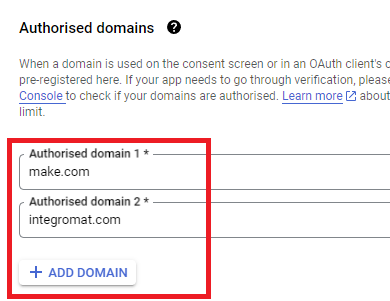
  • 3a. Insert Two Authorised Domains

    • Insert make.com and integromat.com

    • Fill in other required fields

    • Click “Save and Continue”.

  • 3b. Add All Scopes

    • Click “Add or Remove Scopes”

    • Select 100 “Rows per page”, for each page, check all the rows, OR

    • Manually type in the scopes you need

    • Click “Update” at the bottom

  • 3c. Step through and go to dashboard

    At the last step/page, click “BACK TO DASHBOARD” instead of “Prepare for Verification”

  • 3d. Publish your GCP OAuth2 app

    You will need to set your OAuth application to “Production”, otherwise the credentials expire very frequently.

    • To do this, go back to “OAuth consent screen

    • Then click the “PUBLISH APP” button

    • Then click the “CONFIRM” button


4. Create New Connection (HTTP, or respective Google module)

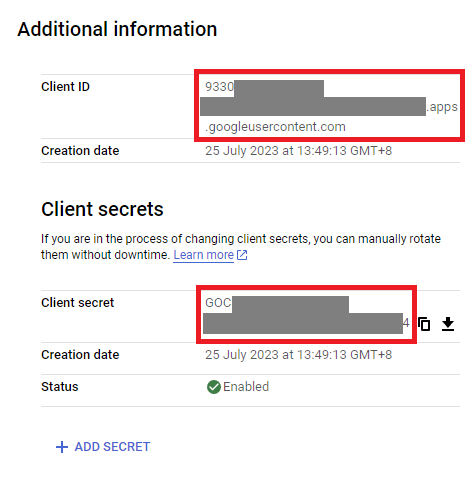
You can find the Client ID and Client Secret in the OAuth2 app you created in GCP, on the right-hand side of where you inserted the callback URLs in step 2:

  • 4a. Specific Google module (Sheets, Docs, Drive, Gmail, etc.)

    Insert the GCP app client ID and secret here BEFORE clicking “Sign in”

    (Gmail example)

    OR,

  • 4b. HTTP OAuth 2.0 Request module

    You need a “Authorize Parameters” key of redirect_uri with the above Make OAuth2 callback URL.


Related Topics:

Hope this helps! If you are still having trouble, please provide more details.

@samliew

Question 2:

Polling Triggers & Empty “Check Runs”

This is because the module is a POLLING trigger, and not an INSTANT (Webhook) trigger.

If you don’t see any bundles from the trigger module and operations on the rest of the modules, it means there are no new responses (empty output bundle) when the scenario ran to check for new items. This is called a “Check run”.

There are two main types of triggers, Polling (scheduled), and Instant (webhooks). Polling triggers can only run on a schedule. Instant triggers can be run as soon as data is received by the webhook.

  • Polling means Make checks external service for changes (pull changes to Make).
  • Webhook (instant) triggers means external service calls Make when there are new changes (push changes to Make).

The module you are using does not push changes — it’s basically a API request that Make has to occasionally “call” to fetch the latest changes/items.

To find out more on the different types of Trigger modules, see refer to Types of Modules and Webhooks sections of the Make Help Centre.

If you want your scenario to only run when there is new data (and not on a schedule or timed interval), see if your app has an “Instant” or “Webhook” trigger in Make. If not, check if the third-party service has a feature that can send out a webhook when content is created/updated - and then you can point it to a “Custom Webhook” trigger in your scenario.

If you want to re-run your scenario on older data,

Polling Triggers: Epoch Panel & Selecting Older Data

Go to the Epoch Panel, by right-clicking on the trigger module (polling triggers only), and select “Choose where to start” from the list of options in the context menu.

If you select “From now on”, the next time the scenario runs it will only return new data (or nothing if there is no new data).

You can also select other old data to re-run your scenario with next using the “Choose manually” option. This will then show you a list of previous historical items you can select to process the next time the scenario is triggered.

For more information, see

Hope this helps! If you are still having trouble, please provide more details.

@samliew