Unwanted Multiple Module Execution After Implementing Text Parser (Looping/Bundling Issue)

Hello, community!

We are facing a critical issue where our scenario starts looping uncontrollably after we introduced Text Parser modules. We need guidance on how to manage data bundles efficiently in this context.

  1. Brief Description of Scenario and Goal:

Our scenario is a complex sequence for automatically processing documents and forms (starting with a Webhook).

Goal: Receive form data, including text and photos/files, process them, and extract key data points.

Logic:

Webhook receives data (1 Bundle).

PDF.co transforms PDFs into PNGs.

Google Cloud Vision performs OCR on images.

Three separate Text Parser modules follow to extract three different, specific values (e.g., Name, Date, ID) from the OCR result.

  1. Symptom and Looping Issue:

The scenario works correctly and executes once for each incoming Webhook before the Text Parsers are added.

After implementing the three Text Parser modules, the scenario begins repeatedly executing all subsequent modules (PDF.co, Google Cloud Vision, etc.) in a massive, uncontrolled loop. This continues until the operations are complete, costing many operations. Removing the Text Parsers resolves the issue immediately.

  1. Question:

We assume that each of our three Text Parser modules generates an individual output bundle, and these multiple bundles then force the rest of the script to execute repeatedly, causing the loop.

How can we reliably collapse all the extracted values (from the three Text Parsers) back into a single bundle to ensure that all subsequent modules are executed only once?

Please suggest the simplest and most efficient method for solving this data flow (bundling) issue within a single script.

CRITICAL: We will attach screenshots of our scenario map for better context!

Thank you for your help!

Hey there,

just to clarify - there are no loops within a scenario. Each bundle a module produces will be processed by subsequent modules.

Most likely what you are observing is due to a configuration of one of the text parser modules - it is finding a lot of matches and producing a new bundle for each of them. Check the output bundles of each of them and see what they are producing.

Can you give us a sample text, the regex you are using and show a screenshot of how the modules are configured? You can use this https://regex101.com/

Hello!

Thank you for the clarification! I completely agree that the problem lies in the excessive creation of bundles, which caused the script to te

rminate after 59 operations.

  1. Text Parser Module Configuration

Here are the details of the three Text Parser modules that process text:

Purpose: Extract VIN.

Regex Pattern: E\s*.*?([A-Z0-9]{17})

Purpose: Extract License Plate.

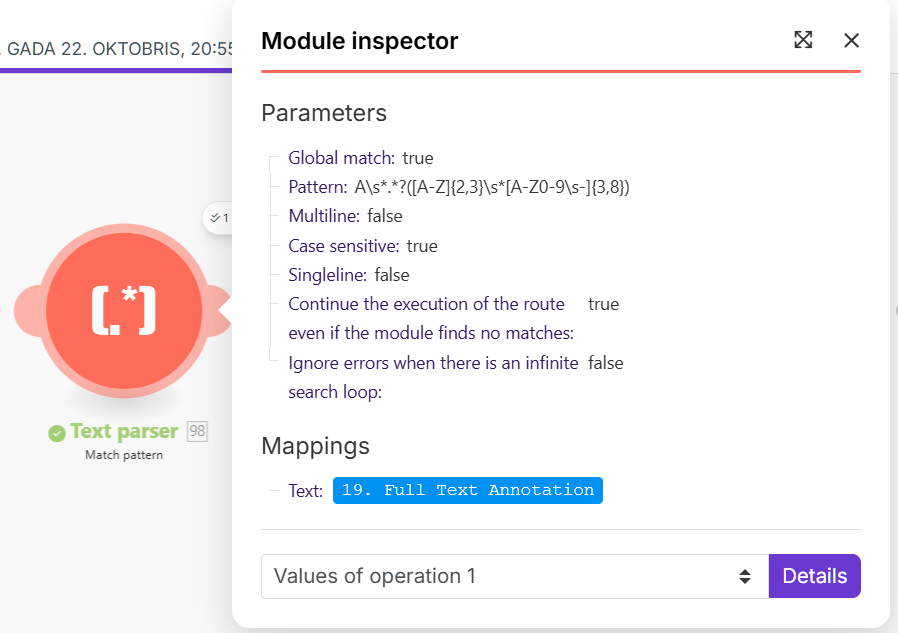
Regex Pattern: A\s*.?([A-Z]{2,3}\s[A-Z0-9\s-]{3,8})

Purpose: Extract Date.

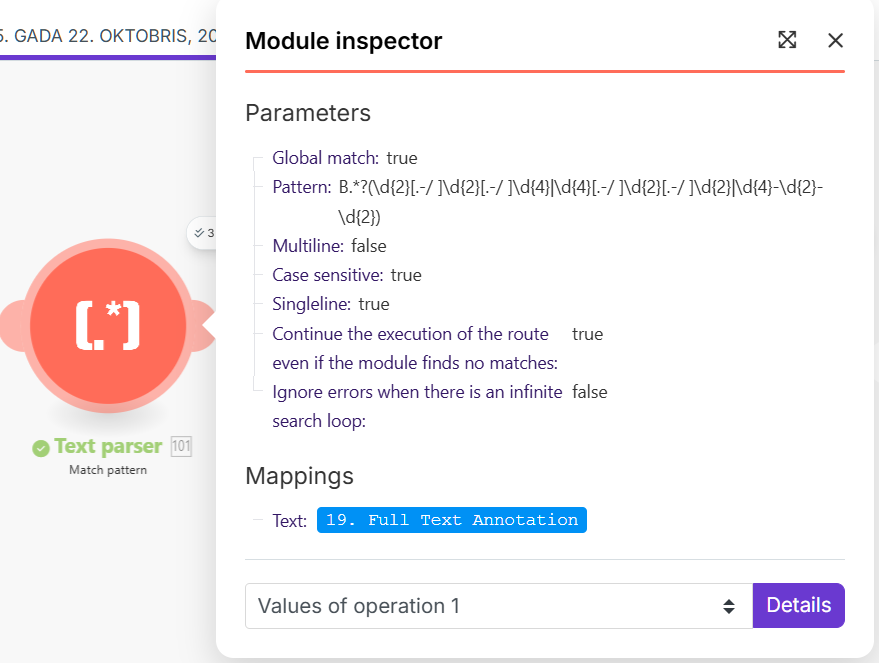
Regex pattern: B.*?(\d{2}[.-/ ]\d{2}[.-/ ]\d{4}|\d{4}[.-/ ]\d{2}[.-/ ]\d{2}|\d{4}-\d{2}-\d{2})

(The screenshots I’ll send will show that the “Global match” option is enabled for all three modules, which is likely the reason for the iteration.)

  1. Source text to be processed (Output from Google Cloud Vision)

This is the full text that is input to the first Text Parser module:

A Registrar
B Registered Register
E VIN-code
090JZN
J Sõiduki kategooria
N3
10.04.2015
B.1 Register Eestis
09/30/2016
XLRTGH4300G060252 R Sõiduki värv
tumeroheline
D.1 Mark
D
D.2 TĂĽĂĽp/Variant/Version
D.3 Kaubanduslik nimetus
DAF
H4GN3
Vt Markused
XF 460 FTP
K TĂĽĂĽbikinnituse nr e4 2007/46 0002 12 K.1 TĂĽĂĽbikood
C
C3609516020
C.1.C.2 Omanik C.2.1 osaĂĽhing ALPTER GRUPP C.2.3 Tartu
maakond, Tartu linn, Tartu linn, Tähe tn 106c
C.3 Kasutaja (C3.1, C3.2) aktsiaselts EAC Auto
J.1 Kere nimetus/tĂĽĂĽp
SADUL
P.1 Töömaht cm³
P.3 KĂĽtuse tĂĽĂĽp
12902 P.2 Võimsus kW
DIISEL
Uste arv
340 v.7 CO, g/km
EUROVI
F.1 Taismass
23900 F.2 Registrimass kg
V.9 Heitmenorm
23900
8777
G TĂĽhimass
Autorongi täismass kg
50000
Pikkus mm
6100 Laius mm
Kandevõime kg
2550
15123
Körgus mm
4000
L Telgi kokku
S.1 Istekohti koos juhiga
S.2 Seisukohti
8000
8000
1.
1.
4400
4400
N Lubatud
2.
2.
teljekoormus
3.
11500
Registritelje-
koormus kg
3.
11500
kg
4.
4.
O Haagise lubatud suurim mass 0.1 piduritega 42325 0.2 piduriteta
kg
Markused
Ă–HKVEDRUSTUS.
Variant: TP239CD6ZZZ
Version: PCF239JML RSNNKD3340H1
E
ANTEE ME
MAARTERA
BEAMETN
ANTEEAMET KAP
750
SEAMET MEAN TELL ME
BEAMET MAANTEEA
BEAMET MAANTEEAME
MAANTEEAMET
LLAMETT
TEEAMEN
I Väljastamise kuupäev
Maanteeamet
27.08.2020
Teelise 4
10916 Tallinn
www.mnt.ee
info@mnt.ee
H Kehtiv kuni
SANTEEAMET
MAL
EM 155267

We process vehicle registration certificates (VRCs) from the Baltic countries (primarily Lithuania, Latvia, and Estonia). These documents are highly standardized. Despite differences in text and details, the layout and structure of key fields in the text we receive remain virtually identical. How can I correctly rewrite or combine these regular expressions (preferably into one to avoid iteration) to reliably extract all three values?

Thanks!

Can you clarify which one is which?

In the sample text the License plate is 090JZN I assume? And the VIN code is XLRTGH4300G060252? This one should find the vin:
(?\b[A-HJ-NPR-Z0-9]{17}\b)
And this one for the license plate:
(?<license_plate>\b[0-9]{3}[A-Z]{3}\b)

Also there are several dates in there, are you looking for the one after B.1 Register Eestis specifically?

This one should get it:
B.\d+\sRegister Eestis\s(?\d{2}[./]\d{2}[./]\d{4})

Then you can disable the global match so it only finds the first instance.

1 Like

Thank you very much for your prompt and detailed response! This will greatly help us resolve the issue quickly.

VIN:

XLRTGH4300G060252 is the correct VIN format.

License Plate:

090JZN is an example number.

The pattern (?<license_plate>\b[0-9]{3}[A-Z]{3}\b) works perfectly for this example (3 digits + 3 letters).

Our database contains various number formats (for example, 090JZN), but we also have formats such as 2 letters + 4 digits or 4 letters + 2 digits (for example, AB1234 or ABCD12).

Date:

Yes, we look for the date immediately after the B header.\d+ Register Estonia.

And in all other parameters, a letter (A, E, B, etc.) followed by a space and a value (VIN, reg. numb., etc.) is used as an anchor because it’s standard in all documents from all countries—Latvian, Lithuanian, Polish, etc.

Regex: pattern B.\d+\sRegister Eestis\s(?<date_field>\d{2}[./]\d{2}[./]\d{4}) fully complies with the requirements. We will definitely disable global search, as you suggest, to get only the first instance.

Thank you so much for your help!

OK, then something like:
(?<license_plate>\b(?:[0-9]{3}[A-Z]{3}|[A-Z]{3}[0-9]{3}|[A-Z]{2}[0-9]{4}|[A-Z]{4}[0-9]{2})\b)
to make it a bit more inclusive and match different combos.

2 Likes