Hi everyone,
I’m facing a weird issue when trying to assign a parsed JSON field value to a variable in Make.
 Context:
- I’m parsing a JSON from a WhatsApp form using the Parse JSON module.
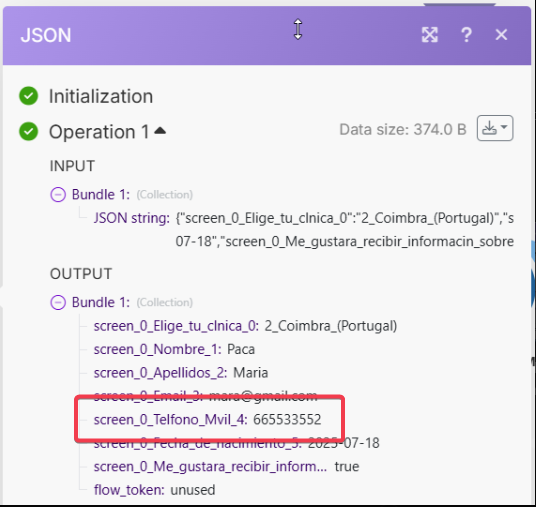
- The field
screen_0_Telefono_Mvil_4(a phone number) appears correctly in the JSON output (e.g.,665533552). - I try to map it using Set variable or Set multiple variables, or even directly into Google Sheets, but it shows up as empty.
- All other fields from the same JSON work perfectly (name, email, etc.).

 What I’ve tested:
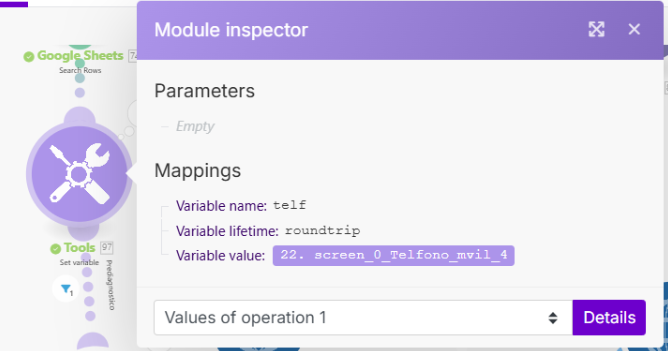
- Mapping the field directly from the parsed JSON (selected via UI, not typed).
- Using
toString()to ensure the value is treated as a string. - Logging the variable right after setting it (it’s still empty).
- Mapping other fields from the same JSON bundle — they work fine.
- The value exists in the bundle and is a valid number (e.g.,
665533552). - Tried using Set variable, Set multiple variables, and direct mapping into Google Sheets — always ends up empty for this specific field.
 Additional Clues:
- The JSON field name is:
screen_0_Telefono_Mvil_4(no special characters, no typos). - Make lets me select it from the UI dropdown (so it’s recognized as a valid field).
- Yet when mapped to a variable, it resolves as
empty.
 Main question:
Has anyone experienced a situation where Make silently drops a field’s value when mapping it to a variable, even though it appears in the JSON output and is selectable in the UI?
Any tips on how to debug further or force Make to treat it correctly?
Thanks in advance
A.