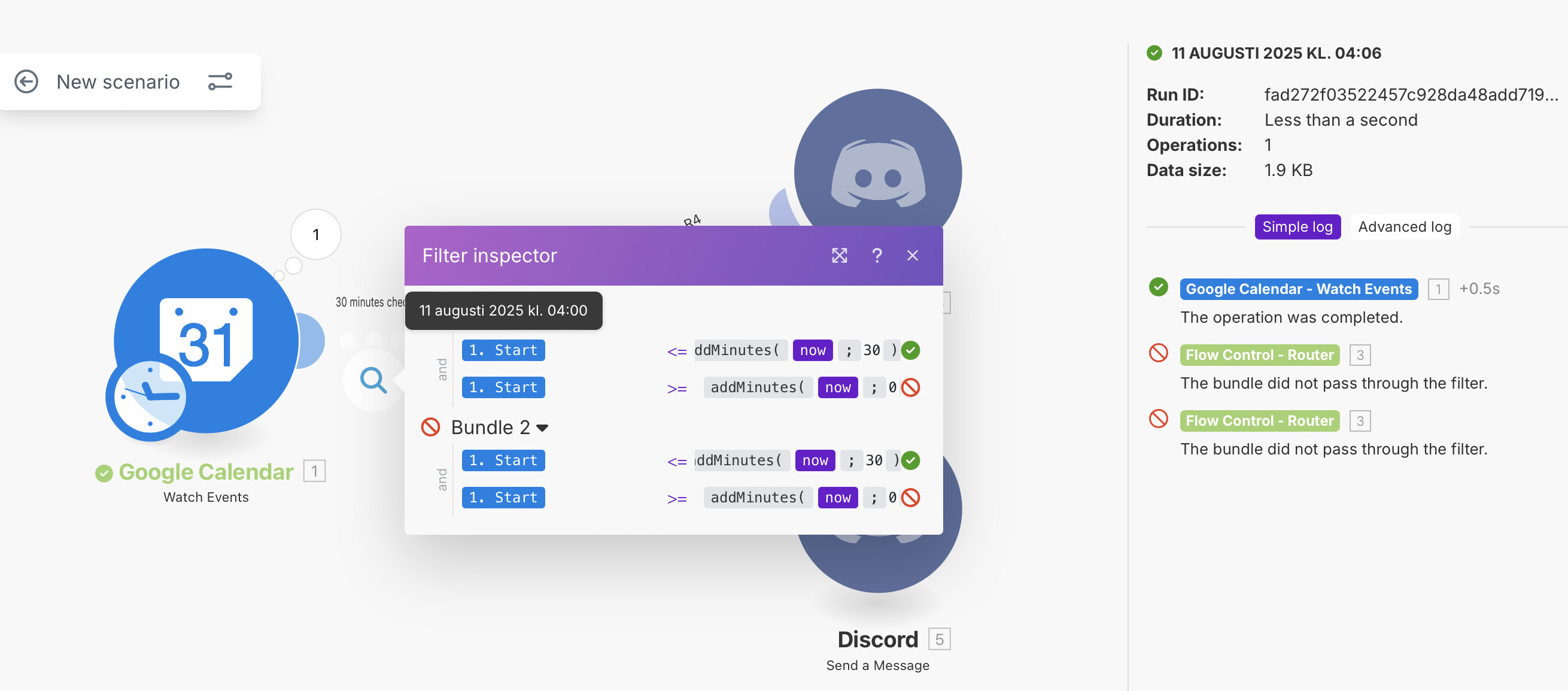
My goal:
30 minutes before an event on Google Calendar starts, post a message on Discord.
So my Scenario has Google Calendar as start Module, a little filter then the action (in fact I have a router, but my current issue is that the flow stops at the filter before the router).
To get that:
Google Calendar Module runs every 15 minutes
Google Calendar Module watch Event Start
Filter :
Logic is: eventStart <= now <= eventStart+30 minutes
So I used now <= eventStart+30 minutes AND eventStart <= now+0 minute
I checked the History, and I have an event that starts at 4:00
At 3h51: No event discovered by the Google Calendar Module (because it hasn’t started yet?)
At 4:06: Event discovered by Google Calendar Module (because it has started?) but can’t pass the filter (which is logical).
So I think the issue is on Google Calendar Module, but then I’m at loss on what to do. I saw that some other templates with Google Calendar watch creation dates, but I’m not sure why, and my events are mostly recursive, so will it work really then?
I am missing something, since I guess this scenario should be possible, but which part?
The issue here is more about how the Google Calendar “Watch Event Start” trigger works rather than your filter logic. That trigger only returns events when they are about to start (or have already started, depending on your settings) — it doesn’t continuously list upcoming ones for you to filter. That’s why you’re seeing nothing at 3:51 but something at 4:06.
If you want to catch events 30 minutes before start time, you have a couple of options:
-
Switch to “Watch Events” instead of “Watch Event Start.”
- This gives you all upcoming events in the time window you set, so your filter can catch those starting in the next 30 minutes.
-
Use “Watch Updated Event” with a date range search
- You can tell it to fetch events between
now and now + 30 minutes every 15 minutes.
-
Alternative logic: Instead of trying to filter at trigger time, pull all events for the day (or next few hours) and then filter in Make by
This way, you’ll catch them in the right window before start time.
The main takeaway: the “Watch Event Start” module won’t give you early notice — you need a trigger that can see events before they start.
1 Like
Thank you for the explanation.
I’ll try it.
I didn’t want to list all events to avoid calculation, but as I understand it now, the watch event starts works as you described which I kinda felt after debugging it.