I’m trying to populate a date/time field in Airtable that is set to Local format (14/08/2025).
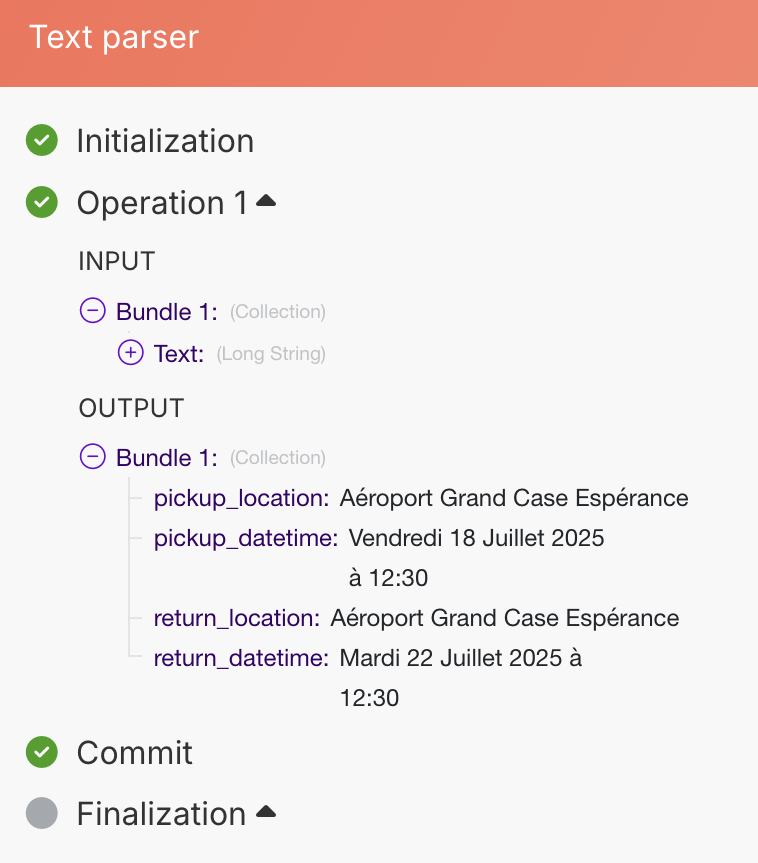
The data I need to retrieve comes out of my TextParser module in the following format:
I think instead of the formatDate() function you need to use the parseDate() function. This function takes in a string + your definition of how the string has to be read and gives back a date. However, I’m not even sure that this is possible.
Is the data always like this or does it differ sometimes? If it’s always the same you might come up with a way to convert it to a date. First word is the day, then the number…
Alternatively, you could feed this to Gemini and ask for a date back. Should work and is basically free too.
Considering the value of pickup_datetime is a string, I would use both parseDate() and formatDate(). First I would replace the word “at“ or in your case “à“ with just a space. Then I would take the resulting string and input it into parseDate() indicating that the format that was used was dddd D MMMM YYYY H:mm. Finally I would use formatDate() to choose the format that you want. In the example i am showing you i chose DD/MM/YYYY which would result in 18/07/2025.
Thanks for your answer. The issue is that Make doesn’t recognize dates in French, so I used a Text Parser / Match Pattern to split all the data from my “date” field, then a Set Multiple Variables module to convert the months into numbers, and finally I combined everything into an ISO date. Anyway, thanks a lot for your help!
@morgan_moussier Parsing and formatting dates in other languages can be tricky and ops consuming but you can use Native AI modules by make like “Request Anything”. Here is how you can find and use it.