Hi,
I am experiencing this error despite a valid oAth connection to my airtable:
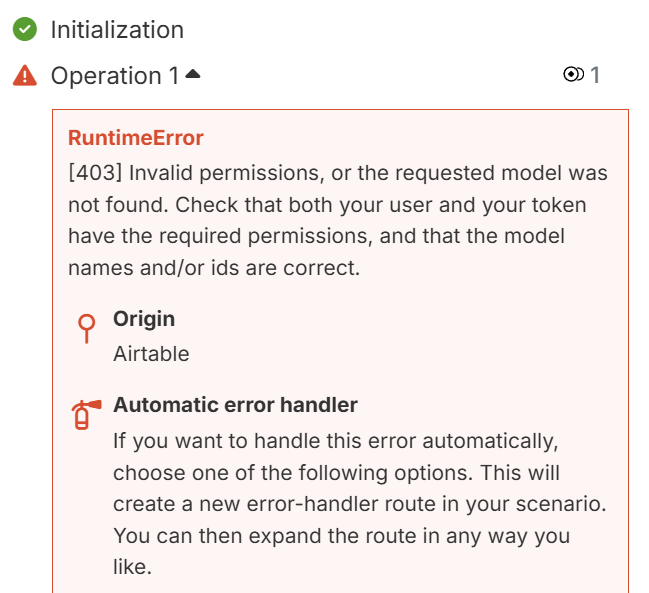
The operation failed with an error. [403] Invalid permissions, or the requested model was not found. Check that both your user and your token have the required permissions, and that the model names and/or ids are correct.
It was working before and running fine, but not anymore. Deleting all connections and creating a new one did not work. Personal access token with the correct API permission did not work either. Please help.
Hey R_Commerce!
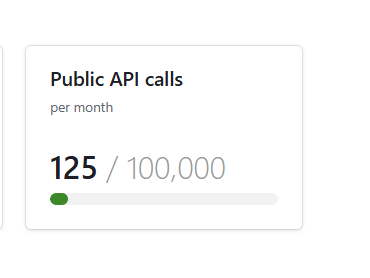
That 403 error with valid credentials typically means you’ve hit your Airtable API rate limits.
The Issue:
Airtable has monthly API call limits based on your plan:
- Free Plan: 1,000 API calls/month
- Team Plan: 100,000 API calls/month
- Business/Enterprise: Unlimited API calls
Quick Check:
What Airtable plan are you on? If you’re on the Free plan, you’ve likely exhausted your 1,000 monthly calls - this is a common issue with Make scenarios that poll frequently.
Solutions:
-
Immediate Fix: Wait for your monthly limit to reset (resets on your billing cycle date)
-
Check Usage: Go to Airtable → Account → Usage to see your API consumption
-
Long-term Fix:
- Upgrade to Team plan ($20/seat/month) for 100,000 API calls
- Optimize your Make scenarios to reduce API calls (batch operations, fewer trigger checks)
- Use webhooks instead of polling triggers
-
Temporary Workaround: If urgent, create a new Airtable workspace (separate API limit) but this isn’t sustainable
The error message is misleading - it shows “Invalid permissions” when it’s actually a rate limit issue. Your connection is fine, you just need more API capacity or to wait for the reset.
Sam @ Flow Digital
It’s not the API rate limit.
It is:
”RuntimeError
[403] Invalid permissions, or the requested model was not found. Check that both your user and your token have the required permissions, and that the model names and/or ids are correct.”
@R_Commerce apologies for the late response!
What I know is that the Airtable API is super reliable and it only returns a permission error when there is actually a permissions error. This could potentially be because a new PAT token needs to be created, scopes are missing and/or if there is a locked field.
Double-checking everything should resolve the issue. That said, if you need a deep-dive into it, happy to hop on a call for a troubleshooting session.