My scenario is simple, and used to work, and now does not.
The trigger is a webhook which passes data to Make.
There are then two Notion modules to get related properties.
Then there is a Gmail send email module that includes data from the trigger module and each of the Notion modules.
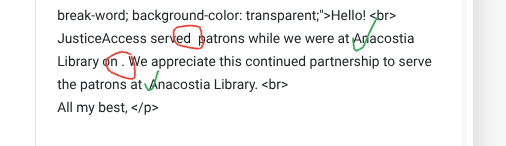
The history shows that the data is being passed correctly, but the email is sending with blanks in place of some of the data. I’m trying to figure out what I need to fix.
- Data being passed correctly by the webhook:
-
Data being pulled correctly from related Notion database:
-
Output from Notion database sending in the email, but data from the trigger module not:
Any idea what might be going on here?
Report service numbers to DCPL (updated database).blueprint.json (103.7 KB)
Hey Rebecca,
can you share a screenshot of the Gmail module and how its currently configured? Maybe the names of the variables got changed or something?
I don’t think the variable name got changed (though that would be very like me).
Hey Rebecca!
Looking at your webhook structure, I see the exact issue. Your properties have special characters and spaces that need special handling. Here’s the complete solution:
Understanding Your Data Structure: Your webhook sends:
1.data.properties
  ├── "# of patrons served" → formula → number
  ├── "Start UTC" → date → start
  └── "Primary contact email" → rollup → array[] → email
The Fix - Use get() Function:
In your Gmail module, replace the current mappings with these exact formulas:
For Subject Line:
JusticeAccess service numbers, {{formatDate(get(get(1.data.properties; "Start UTC"); "date.start"); "M/D/YYYY")}}
For Email Body - Number of Patrons:
{{get(get(1.data.properties; "# of patrons served"); "formula.number")}}
For Email Body - Date:
{{formatDate(get(get(1.data.properties; "Start UTC"); "date.start"); "MMMM DD, YYYY")}}
For Location Name:
{{first(map(get(8.properties_value; "Name"); "plain_text"))}}
Alternative Method - Add Set Variables Module:
Insert a Tools > Set Multiple Variables module between webhook (Module 1) and Gmail (Module 10):
Variable: patronsServed
Value: {{get(get(1.data.properties; "# of patrons served"); "formula.number")}}

Variable: startDate
Value: {{get(get(1.data.properties; "Start UTC"); "date.start")}}

Variable: locationName
Value: {{first(map(get(8.properties_value; "Name"); "plain_text"))}}

Variable: contactEmail
Value: {{first(get(get(1.data.properties; "Primary contact email"); "rollup.array")[].email)}}
Then in Gmail, simply use:
{{3.patronsServed}}{{formatDate(3.startDate; "MMMM DD, YYYY")}}{{3.locationName}}{{3.contactEmail}}
Why This Works:
get() safely navigates nested objects with special characters- First
get() retrieves the property by name
- Second
get() drills into the nested structure
- No need for backticks or escape characters
Test with one record first to verify the mappings work correctly!
Sam @ Flow Digital