Filter by part of the word

I checked the Help Center article about filtering:

https://help.make.com/filtering

It’s very basic and doesn’t provide any advanced information.

So please help me with this situation:

I have a Facebook comment that contains text.

For example: “Check this out: https://example.com

How can I filter comments by part of the word? I need to filter by “https“.

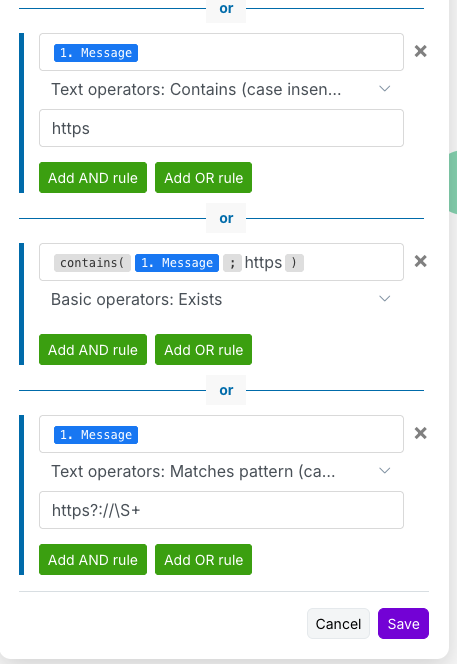
My test, but it’s not working:

Please help me, thank you.

Welcome to the Make community!

You can delete the first two.

The pattern should be exactly this

https:

or this

https:\/\/

Alternatively,

Hope this helps! If you are still having trouble, please provide more details.

@samliew
P.S.: investing some effort into the tutorials in the Make Academy will save you lots of time and frustration using Make!

Thank you very much for your help.
I made filter by your example, but still the same problem.

This is my try:

What I missed?

What does the variable Message contain? Does it have http?

Please provide the output bundles of each of the relevant modules by running the scenario (you can also get this without re-running your scenario from the History tab).

Click on the white speech bubbles on the top-right of each module and select “Download input/output bundles”.

A. Upload as a Text File

Save each bundle contents in a plain text editor (without formatting) as a bundle.txt file.

You can upload the file here by clicking on this button:

B. Insert as Formatted Code Block

If you are unable to upload files on this forum, alternatively you can paste the formatted bundles.
Here are some ways to provide text content in a way that it won’t be modified by the forum.

  • Method 1: Type code fence manually
    Add three backticks ``` in a separate line before and after the content, like this,

    ```
    text goes here
    ```
    
  • Method 2: Highlight and click the “preformatted text” button in the editor

  • Method 3: Upload your file and share the public link
    (this method is only recommended for large files exceeding the forum upload limit)

Providing the input/output bundles will allow others to replicate what is going on in the scenario, especially if there are complex data structures (nested arrays and collections) or if external services are involved, and help you with mapping the raw property names from collections.

This will allow others to better assist you. Thanks!

Hope this helps! If you are still having trouble, please provide more details.

@samliew

There is no output bundles button.

Please take a look here:

Polling Triggers & Empty “Check Runs”

This is because the module is a POLLING trigger, and not an INSTANT (Webhook) trigger.

If you don’t see any bundles from the trigger module and operations on the rest of the modules, it means there are no new responses (empty output bundle) when the scenario ran to check for new items. This is called a “Check run”.

There are two main types of triggers, Polling (scheduled), and Instant (webhooks). Polling triggers can only run on a schedule. Instant triggers can be run as soon as data is received by the webhook.

  • Polling means Make checks external service for changes (pull changes to Make).
  • Webhook (instant) triggers means external service calls Make when there are new changes (push changes to Make).

The module you are using does not push changes — it’s basically a API request that Make has to occasionally “call” to fetch the latest changes/items.

To find out more on the different types of Trigger modules, see refer to Types of Modules and Webhooks sections of the Make Help Centre.

If you want your scenario to only run when there is new data (and not on a schedule or timed interval), see if your app has an “Instant” or “Webhook” trigger in Make. If not, check if the third-party service has a feature that can send out a webhook when content is created/updated - and then you can point it to a “Custom Webhook” trigger in your scenario.

If you want to re-run your scenario on older data,

Polling Triggers: Epoch Panel & Selecting Older Data

Go to the Epoch Panel, by right-clicking on the trigger module (polling triggers only), and select “Choose where to start” from the list of options in the context menu.

If you select “From now on”, the next time the scenario runs it will only return new data (or nothing if there is no new data).

You can also select other old data to re-run your scenario with next using the “Choose manually” option. This will then show you a list of previous historical items you can select to process the next time the scenario is triggered.

For more information, see

Hope this helps! If you are still having trouble, please provide more details.

@samliew

Hi,

Thank you for your instruction.

Looks like the output bundles fill up only when it finds some results.
So I added additional text to my Facebook comment.

Here is the result:
[
{
“id”: “101071876091291_682122801228874”,
“from”: {
“name”: “John Smit”,
“id”: “251914564460417848”
},
“parent”: {},
“message”: “Lorem ipsum sun text v1”,
“can_hide”: true,
“can_like”: true,
“can_remove”: true,
“like_count”: 0,
“can_comment”: true,
“created_time”: “2025-10-27T07:52:03.000Z”,
“comment_count”: 0
},
{
“id”: “101071876091291_837288485412347”,
“from”: {
“name”: “John Smit”,
“id”: “251914564460417848”
},
“parent”: {},
“message”: “Lorem ipsum car text v1”,
“can_hide”: true,
“can_like”: true,
“can_remove”: true,
“like_count”: 0,
“can_comment”: true,
“created_time”: “2025-10-27T07:52:10.000Z”,
“comment_count”: 0
}
]

Very strange, but only two comments were taken.
It seems that the module did not review all the comments on the page.
There are 8 in total to check, but it only checked two.

Facebook Pages module, there is a limit.
(The maximum number of results to be worked with during one execution cycle.)
Value is 100. So this shouldn’t be a problem.