What is your goal?
To update a contact’s phone number and email address.
 What is the problem & what have you tried?
When attempting to update the phone number and email address, MAKE does not accept the parameters:
BundleValidationError
Validation failed for 2 parameter(s).
Array of objects expected in parameter ‘emailAddresses’.
Array of objects expected in parameter ‘phoneNumbers’.
I have tried several ways. I check the size of the phone and email array first and only save to existing ones. I also used the formula with conditions to update [1] or [2] if they exist, or save directly if they don’t. Today there are several routes depending on the configuration of the phone and email array, but if the expression with the conditions works, it will be just one route and make everything simpler.
Here is the simple instruction confirming that the flow is filtered to come to this function if the array length is equal to 2. I also made sure that the phones are correct in the contents of the variables {{39.Tel_Celular_Tratado2}} and {{6.Tel_Empresa2_Parse}}
[
{ “metadata”: {{14.phoneNumbers[1].metadata}}, “value”: “{{39.Tel_Celular_Tratado2}}”, “type”: “mobile” },
{ “metadata”: {{14.phoneNumbers[2].metadata}}, “value”: “{{6.Tel_Empresa2_Parse}}”, ‘type’: “work” }
]
Here is the conditional flow to check if collections [1] and [2] exist:
]
{
{{if(14.phoneNumbers[1].metadata; ‘“metadata”: ’ & 14.phoneNumbers[1].metadata & ’; '; ‘’)}}
“value”: “{{39.Tel_Celular_Tratado2}}”;
“type”: “mobile”
};
{
{{if(14.phoneNumbers[2].metadata; ‘“metadata”: ’ & 14.phoneNumbers[2].metadata & ’; '; ‘’)}}
“value”: “{{6.Tel_Empresa2_Parse}}”;
“type”: “work”
}
]
To resolve this for now, I am deleting the existing Contact ID and recreating the contact with the phone numbers and emails I want to save, but obviously this is not ideal.
 Error messages or input/output bundles
BundleValidationError
Validation failed for 2 parameter(s).
Array of objects expected in parameter ‘emailAddresses’.
Array of objects expected in parameter ‘phoneNumbers’.
What is your goal?
Fazer o updade do número de telefone e do email de um contato.
What is the problem & what have you tried?
Na tentativa de fazer o update do telefone e do email, o MAKE não aceita os parâmetros:
BundleValidationError
Validation failed for 2 parameter(s).
Array of objects expected in parameter ‘emailAddresses’.
Array of objects expected in parameter ‘phoneNumbers’.
Eu já tentei de várias formas. Verifico antes o tamanho do array do telefone e do email e gravo apenas nos existentes e também usei a fórmula com condições para fazer o updtate em [1] ou [2] se existir ou gravar de forma direta caso não exista. Hoje há várias rotas conforme a configuração do arrya de telefone e email, mas se a expressão com as condicioinais funcionar, será apenas uma rota e tornará tudo mais simples.
Segue a instrução simples ratificando que o fluxo está filtrado para vir para essa função se o comprimento do array for igual a 2. Também me certifiquei que os telefones estão corretos nos conteúdos das variáveis {{39.Tel_Celular_Tratado2}} e {{6.Tel_Empresa2_Parse}}
[
{ “metadata”: {{14.phoneNumbers[1].metadata}}, “value”: “{{39.Tel_Celular_Tratado2}}”, “type”: “mobile” },
{ “metadata”: {{14.phoneNumbers[2].metadata}}, “value”: “{{6.Tel_Empresa2_Parse}}”, “type”: “work” }
]
Segue o fluxo condicional para verificar se o collection [1] e [2] existem:
[
{
{{if(14.phoneNumbers[1].metadata; '“metadata”: ’ & 14.phoneNumbers[1].metadata & '; '; ‘’)}}
“value”: “{{39.Tel_Celular_Tratado2}}”;
“type”: “mobile”
};
{
{{if(14.phoneNumbers[2].metadata; '“metadata”: ’ & 14.phoneNumbers[2].metadata & '; '; ‘’)}}
“value”: “{{6.Tel_Empresa2_Parse}}”;
“type”: “work”
}
]
Para resolver isso por enquanto estou excluindo o Contact ID existente e criando novamente o contato com os telefones e emails que quero gravar, mas logicamente não é o ideal
Error messages or input/output bundles
BundleValidationError
Validation failed for 2 parameter(s).
Array of objects expected in parameter ‘emailAddresses’.
Array of objects expected in parameter ‘phoneNumbers’.
 Screenshots (scenario flow, module settings, errors)


 Okay
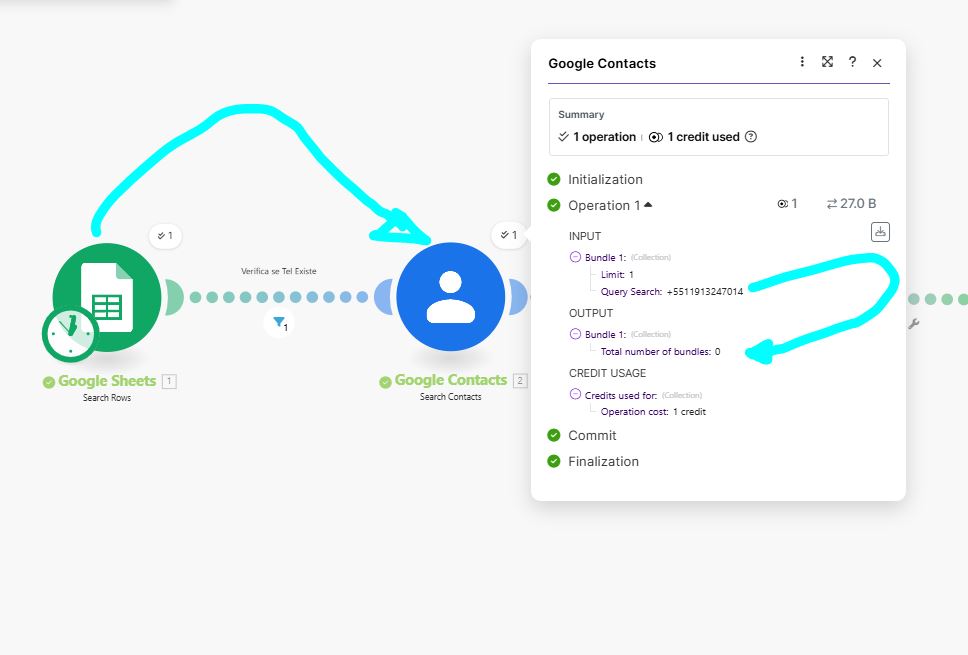
Okay  If you can help me with another issue, but within the same module, I am having an intermittent problem. In some cases, the Google Contacts - Search Contacts module has returned an empty response when there is actually a record in Google Contacts. When this happens, I run it again and the response is positive, that is, it returns the record for the searched item, but it has also happened that I ran it again and the response was negative, and on the third time the response was positive. Logically, this creates duplicate records.