Hello, I am trying to connect my personal Google account (@gmail.com) to a Google Drive/Sheets module using the custom OAuth client method for restricted scopes.
I have followed all the steps in the official guide:
Created a project in Google Cloud Platform.
Configured the OAuth consent screen with the correct scopes (.../auth/drive, .../auth/spreadsheets) and added myself as a test user.
Created a ‘Web application’ type OAuth Client ID.
I have meticulously set the ‘Authorized redirect URI’ to https://www.make.com/oauth/cb/google-restricted. I have checked for typos and spaces, and even tried waiting for propagation delays.
However, I consistently get the 400: redirect_uri_mismatch error when I try to sign in. I believe this is a platform issue, as all configuration steps on my end have been verified multiple times. Please advise.
5. Last but not the least, check the Audience section and add your email as
a test user.
If you have done the above and you still get to a roadblock, if you get to a part where it says back to safety, don’t click on back to safety, click on advanced
Here are some commonly-needed redirect URIs you need for your Google Cloud Console OAuth app. If you set these up, you can reuse the same GCP app for other Google apps and modules on Make.
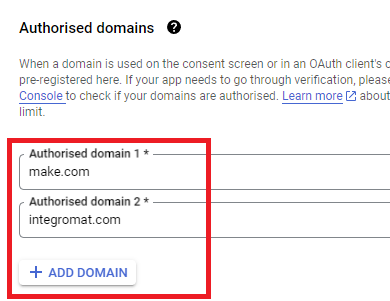
You are also required to insert the legacy URLs below from the old Integromat system that not been migrated to Make yet (same as the above list, but replace “make” with “integromat”):
Note 1: Due to inconsistencies in Make’s implementation of the connections, there are two separate entries where has one is google and another ending in a forward slash google/ - you might need one or the other, so we have to use both!
Note 2: Once you’ve set these up, you can use/reuse the same Google OAuth App ID + Secret for all the supported Google connections and modules on Make - you’ll just have to enable the relevant Google APIs!
4. Create New Connection (HTTP, or respective Google module)
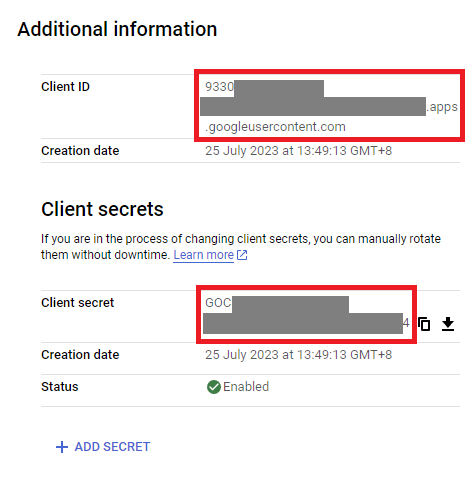
You can find the Client ID and Client Secret in the OAuth2 app you created in GCP, on the right-hand side of where you inserted the callback URLs in step 2: