How to map invoice rows in HTTP POST module so that multiple rows would be created?

:bullseye: What is your goal?

Creating invoices in an external system with REST API based on CRM data from Airtable.

:thinking: What is the problem & what have you tried?

I cannot map array data for dynamic amount of invoice rows to the HTTP POST module’s “invoice rows” section. I have tried without “Map” on, but then I can only see one of the values, and I cannot figure out how to do with “Map” on.

I guess a basic question is if I even should be able to map the values directly to the HTTP POST module, or if I would need to some other “re-packaging” module before that?

For some reason I cannot upload more than one screenshot, so I chose the mapping view with “Map” enabled.

Thank you in advance,

Björn

:clipboard: Error messages or input/output bundles

Example of Airtable’s “Get Record” output data, where two values exist:

{
“Bundle 1”: {
“Hinta 0% (from Ostettu tuote)”: [
390.4382470119522,
79.6812749003984
],
“VAT rate (from Ostettu tuote)”: [
0.255,
0.255
],
“Hinta 25.5% (from Ostettu tuote)”: [
490,
100
]
}

:camera_with_flash: Screenshots (scenario flow, module settings, errors)

See “Setting the Correct Aggregator Source” below.

Combining Bundles Using Aggregators

Every result/item from some module types (like Trigger / Iterator / List / Search / Match modules) can potentially and likely output more than one bundle. These multiple bundles will individually run subsequent modules once per bundle, which is not optimal in most cases:

  • one operation per bundle per module, which could lead to…
  • use of multiple credits per bundle per module (some modules use more than one credit)
View example screenshots

Aggregator Example

The “Search Rows” module runs one time, returning 999 results (999 bundles).

  • Without Aggregator: the tools module run 999 times (999 operations)


    (and if there are more modules, they run 999 times each)

  • With Aggregator: the tools module only runs 1 time (1 operation)

:warning: Warning: :police_car_light:
This can easily use your entire quota of credits if you are not careful or fail to understand this concept.

To “combine” multiple bundles into a single variable, so that you can process all of the items in a single operation, you’ll need to use an aggregator. Aggregators is a type of module that accumulates bundles and outputs one bundle (unless you are using “Group By”). An example of a commonly-used aggregator module is the Array aggregator module.

You can find out more about some other aggregator modules here:

Question: Which is the best aggregator do you think you’ll need for your use-case?

Setting the Correct Aggregator Source

You need to set the “Source Module” field of the aggregator to where the bundles are coming from. This is usually an iterator module, but can also be a search/list/repeater module, or even the trigger module!

Mapping a Complex (Collection) Structure Into an Array Field

The Array Aggregator module is very powerful because it allows you to build a new complex array of collections that matches a later module’s array field to map multiple items (collections) to it. Such fields initially may allow you to manually add individual items, but toggle the “Map” switch on, and you can map an array variable (from an Array Aggregator) containing multiple collections.

Simply select the respective “Target structure type” in an Array Aggregator module.

As you can see from the example above, the “Map” toggle on complex array fields are used when you have an array variable (like from an array aggregator).

:clipboard: Note: :light_bulb:
Other combinations of modules may also allow you to generate an array that matches a future module field’s array structure, like “Aggregate to JSON + Parse JSON”, or “Create JSON + Parse JSON”, but this is an advanced topic.

Question: Are you mapping your array into a field that accepts more than one item/collection?

Example

Here is an example of how your scenario could look like:
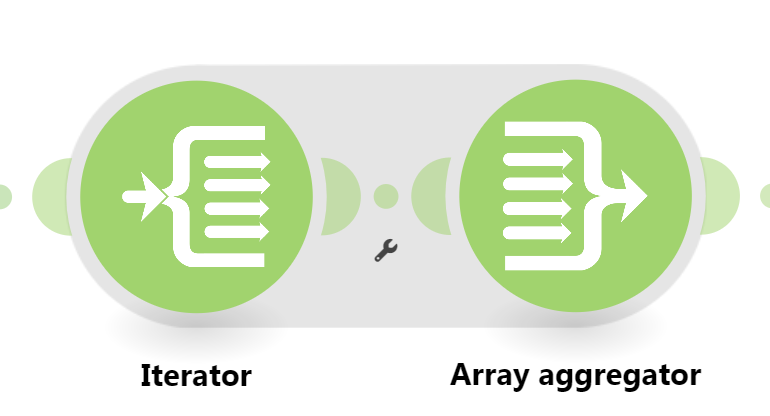
This is just an example. Your solution may or may not look like this depending on requirements and actual data.

For more information, see “Mapping with arrays” in the Help Centre. I also suggest going through the Make Academy, which also covers the use of Iterators & Aggregators.

Hope this helps! If you are still having trouble, please provide more details.

-– @samliew

Thank you for replying. Unfortunately I got perhaps more confused than before :).

I think the basic question, the one that would help me understand the other parts, is how looping withing a module is supposed to work. This HTTP module first has some invoice header data, and then one can add n invoice rows manually. If I add an item I get an “Item 2” with same fields to populate as in the picture below. But since one cannot know the amount of rows, it needs to be dynamic.

That is why I enabled “Map” and thought I’d be able to build the data structure and populate it with the variables from the earlier Get Record module’s output.

Is this the right way to do this? What is the syntax for doing that? I tried different ways to do it, but failed. Here’s showing the logic I tried to use, having one row and its either fixed or variable data point defined.

I have not been able to find documentation for how to use this “Map” way of defining data. Does it make any sense to try to it this way?

Rgds,

Björn

I have discarded the approach in my previous reply, and tried to get the Iterator/Aggregator approach.

I can get some results, but some are unexpected.

As the target module for the Aggregator is a HTTP POST request, I get to define the target structure in the Array aggregator. The problem is that there’s only one “Value” field to be chosen in the Iterator output, when I would have expected one value for each of the invoice row data points, e.g. price VAT, VAT rate, price VAT 0, and so on).

The Iterator I have tried to set up different ways, both like this with hand selected Items and with Map toggle enabled.

The results looks like this, so I get the the different aspects of the invoice row (here price and VST rate) as separate bundles.

This results in the following output from the Aggregator:

I also tried using one Iterator for each of the invoice row values, then mapping the resulting values from each of the to the Aggregator.

While that worked partly, it for some reason resulted in multiples of the invoice rows.

I guess there’s an easy explanation here for what I do wrong. I couldn’t find the answer in the Help documentation, nor in the Academy lesson. All I found handled the situation with only one array to handle, not my situation with multiple arrays.

Cheers,

Björn

Hey Björn.

you need to aggregate to the same structure that the HTTP module is expecting.

You can check our the Make Academy course on iterators and aggregators here.

Thanks @Stoyan_Vatov. I realise that but can’t find a way to populate that structure with the variables. There’s something wrong in my Iterator setup I can’t find the solution for. I have watched that course and read the Help pages for both Iterator and Aggregator, but they don’t address this issue. At least as far I can understand it.

Here’s the data structure from the HTTP module replicated in the Aggregator module. My problem is I can’t build the Iterator so that I’d get several values in the Iterator output, so that I could map them to the HTTP structure.

If I have the “Map” toggle enabled in the Iterator and place one array from the Get Record module there, I do get its value in the Iterator output “Value” field.

But I cannot understand how to construct that Iterator “Map” to contain several arrays so I’d get one for price, one for VAT rate etc.

Rgds,

Björn

Oh right, the iterator needs to run at least once to get the data and populate it in the menu.

Try running the scenario up to the iterator and try refreshing the page to update it.

Alternatively, you can type the variable names manually. They would be something like {{41.price}} and {{41.amount}} for example.

I have run the scenario tens of times, again and again :). It’s a webhook trigger initiated by a new sales order in the CRM (Airtable), feeding an order with two products.

This Iterator setup with only one variable works.

I can then find that variable to map in the Aggregator, with a visible value:

That translates to a bundle with two product row arrays, one for the price 490 and one for the price 100. The other data fields were hard coded.

I can’t find the way to use the Iterator so that I could get more of arrays, just one at the time. If I use the manual “Item 1”, “Item 2” etc like this:

I get nothing visible to map to from the Iterator:

So I think I’m using the Iterator wrong, or not understanding how it should work.

Rgds,

Björn

Ooooh you have separate arrays for each variable, well this is a proper mess.

I assume the first item from each array corresponds to the same overall item?

Can you show the outputs of the different modules so we can see the full picture of what the complete data looks like?

A proper mess, yes, it would seem so :D.

Here’s a download of the full (obfuscated) output from the Airtable Get Record module.

module-31-output-bundles.json (5.9 KB)

From this data some items are carried over direct to the HTTP POST module to become invoice headers (e.g. rows 13-15 and row 20).

Others are used to form invoice rows, of which there are two in this example, e.g. rows 3-6, rows 34-37, rows 72-75, rows 88-91 and rows 134-137. These are the ones I try to Iterate/Aggregate to the HTTP POST module.

And yes, the first item always corresponds to the same overall item (produc).

Cheers,

Björn

You can try this, iterate the first array and map the value coming from the iteratorin the aggregator.

Then for the other items, map the item from their respective array directly that come from the airtable module and use the same order index to get the corresponding items.

This assumes that the order of each array is the same and say the second item in each array corresponds to the second item overall.

But I strongly suggest you completely rework your airtable instead and have complete items mapped together inside the same array instead of having their individual parts spread out over sperate arrays with no directly link between them to find which item belongs to which other item.

Here is an example scenario of what I mean, using your JSON file: Example - Make.com Automation Scenario

I tried to iterate only one of the values, and link the others directly to the Aggregator, but it didn’t help.

If I chose the top level array value ( {{31.Tuotenimi (from Ostettu tuote)}} ) I just got all the values after each other in the output

If I chose the underlying array value for which one can give a number ( {{31.Tuotenimi (from Ostettu tuote)}} ) it returned the same value for both rows.

Here I didn’t understand what you mean with using the same order index? I did at first not put anything in the order index slot, but then tried “2”. In both cases it returned the same twice, but different values if empty or if “2”.

I truly don’t see how to “pre-package” the arrays in Airtable. The product data comes from linked records which I have LookUp fields for. Hence they are always in the right order compared to each other.

This is an example of the data I have in different LookUp table fields in Airtable:

  • [product 1 name, product 2 name, product 3 name]
  • [product 1 price, product 2 price, product 3 price]
  • [product 1 VAT, product 2 VAT, product 3 VAT]

They are natural arrays in themselves, but there’s to my knowledge no way to combine these into one array in Airtable, since Airtable doesn’t do arrays in regular formula fields.

I’m sorry but I didn’t understand the example scenario you se generously prepared?

Rgds,

Björn

You need to map the bundle order position variable from the iterator in the order index place.

Your iterator should emit one bundle per product, and the Array Aggregator should use that Iterator as its source and the HTTP module’s invoice-row collection as its target structure. In each aggregated row, map the Iterator’s current Value for one field; for the other parallel arrays, use get(sourceArray; Iterator.Bundle order position) so row 1 pulls index 1 from every array, row 2 index 2, and so on. Don’t type a fixed index like 2, and don’t iterate the arrays separately or you’ll create cross-products. Before sending the request, inspect the aggregator output: it should be an array of complete row objects with matching product, price and VAT values. Longer term, keep each product’s fields together in one line-item record.

Thank you @Stoyan_Vatov, this reply was the final touch to make it all work. Sorry for the delayed reply, and thanks for all your efforts!

Cheers,

Björn

Thank you @aldo_quantic! This seems the same as the previous reply, with some more details. And yes, this made it work.

Cheers,

Björn