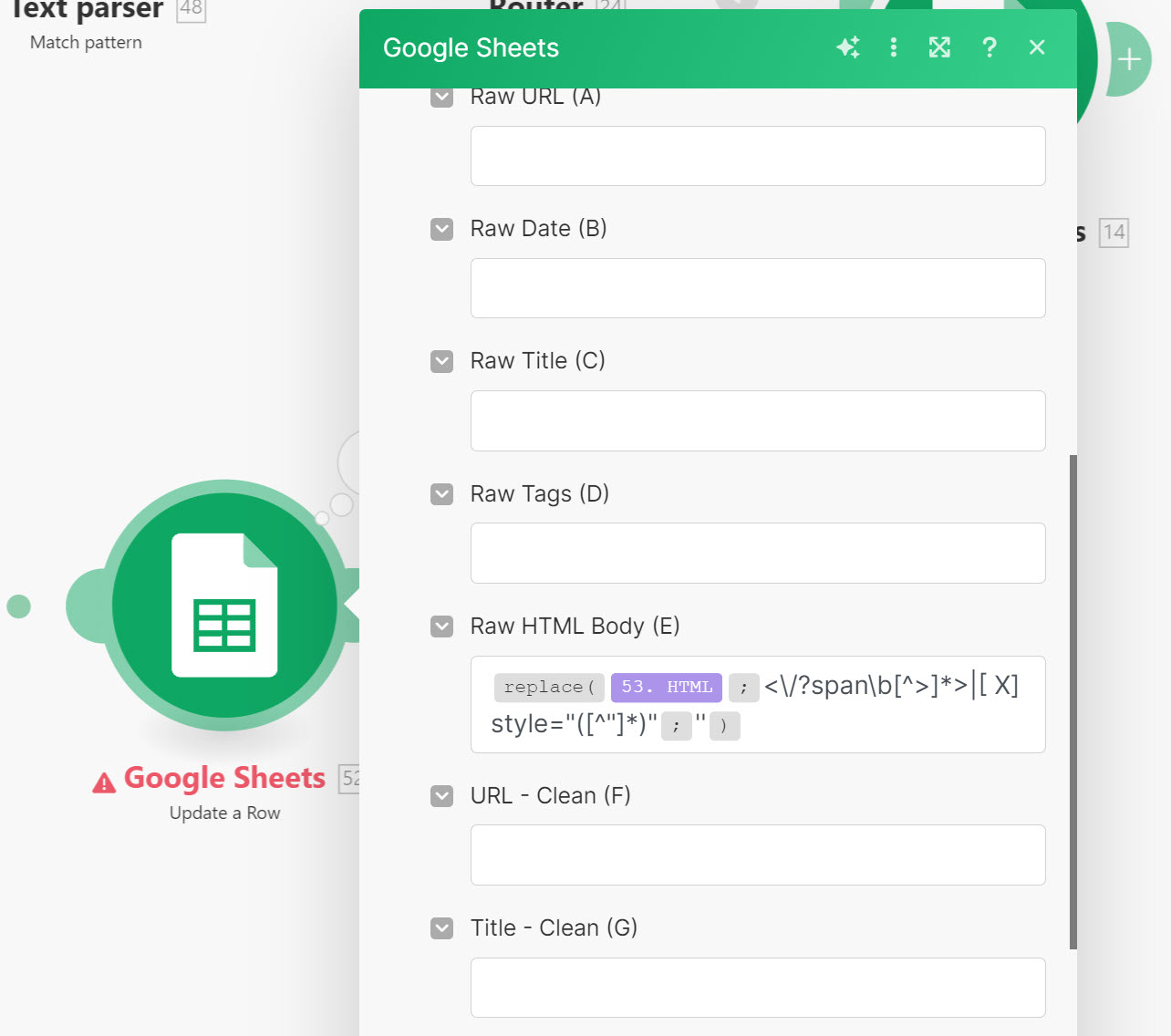
Problem: I am using the replace string to remove the and styling from some HTML before importing it to Google Sheets. I am getting an error back saying that it is over 50000 characters. This should not be the case if the replace string is working correctly.
Question: I am not sure, but maybe the replacement is not global so it is just replacing the first instance? What am I doing wrong? blueprint (2).json (81.1 KB)
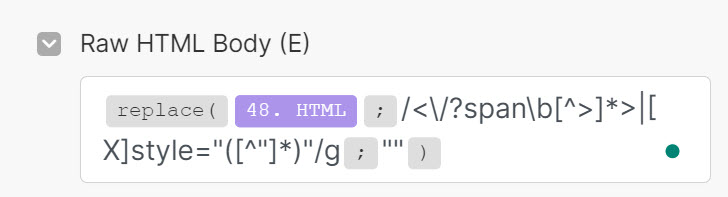
If you want to use a regular expression pattern in the inline replace function, you also need to include the delimiters and the flags.
...
add delimiters and global flag:
/.../g
I can’t see what you’re replacing, could you provide the output bundle for module [53]?
When reaching out for assistance with your regex pattern for a Text Parser module, it would be super helpful if you could share the actual text you’re trying to match. Screenshots of text can be a bit tricky, so if you could copy and paste the text directly here, that would be awesome! It ensures we can run it against test patterns effectively. If there’s any sensitive info, feel free to change it to something fictional yet still valid by keeping the format intact.
Providing clear text examples saves time on both ends and helps us give you the best possible solution. Without proper examples, we might end up playing a guessing game, and nobody wants that as it is a waste of time! You are more likely to get a correct answer faster. So, help us help you by sharing those text snippets.
Please also format text examples in code blocks:
A. Type code fence manually
Either add three backticks ``` before and after the text, like this:
``` content goes here
```
B. Highlight and click the format button
Or use the format code button in the editor:
Thanks @samliew,
Thank you for your point about delimiters and global flags. I will work on learning about those as I wait for your further reply.
I provided the blueprint in my initial comment as the text/html that the regular expression is referencing is absolutely terrible. Here is the blueprint again. blueprint (2).json (81.1 KB)
Here is a bit of the HTML (again it is pretty bad and the original in the blueprint is longer). The Expression removes all tags and styling.
<div>
<p style="margin: 0in -1pt 0.0001pt 2pt;"><span><img title="Lee Norcross" style="width: 250px; height: 304px; margin-right: 4px; float: left;" alt="Lee Norcross" src="/img/~www.l2insuranceagency.com/Blogs/Lee-1.png" longdesc="Lee Norcross" />This is a frequently asked question. Attorney takes the “free” non-practicing Extended Reporting Period Endorsement(ERP/Tail) on his Lawyers Professional Liability Insurance Policy and decides to start practicing law again at a later date. What is the impact on the ERP?</span></p>
<p style="margin: 0in -1pt 0.0001pt 2pt;"><span> </span></p>
<p style="margin: 0in -1pt 0.0001pt 2pt;"><span>In most circumstances once the attorney starts to practice law again the “free” retirement ERP becomes null and void. Given the claims made nature of Lawyers Professional Liability Insurance policy, it means that the attorney losses protection for past acts that were previously covered.</span></p>
<p style="margin: 0in -1pt 0.0001pt 2pt;"><span> </span></p>
<p style="margin: 0in -1pt 0.0001pt 2pt;"><span><br />
The following is an excerpt from the MedMarc/Proassuance policy that deals with a non-practicing ERP:</span></p>
<p style="margin: 0in -1pt 0.0001pt 2pt;"><strong><span> </span></strong><strong style="font-size: 10pt;"> </strong></p>
<p style="margin: 0in -1pt 0.0001pt 2pt;"><strong><span>“6.4.<span style="letter-spacing: 2.65pt;"> </span><span style="letter-spacing: -0.05pt;">EX</span><span style="letter-spacing: 0.15pt;">T</span><span style="letter-spacing: -0.05pt;">E</span>N<span style="letter-spacing: 0.15pt;">D</span><span style="letter-spacing: -0.05pt;">E</span>D<span style="letter-spacing: -0.55pt;"> </span><span style="letter-spacing: 0.1pt;">R</span><span style="letter-spacing: 0.05pt;">E</span><span style="letter-spacing: -0.05pt;">P</span><span style="letter-spacing: 0.05pt;">O</span>R<span style="letter-spacing: 0.15pt;">T</span>ING<span style="letter-spacing: -0.55pt;"> </span><span style="letter-spacing: -0.05pt;">P</span><span style="letter-spacing: 0.05pt;">E</span>RI<span style="letter-spacing: 0.05pt;">O</span>D<span style="letter-spacing: -0.2pt;"> </span><span style="letter-spacing: -0.05pt;">E</span>ND<span style="letter-spacing: 0.05pt;">O</span><span style="letter-spacing: 0.1pt;">R</span><span style="letter-spacing: -0.05pt;">SE</span><span style="letter-spacing: 0.2pt;">M</span><span style="letter-spacing: -0.05pt;">E</span>NT<span style="letter-spacing: -0.65pt;"> </span>-<span style="letter-spacing: -0.05pt;"> </span>N<span style="letter-spacing: 0.05pt;">O</span>N<span style="letter-spacing: 0.05pt;">-</span><span style="letter-spacing: -0.05pt;">P</span><span style="letter-spacing: 0.25pt;">R</span><span style="letter-spacing: -0.25pt;">A</span>C<span style="letter-spacing: 0.15pt;">T</span>ICING<span style="letter-spacing: -0.85pt;"> </span><span style="letter-spacing: 0.1pt;">I</span>N<span style="letter-spacing: -0.05pt;">S</span>U<span style="letter-spacing: 0.15pt;">R</span><span style="letter-spacing: -0.05pt;">E</span>D</span></strong></p>```
If you want to use a regular expression pattern in the inline replace function, you also need to include the delimiters and the flags. add delimiters and global flag: /…/g
You were spot on @samliew with your comment about delimiters and global flags. I adjusted the string and after my edit, it appears to be working correctly.
I adjusted the regular expression from:
As a follow-up. I am using double quotes (“”) as the replacement string. This essentially replaces it with nothing. Would it be better to use the “emptysting” keyword instead of the double quotes (“”)?
Excellent work on figuring it out, and glad I could help!
1. If anyone has a new question in the future, please start a new thread. This makes it easier for others with the same problem to search for the answers to specific questions, and you are more likely to receive help since newer questions are monitored closely.
2. The Make Community guidelines encourages users to try to mark helpful replies as solutions to help keep the Community organized.
This marks the topic as solved, so that:
others can save time when catching up with the latest activity here, and
allows others to quickly jump to the solution if they come across the same problem
To do this, simply click the checkbox at the bottom of the post that answers your question:
3. Don’t forget to like and bookmark this topic so you can get back to it easily in future!
4. Do join the unofficial Make Discord server for live chat and video assistance