Hi everyone,
I have a scenario that goes like this :
- Webflow Form Submission
- Router
- Set Variable
- Create Record in my CRM
- Send an Email internally through Brevo Send Email integration
In the form, people have a multiselect where they can choose the type of equipment they own.
The Set Variable module handles that. And the ouput can look like below
[
    {
        "type_installation": [
            "PAC A/E",
            null,
            null
        ]
    }
]
or
[
    {
        "type_installation": [
            "PAC A/E",
            null,
            "PV"
        ]
    }
]
Now, in the subject and the body of my email I send the following:
“Type of equipment : {{10.type_equipment}}” –> This is the Set Variable module.
The issue is that if the prospect selects only one service, I will receive
“Type of equipment : , , PV”
or
”Type of equipment : "PAC A/E, ,
I tried some join / map / replace / trim, but I never make it work…
I would appreciate your help to make it work 
Cheers
Hey @Quentin_h33,
Use this formula to clean up the value:
{{trim(replace(10.type_equipment; “,”; “”))}}
Let me know if you need further clarification!
If this helps, kindly mark it as a solution 
Hello @Probotic_Solutions ,
thanks for your help.
I tried your solution (just adapted it to my scenario): {{trim(replace(4.type_installation; “,”; “”))}}
But when I paste it, it looks like this:
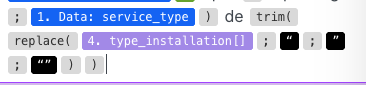
If I try to update it to make it “work”, then it doesn’t change anything 


Any idea?
Hi @Quentin_h33,
Apologies for the misunderstanding. It’s a multiselect field where the user can select one or more options, including all. So, we just need to remove the empty elements from the array.
I tested it, and the following formula worked well:
{{remove(15.contacts; emptystring)}}
OR
{{remove(4.type_installation; emptystring)}}
Let me know how it goes. If this helps, please consider marking it as a solution.
Hello,
Thanks again for your help but it doesn’t seem to work.

ANy idea?
I was sure it would be simple but somehow I don’t manage to have it right…
Hey Quentin,
what does the incoming data literary look like? Can you paste the output bundle form the module here?
I tested with the JSON strings from your initial post and this works:
{{remove(1.type_installation; null; emptystring)}}
Basically use the remove() function on the incoming array and have it delete any values that are either null or empty strings.
Hello,
Thanks for your help, it worked!! I am a “bit” perfectionist so you can’t imagine how happy I am thanks to you.
For your info
Here is the global scenario :
On the module “Set Variable”
Input :
[
{
“name”: “type_installation”,
“scope”: “roundtrip”,
“value”: [
null,
“Climatisation”,
null,
“Gaz”,
null,
null,
“Plomberie”,
null
]
}
]
Output :
[
{
“type_installation”: [
null,
“Climatisation”,
null,
“Gaz”,
null,
null,
“Plomberie”,
null
]
}
]
Here is the module content
{{add(emptyarray; if(1.data.pac = “true”; “PAC A/E”; ); if(1.data.clim = “true”; “Climatisation”; ); if(1.data.pv = “true”; “PV”; ); if(1.data.gaz = “true”; “Gaz”; ); if(1.data.fioul = “true”; “Fioul”; ); if(1.data.domestic_hot_water = “true”; “ECS”; ); if(1.data.bathroom = “true”; “Plomberie”; ); if(1.data.plumbing = “true”; “Plomberie”; ))}}
Thanks again!


