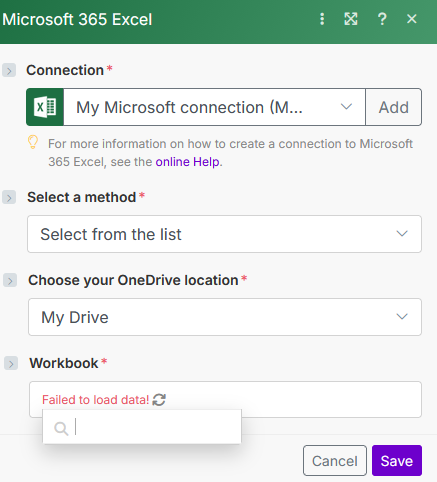
It should be simple, but it is not. I can’t spend any more time trying to figure this out! I have authorized the connection but the Excel module can’t see the workbooks in my OneDrive folder - it just says “Failed to load data”…
Please help!
It should be simple, but it is not. I can’t spend any more time trying to figure this out! I have authorized the connection but the Excel module can’t see the workbooks in my OneDrive folder - it just says “Failed to load data”…
Please help!
After authorizing the connection, the Excel module can’t access workbooks in OneDrive and shows a “Failed to load data” error.
I’ll help you identify what’s blocking the connection checking permissions, file paths, and integration settings and guide you through the exact steps to get your Excel module properly reading your OneDrive files.
Schedule a call with me here so we can have a chat about this.
Try clicking the select a method and choosing something from there.
Hey @Martin_Zahradnik,
If you still need help with the issue, we can connect and get it resolved as soon as possible.
Feel free to check out my Fiverr Services and connect with me on LinkedIn
It sounds like your Excel module is connected but failing at the OneDrive file discovery stage — that’s a common Make.com issue tied to permission scopes or folder hierarchy (especially with business Microsoft accounts).
I’ve fixed this before by reconfiguring the Graph API access token and adjusting OneDrive’s shared folder visibility so Make can properly read your workbook list.
Happy to jump in, review your setup live chat and get it working quickly.
You can also connect securely via Fiverr Workspace.
Best,
Mavin C
Automation & Integration Expert